> ## Documentation Index
> Fetch the complete documentation index at: https://cal.id/docs/llms.txt
> Use this file to discover all available pages before exploring further.
# Mark Guests as No Show
> Mark attendees as no-show for past appointments in Cal ID to keep your booking history accurate and trigger workflows for follow-up outreach.
When an attendee doesn't appear, mark them as "No-Show" so your booking history reflects reality. In **Cal ID**, this keeps your records clean, distinguishes successful meetings from missed ones, and can trigger automated follow-up outreach.
## Mark a guest as no-show
Go to the **Bookings** tab and select the **Past** sub-tab to see completed meetings.
Click the **Details** arrow on the specific booking you wish to manage.
Click the **Mark no-show** button located in the bottom-right corner.
If a mistake was made, click **Unmark no-show** in the same location to revert the status.
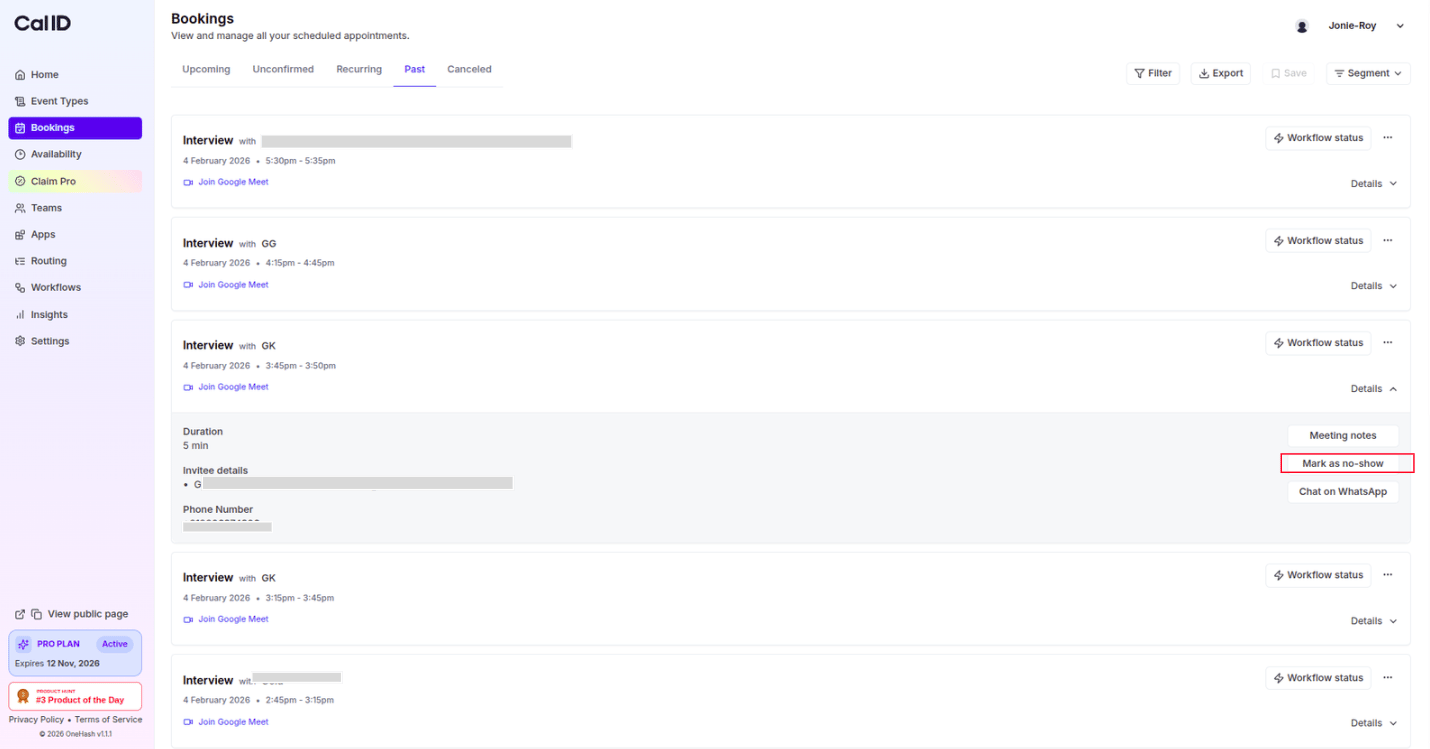 No-show is only available for **past** bookings—meetings that have already taken place. Use the **Past** filter to isolate them.
## Handling multiple attendees ('n' more)
For meetings with more than two attendees, Cal ID provides a streamlined way to manage group attendance.
Click the **Mark as no show** button, which triggers a checklist popup for meetings with multiple participants.
No-show is only available for **past** bookings—meetings that have already taken place. Use the **Past** filter to isolate them.
## Handling multiple attendees ('n' more)
For meetings with more than two attendees, Cal ID provides a streamlined way to manage group attendance.
Click the **Mark as no show** button, which triggers a checklist popup for meetings with multiple participants.
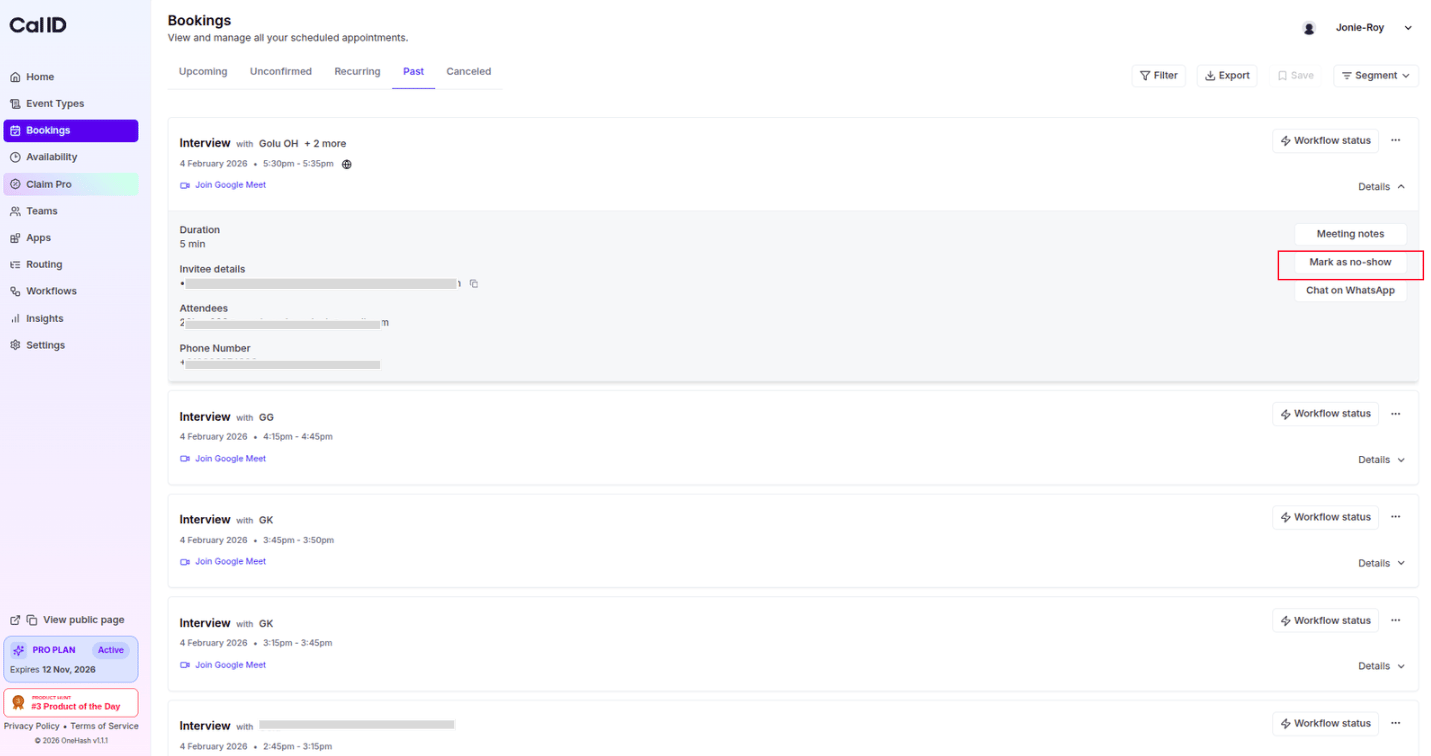 Use the checklist to mark or unmark multiple guests as "No-Show" simultaneously.
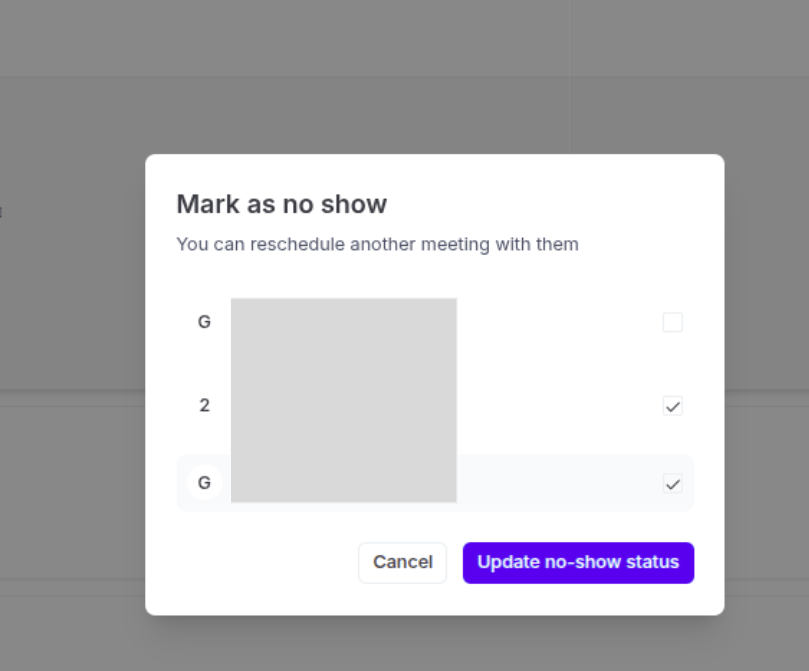 This ensures that even in large group sessions, you can accurately record which specific individuals were present.
## Attendance management overview
* **Filter view**: Use the **Past** filter to isolate meetings that have already occurred.
* **Attendee information**: View the attendee's name, timezone, and email address within the details section.
**Professional follow-ups:** By marking a guest as a no-show, you keep your data clean for reporting. This status can also be used as a trigger for automated workflows, such as sending a personalized email to the guest asking them to reschedule.
## Next steps
Build a workflow that emails no-show guests to reschedule automatically.
Confirm which reminders and notifications actually reached your attendees.
## Related topics
- [How to See Booking Details](/docs/bookings/view-details.md)
- [Monitoring Notification Delivery with Workflow Status](/docs/bookings/workflow-status.md)
- [Exporting Booking Details](/docs/bookings/export.md)
- [Workflows Setup to Cal ID](/docs/workflows/overview.md)
- [Analyzing Booking Performance with Cal ID Insights](/docs/insights/booking-performance.md)
This ensures that even in large group sessions, you can accurately record which specific individuals were present.
## Attendance management overview
* **Filter view**: Use the **Past** filter to isolate meetings that have already occurred.
* **Attendee information**: View the attendee's name, timezone, and email address within the details section.
**Professional follow-ups:** By marking a guest as a no-show, you keep your data clean for reporting. This status can also be used as a trigger for automated workflows, such as sending a personalized email to the guest asking them to reschedule.
## Next steps
Build a workflow that emails no-show guests to reschedule automatically.
Confirm which reminders and notifications actually reached your attendees.
## Related topics
- [How to See Booking Details](/docs/bookings/view-details.md)
- [Monitoring Notification Delivery with Workflow Status](/docs/bookings/workflow-status.md)
- [Exporting Booking Details](/docs/bookings/export.md)
- [Workflows Setup to Cal ID](/docs/workflows/overview.md)
- [Analyzing Booking Performance with Cal ID Insights](/docs/insights/booking-performance.md)