> ## Documentation Index
> Fetch the complete documentation index at: https://cal.id/docs/llms.txt
> Use this file to discover all available pages before exploring further.
# How to Find Your Event Type ID
> Locate the unique Event Type ID for any Cal ID event directly from your browser's address bar so you can use it in API calls and third-party tools.
In **Cal ID**, every event type has a unique **Event Type ID**. You might need this ID if you are using our API, setting up advanced integrations, or troubleshooting specific booking workflows.
## How to find your event type ID
Finding your ID is quick and can be done directly from your browser's address bar while editing your event.
### Steps to locate the ID
Open your [Cal ID](https://cal.id/home) dashboard.
Go to the **Event Types** tab in the left-hand sidebar.
Find the specific event you are interested in and click the **Edit** button.
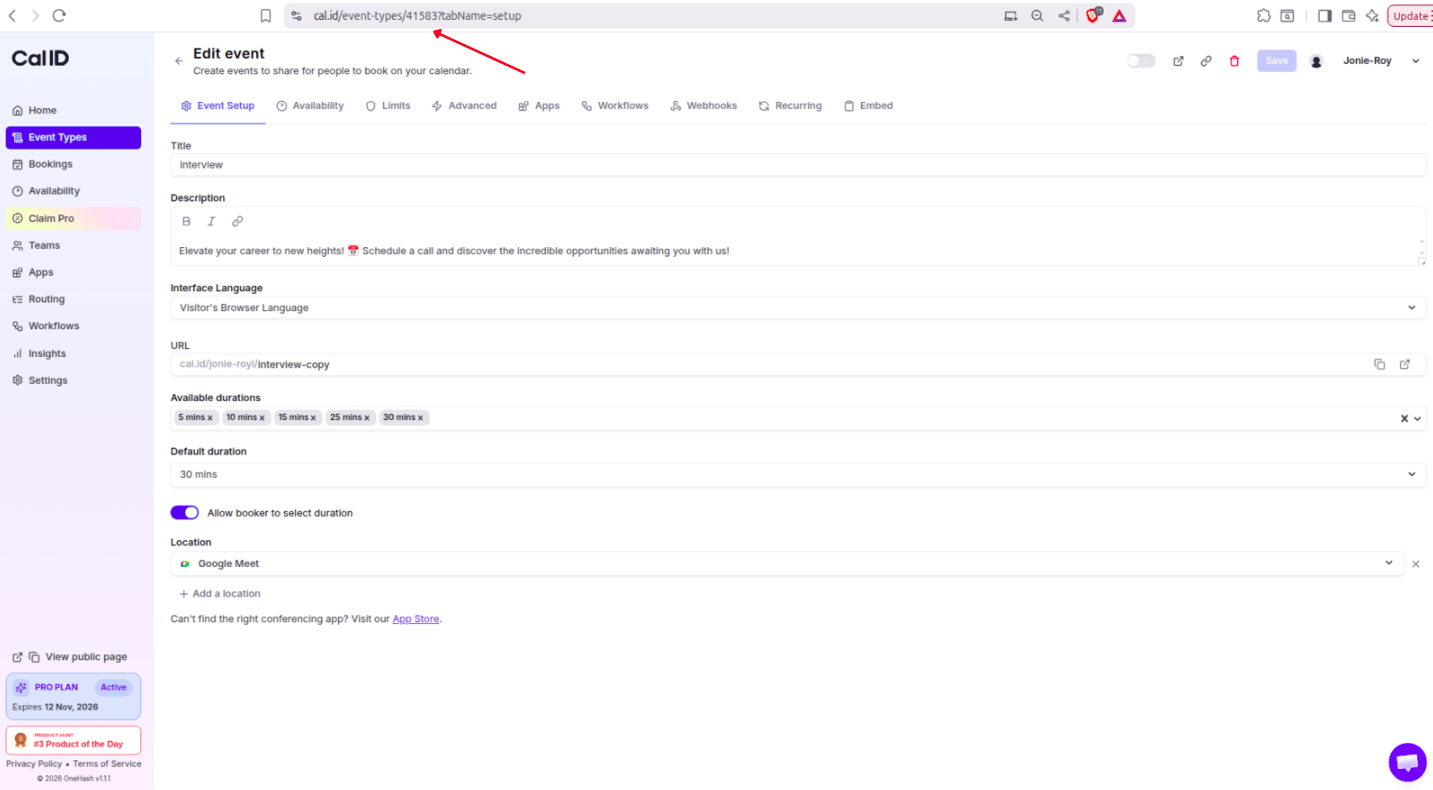
Once the edit page loads, look at the **URL in your browser's address bar**.
The **Event Type ID** is the number located in the URL.
**Example:** If your URL looks like this: `https://cal.id/event-types/12345?tabName=Setup` — your Event Type ID is **12345**.
 ## Why would you need this ID?
* **API Integrations**: If you are building a custom app or website that needs to trigger actions based on a specific event.
* **Webhooks**: To identify which event type triggered a specific notification.
* **Custom Styles**: When using advanced CSS or scripts to modify the look of a specific booking page.
* **Support**: Our team may ask for this ID to help investigate issues with a particular event.
If you need to share multiple IDs for a team project, it's a good idea to keep a simple spreadsheet or document with the **Event Name** and its corresponding **Event Type ID**. This saves you from having to click into every event type every time you need a specific ID for an integration.
## Related topics
- [How to Get Your Cal ID API Key](/docs/developers/api-key.md)
- [Api Integration](/docs/developers/api-integration.md)
- [Webhook in Cal ID](/docs/developers/webhooks.md)
- [Event Types](/docs/event-types/basics/overview.md)
## Why would you need this ID?
* **API Integrations**: If you are building a custom app or website that needs to trigger actions based on a specific event.
* **Webhooks**: To identify which event type triggered a specific notification.
* **Custom Styles**: When using advanced CSS or scripts to modify the look of a specific booking page.
* **Support**: Our team may ask for this ID to help investigate issues with a particular event.
If you need to share multiple IDs for a team project, it's a good idea to keep a simple spreadsheet or document with the **Event Name** and its corresponding **Event Type ID**. This saves you from having to click into every event type every time you need a specific ID for an integration.
## Related topics
- [How to Get Your Cal ID API Key](/docs/developers/api-key.md)
- [Api Integration](/docs/developers/api-integration.md)
- [Webhook in Cal ID](/docs/developers/webhooks.md)
- [Event Types](/docs/event-types/basics/overview.md)