> ## Documentation Index
> Fetch the complete documentation index at: https://cal.id/docs/llms.txt
> Use this file to discover all available pages before exploring further.
# Webhook in Cal ID
> Automate downstream flows by subscribing to Cal ID webhook triggers for bookings, meetings, no-shows, form submissions, and other scheduling events.
Webhooks let you automate downstream flows the moment something happens in Cal ID — a booking is scheduled, rescheduled, cancelled, paid for, and more. You subscribe to specific trigger events by pointing Cal ID at a subscriber URL that receives a JSON payload each time a trigger fires. Webhooks can be attached to your account or to individual event types, including team event types.
Prefer no-code? You can trigger automations without building a listener by connecting Cal ID to your other apps through an automation platform. For the full payload schemas and delivery details, see the [Webhook events reference](/docs/api-reference/webhook-events).
## Available triggers
| Trigger | Code | Fires when |
| ------------------------- | --------------------------- | ---------------------------------- |
| Booking Created | `BOOKING_CREATED` | A booking is confirmed |
| Booking Requested | `BOOKING_REQUESTED` | A booking needs your confirmation |
| Booking Rescheduled | `BOOKING_RESCHEDULED` | An existing booking is moved |
| Booking Cancelled | `BOOKING_CANCELLED` | A booking is cancelled |
| Booking Rejected | `BOOKING_REJECTED` | You decline a requested booking |
| Booking Payment Initiated | `BOOKING_PAYMENT_INITIATED` | Checkout begins for a paid booking |
| Booking Paid | `BOOKING_PAID` | Payment for a booking succeeds |
| Booking No-show Updated | `BOOKING_NO_SHOW_UPDATED` | An attendee is marked as a no-show |
| Form Submitted | `FORM_SUBMITTED` | A routing form is submitted |
| Out-of-office Created | `OOO_CREATED` | An out-of-office entry is created |
## Create a webhook subscription
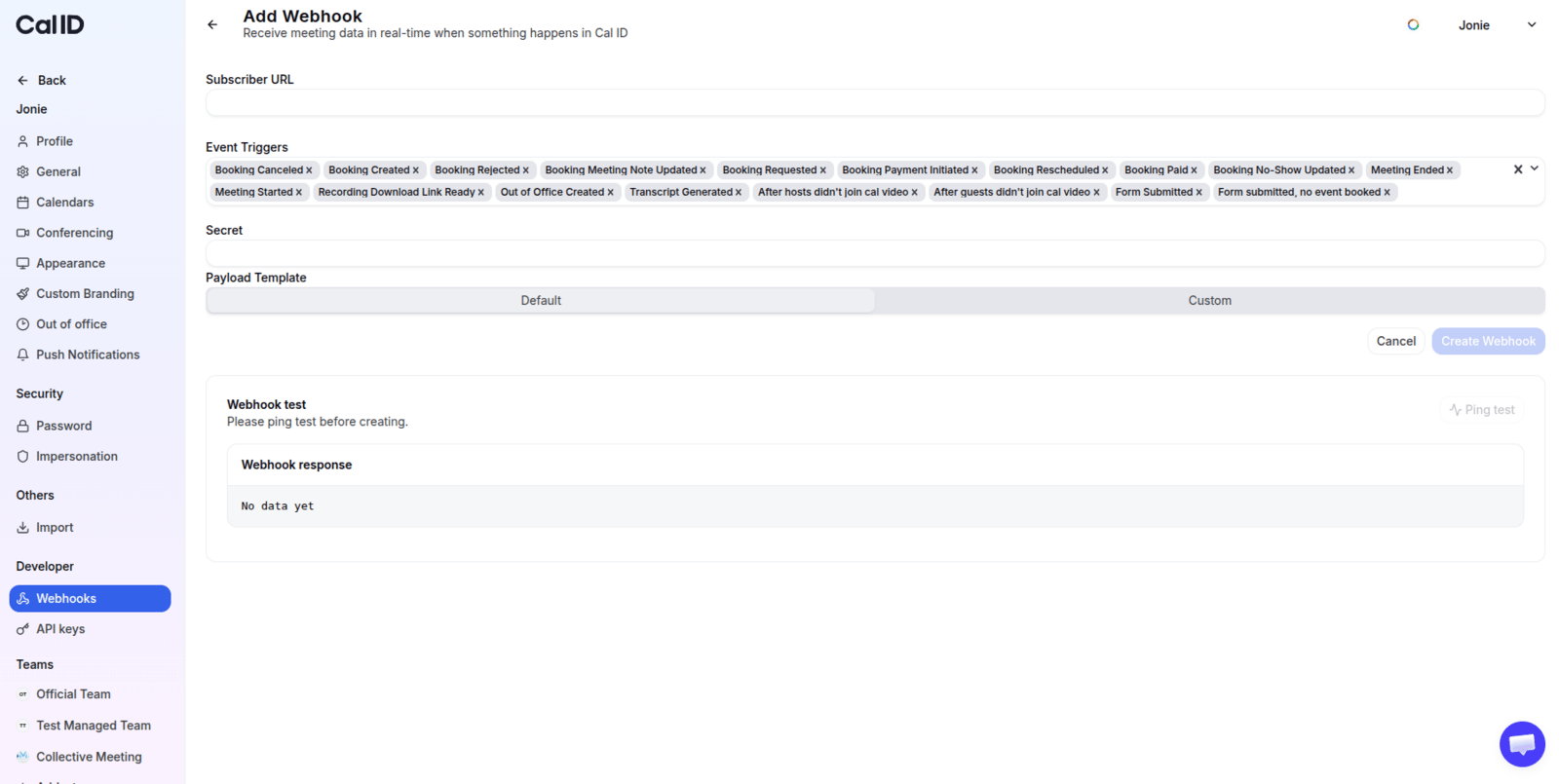
Visit `/settings/webhooks` and start a new subscription.
This is the listener URL that receives the payload whenever a subscribed trigger fires.
Select which triggers to listen to from the list above.
Provide a secret key to verify incoming payloads on your subscriber URL — this confirms a payload is authentic and hasn't been tampered with. Leave it blank to skip.
Optionally tailor the payload you receive when a subscribed event fires (see [custom payload templates](#adding-a-custom-payload-template) below).
 ## An example webhook payload
```json theme={null}
{
"triggerEvent": "BOOKING_CREATED",
"createdAt": "2023-05-24T09:30:00.538Z",
"payload": {
"type": "60min",
"title": "60min between Pro Example and John Doe",
"description": "",
"additionalNotes": "",
"customInputs": {},
"startTime": "2023-05-25T09:30:00Z",
"endTime": "2023-05-25T10:30:00Z",
"organizer": {
"id": 5,
"name": "Pro Example",
"email": "pro@example.com",
"username": "pro",
"timeZone": "Asia/Kolkata",
"language": {
"locale": "en"
},
"timeFormat": "h:mma"
},
"responses": {
"name": {
"label": "your_name",
"value": "John Doe"
},
"email": {
"label": "email_address",
"value": "john.doe@example.com"
},
"location": {
"label": "location",
"value": {
"optionValue": "",
"value": "inPerson"
}
},
"notes": {
"label": "additional_notes"
},
"guests": {
"label": "additional_guests"
},
"rescheduleReason": {
"label": "reschedule_reason"
}
},
"userFieldsResponses": {},
"attendees": [
{
"email": "john.doe@example.com",
"name": "John Doe",
"timeZone": "Asia/Kolkata",
"language": {
"locale": "en"
}
}
],
"location": "Calcom HQ",
"destinationCalendar": {
"id": 10,
"integration": "apple_calendar",
"externalId": "https://caldav.icloud.com/1234567/calendars/XXXXXXXX-XXXX-XXXX-XXXX-XXXXXXXXXXXX/",
"userId": 5,
"eventTypeId": null,
"credentialId": 1
},
"hideCalendarNotes": false,
"requiresConfirmation": null,
"eventTypeId": 7,
"seatsShowAttendees": true,
"seatsPerTimeSlot": null,
"uid": "bFJeNb2uX8ANpT3JL5EfXw",
"appsStatus": [
{
"appName": "Apple Calendar",
"type": "apple_calendar",
"success": 1,
"failures": 0,
"errors": [],
"warnings": []
}
],
"eventTitle": "60min",
"eventDescription": "",
"price": 0,
"currency": "usd",
"length": 60,
"bookingId": 91,
"metadata": {},
"status": "ACCEPTED"
}
}
```
## Verify the authenticity of a payload
When you set a secret, Cal ID signs each request so you can confirm it genuinely came from Cal ID.
Add a secret key to your webhook and save.
Wait for the webhook to fire — a booking is created, cancelled, rescheduled, and so on.
Use the secret key to create an `hmac`, then combine it with the received webhook payload to produce a SHA256 signature.
Compare your computed hash with the one in the webhook's `X-Cal-Signature-256` header. If they don't match, the payload was altered and can't be trusted.
## Adding a custom payload template
Customizable webhooks are a great way to reduce development effort — in many cases they remove the need to build an additional integration service. Here's an example custom payload template:
```json theme={null}
{
"content": "A new event has been scheduled",
"type": "{{type}}",
"name": "{{title}}",
"organizer": "{{organizer.name}}",
"booker": "{{attendees.0.name}}"
}
```
Here `{{type}}` represents the event type slug and `{{title}}` represents the title of the event type. Variables must be wrapped in double curly braces as shown above. The full set of supported variables is listed below.
### Webhook variable list
| Variable | Type | Description |
| ------------------ | -------- | ------------------------------------------------------------------------------------------------------------------------------------------------------------------------------------------------------------------------------------------------ |
| triggerEvent | String | The name of the trigger event \[`BOOKING_CREATED`, `BOOKING_REQUESTED`, `BOOKING_RESCHEDULED`, `BOOKING_CANCELLED`, `BOOKING_REJECTED`, `BOOKING_PAYMENT_INITIATED`, `BOOKING_PAID`, `BOOKING_NO_SHOW_UPDATED`, `FORM_SUBMITTED`, `OOO_CREATED`] |
| createdAt | Datetime | The time of the webhook |
| type | String | The event type slug |
| title | String | The event type name |
| startTime | Datetime | The event's start time |
| endTime | Datetime | The event's end time |
| description | String | The event's description as set in the event type settings |
| location | String | Location of the event |
| organizer | Person | The organizer of the event |
| attendees | Person | The event booker & any guests |
| uid | String | The UID of the booking |
| rescheduleUid | String | The UID of the rescheduling |
| cancellationReason | String | Reason for cancellation |
| rejectionReason | String | Reason for rejection |
| team.name | String | Name of the team booked |
| team.members | String | Members of the team booked |
| metadata | JSON | Contains metadata of the booking, including the meeting URL (videoCallUrl) in the case of Google Meet. |
### Person structure
| Variable | Type | Description |
| ---------------- | ------ | ---------------------------------------------------------------------- |
| name | String | Name of the individual |
| email | Email | Email of the individual |
| timezone | String | Timezone of the individual (e.g., "America/New\_York", "Asia/Kolkata") |
| language?.locale | String | Locale of the individual (e.g., "en", "fr") |
## Next steps
Full trigger list, payload schemas, and signature verification details.
A step-by-step recipe for verifying and handling webhook deliveries.
## Related topics
- [How to Get Your Cal ID API Key](/docs/developers/api-key.md)
- [Api Integration](/docs/developers/api-integration.md)
- [How to Find Your Event Type ID](/docs/developers/event-type-id.md)
- [Setting Up Event-Specific Webhooks](/docs/event-types/event-webhooks.md)
## An example webhook payload
```json theme={null}
{
"triggerEvent": "BOOKING_CREATED",
"createdAt": "2023-05-24T09:30:00.538Z",
"payload": {
"type": "60min",
"title": "60min between Pro Example and John Doe",
"description": "",
"additionalNotes": "",
"customInputs": {},
"startTime": "2023-05-25T09:30:00Z",
"endTime": "2023-05-25T10:30:00Z",
"organizer": {
"id": 5,
"name": "Pro Example",
"email": "pro@example.com",
"username": "pro",
"timeZone": "Asia/Kolkata",
"language": {
"locale": "en"
},
"timeFormat": "h:mma"
},
"responses": {
"name": {
"label": "your_name",
"value": "John Doe"
},
"email": {
"label": "email_address",
"value": "john.doe@example.com"
},
"location": {
"label": "location",
"value": {
"optionValue": "",
"value": "inPerson"
}
},
"notes": {
"label": "additional_notes"
},
"guests": {
"label": "additional_guests"
},
"rescheduleReason": {
"label": "reschedule_reason"
}
},
"userFieldsResponses": {},
"attendees": [
{
"email": "john.doe@example.com",
"name": "John Doe",
"timeZone": "Asia/Kolkata",
"language": {
"locale": "en"
}
}
],
"location": "Calcom HQ",
"destinationCalendar": {
"id": 10,
"integration": "apple_calendar",
"externalId": "https://caldav.icloud.com/1234567/calendars/XXXXXXXX-XXXX-XXXX-XXXX-XXXXXXXXXXXX/",
"userId": 5,
"eventTypeId": null,
"credentialId": 1
},
"hideCalendarNotes": false,
"requiresConfirmation": null,
"eventTypeId": 7,
"seatsShowAttendees": true,
"seatsPerTimeSlot": null,
"uid": "bFJeNb2uX8ANpT3JL5EfXw",
"appsStatus": [
{
"appName": "Apple Calendar",
"type": "apple_calendar",
"success": 1,
"failures": 0,
"errors": [],
"warnings": []
}
],
"eventTitle": "60min",
"eventDescription": "",
"price": 0,
"currency": "usd",
"length": 60,
"bookingId": 91,
"metadata": {},
"status": "ACCEPTED"
}
}
```
## Verify the authenticity of a payload
When you set a secret, Cal ID signs each request so you can confirm it genuinely came from Cal ID.
Add a secret key to your webhook and save.
Wait for the webhook to fire — a booking is created, cancelled, rescheduled, and so on.
Use the secret key to create an `hmac`, then combine it with the received webhook payload to produce a SHA256 signature.
Compare your computed hash with the one in the webhook's `X-Cal-Signature-256` header. If they don't match, the payload was altered and can't be trusted.
## Adding a custom payload template
Customizable webhooks are a great way to reduce development effort — in many cases they remove the need to build an additional integration service. Here's an example custom payload template:
```json theme={null}
{
"content": "A new event has been scheduled",
"type": "{{type}}",
"name": "{{title}}",
"organizer": "{{organizer.name}}",
"booker": "{{attendees.0.name}}"
}
```
Here `{{type}}` represents the event type slug and `{{title}}` represents the title of the event type. Variables must be wrapped in double curly braces as shown above. The full set of supported variables is listed below.
### Webhook variable list
| Variable | Type | Description |
| ------------------ | -------- | ------------------------------------------------------------------------------------------------------------------------------------------------------------------------------------------------------------------------------------------------ |
| triggerEvent | String | The name of the trigger event \[`BOOKING_CREATED`, `BOOKING_REQUESTED`, `BOOKING_RESCHEDULED`, `BOOKING_CANCELLED`, `BOOKING_REJECTED`, `BOOKING_PAYMENT_INITIATED`, `BOOKING_PAID`, `BOOKING_NO_SHOW_UPDATED`, `FORM_SUBMITTED`, `OOO_CREATED`] |
| createdAt | Datetime | The time of the webhook |
| type | String | The event type slug |
| title | String | The event type name |
| startTime | Datetime | The event's start time |
| endTime | Datetime | The event's end time |
| description | String | The event's description as set in the event type settings |
| location | String | Location of the event |
| organizer | Person | The organizer of the event |
| attendees | Person | The event booker & any guests |
| uid | String | The UID of the booking |
| rescheduleUid | String | The UID of the rescheduling |
| cancellationReason | String | Reason for cancellation |
| rejectionReason | String | Reason for rejection |
| team.name | String | Name of the team booked |
| team.members | String | Members of the team booked |
| metadata | JSON | Contains metadata of the booking, including the meeting URL (videoCallUrl) in the case of Google Meet. |
### Person structure
| Variable | Type | Description |
| ---------------- | ------ | ---------------------------------------------------------------------- |
| name | String | Name of the individual |
| email | Email | Email of the individual |
| timezone | String | Timezone of the individual (e.g., "America/New\_York", "Asia/Kolkata") |
| language?.locale | String | Locale of the individual (e.g., "en", "fr") |
## Next steps
Full trigger list, payload schemas, and signature verification details.
A step-by-step recipe for verifying and handling webhook deliveries.
## Related topics
- [How to Get Your Cal ID API Key](/docs/developers/api-key.md)
- [Api Integration](/docs/developers/api-integration.md)
- [How to Find Your Event Type ID](/docs/developers/event-type-id.md)
- [Setting Up Event-Specific Webhooks](/docs/event-types/event-webhooks.md)