> ## Documentation Index
> Fetch the complete documentation index at: https://cal.id/docs/llms.txt
> Use this file to discover all available pages before exploring further.
# Hide Calendar Event details on Shared Calendars
> Show only Busy on shared calendars in Cal ID while keeping the who, what, and why of your meetings confidential from coworkers and integrations.
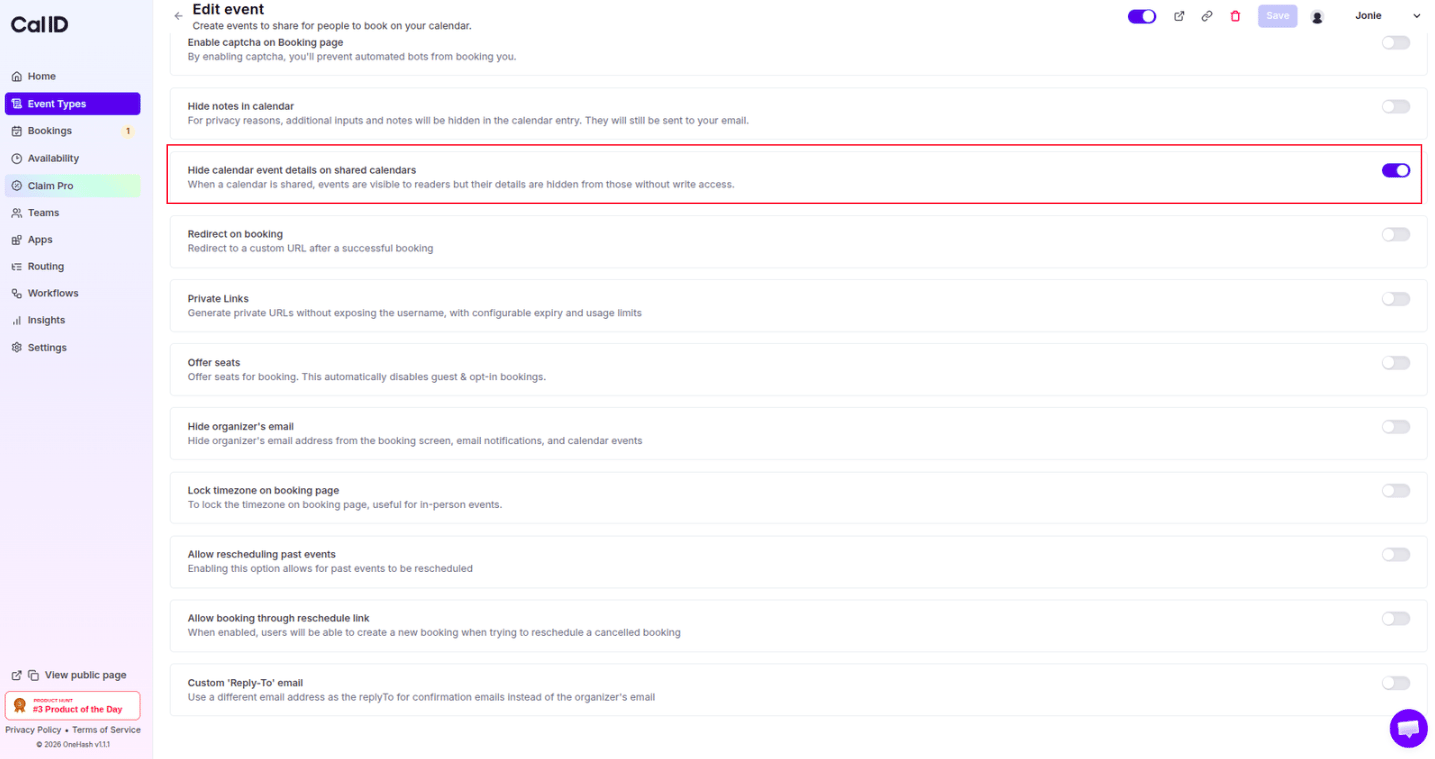
Stay visible as "Busy" without revealing the details. In **Cal ID**, the **Hide calendar event details on shared calendars** feature is a vital privacy tool for professionals who work in collaborative or team environments. It allows you to maintain transparency about your availability while keeping the sensitive "who, what, and why" of your meetings strictly confidential on shared platforms.
## Why use "Hide calendar event details on shared calendars"?
* **Protect Client Confidentiality:** If your calendar is shared with a team or an assistant, this setting ensures they only see that you are "Busy" rather than seeing a specific client's name or sensitive meeting titles.
* **Maintain Professional Boundaries:** It prevents colleagues from seeing personal appointments or internal meeting descriptions that aren't relevant to the wider organization.
* **Compliance & Security:** For industries like healthcare, law, or finance, hiding details is often a requirement to stay compliant with privacy regulations (like HIPAA) by preventing accidental data leaks on shared views.
* **Streamlined Team Views:** Shared calendars can become cluttered; this ensures others only see the essential info they need—when you are free and when you are not.
## How to set it up
Login to your [**Cal ID**](https://cal.id/home) account.
Go to the **Event Types** tab in the left sidebar and select the specific event you wish to modify.
Click on the **Advanced** tab in the top navigation bar.
Scroll down to find the option **Hide calendar event details on shared calendars**.
Switch the toggle to **ON**.
Click the blue **Save** button at the top right of the page.
 ## How it works for the booker
* **Internal Shared View:** For anyone with access to your shared calendar, your appointment will appear as a generic block (usually labeled **"Busy"** or **"Booked"**).
* **Organizer's Personal View:** You, as the owner, will still see the full details (attendee name, email, and answers to booking questions) on your primary calendar and in your Cal ID dashboard.
* **Confirmation Emails:** All pertinent details are still sent to you via your confirmation email, so you never lose the context of the meeting.
* **Attendee Experience:** The guest still receives their own confirmation with full details; this setting only restricts what **others** see on your shared calendar side.
This feature is a "global" privacy shield for the event on shared platforms. It is often used alongside **Hide notes in calendar**, which specifically removes the custom answers to booking questions from the calendar entry. Enabling both ensures that even if someone has high-level permissions on your calendar, the most sensitive data remains hidden.
## Next steps
Strip custom booking answers from your calendar entries too.
Keep your address private on shared invites.
## Related topics
- [Hide Notes in Calendar](/docs/event-types/advanced/hide-notes.md)
- [Hide Organizer's Email](/docs/event-types/advanced/hide-organizer-email.md)
- [Add Events to Calendar](/docs/event-types/advanced/add-to-calendar.md)
- [Disable Default Attendee Confirmation Emails in Cal ID](/docs/event-types/advanced/disable-confirmation-emails.md)
## How it works for the booker
* **Internal Shared View:** For anyone with access to your shared calendar, your appointment will appear as a generic block (usually labeled **"Busy"** or **"Booked"**).
* **Organizer's Personal View:** You, as the owner, will still see the full details (attendee name, email, and answers to booking questions) on your primary calendar and in your Cal ID dashboard.
* **Confirmation Emails:** All pertinent details are still sent to you via your confirmation email, so you never lose the context of the meeting.
* **Attendee Experience:** The guest still receives their own confirmation with full details; this setting only restricts what **others** see on your shared calendar side.
This feature is a "global" privacy shield for the event on shared platforms. It is often used alongside **Hide notes in calendar**, which specifically removes the custom answers to booking questions from the calendar entry. Enabling both ensures that even if someone has high-level permissions on your calendar, the most sensitive data remains hidden.
## Next steps
Strip custom booking answers from your calendar entries too.
Keep your address private on shared invites.
## Related topics
- [Hide Notes in Calendar](/docs/event-types/advanced/hide-notes.md)
- [Hide Organizer's Email](/docs/event-types/advanced/hide-organizer-email.md)
- [Add Events to Calendar](/docs/event-types/advanced/add-to-calendar.md)
- [Disable Default Attendee Confirmation Emails in Cal ID](/docs/event-types/advanced/disable-confirmation-emails.md)