> ## Documentation Index
> Fetch the complete documentation index at: https://cal.id/docs/llms.txt
> Use this file to discover all available pages before exploring further.
# Limit Booking Frequency
> Cap how many times a Cal ID event type can be booked per day, week, or month to protect your workload and prevent burnout from too many meetings.
In **Cal ID**, **Limit booking frequency** lets you cap how many times a specific event type can be booked over a set period, so you stay in control of your workload and never feel overwhelmed by too many meetings.
## Setting booking frequency limits
This setting is perfect for high-energy tasks, such as interviews or deep-dive consultations, where you want to cap the number of sessions you take per day, week, or month.
### Why use booking frequency limits?
* **Prevent burnout:** Limit intense event types so you have enough energy for other responsibilities.
* **Balanced workload:** Distribute your meetings evenly across the week or month instead of having them all clump down in a single day.
* **Quality control:** By limiting the number of sessions, you ensure you can give 100% of your attention to every guest.
## How to set it up
Click on **Event Types** in the left sidebar.
Click on the specific event you want to limit.
Click on the **Limits** tab in the top navigation bar of the event editor.
Find the **Limit booking frequency** section and toggle the switch to **ON** (it will turn blue).
* Enter the maximum number of bookings you want to allow (e.g., "3").
* Select the time period from the dropdown menu (e.g., **per day, per week, or per month**).
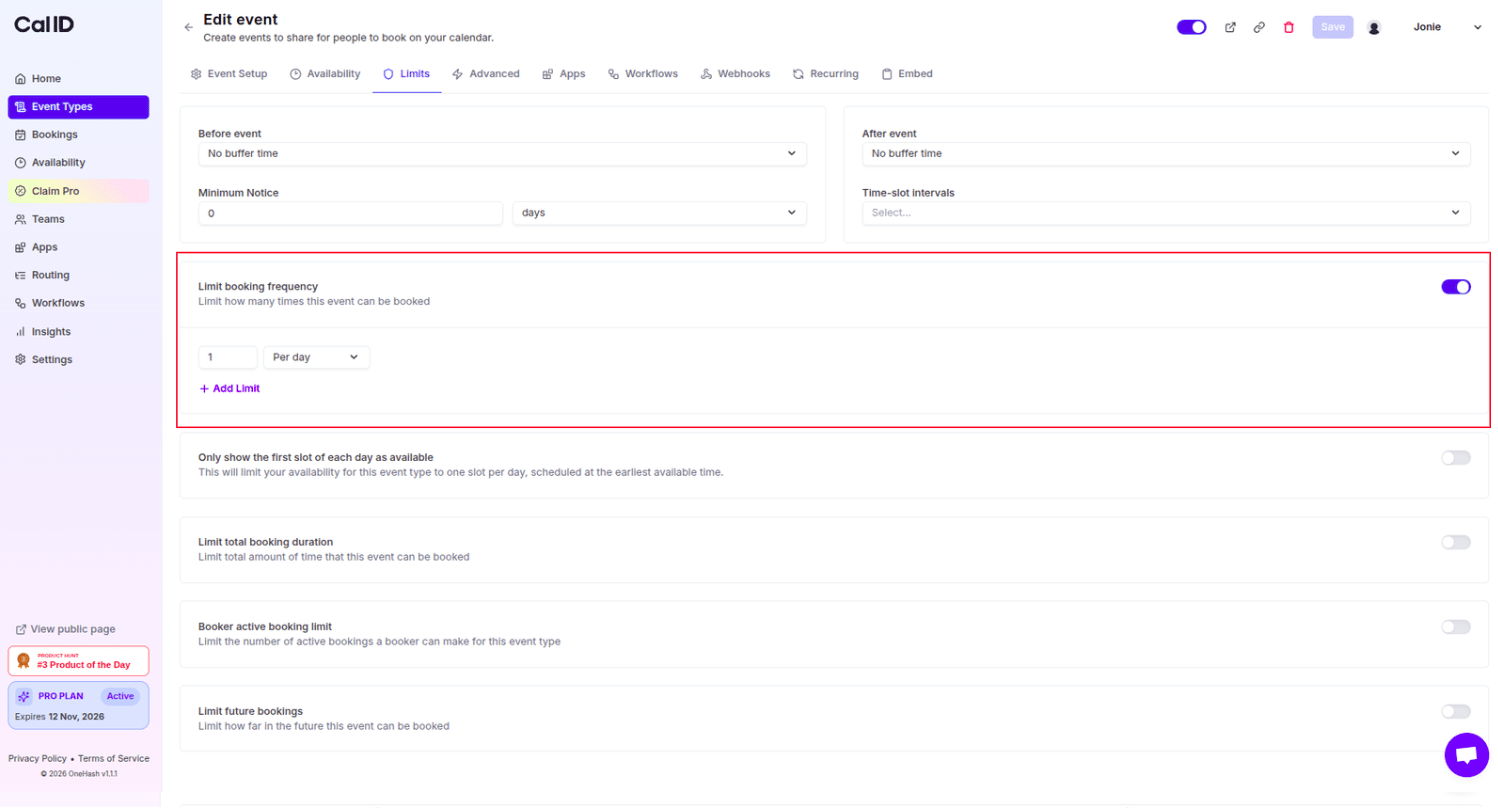 Click the **Save** button at the top right to apply these rules.
You can combine caps across periods to shape both your daily and longer-term load:
| Period | What it caps | Example |
| ------------- | --------------------------------- | ----------------------- |
| **Per day** | Bookings allowed in a single day | 2 interviews per day |
| **Per week** | Bookings allowed across the week | 5 interviews per week |
| **Per month** | Bookings allowed across the month | 15 interviews per month |
## How it works for the booker
* Once your set limit is reached for that period, the event will automatically show as **"Unavailable"** on your booking page for the remainder of that day, week, or month.
* For example, if you limit "Interviews" to 2 per day, once the second person books for Tuesday, no one else will see Tuesday as an option for that specific event.
## Additional control options
On the same **Limits** page, you can find other powerful tools to manage your time.
Cap the total amount of time (in minutes or hours) that this event can be booked for in a day.
Restrict how far into the future (e.g., only 30 days out) guests are allowed to book.
Prevent a single person from booking too many active meetings at once.
## Related topics
- [Booker Active Booking Limit](/docs/event-types/limits/booker-limit.md)
- [Limit total Booking Duration](/docs/event-types/limits/total-duration.md)
- [Event Buffers or Break between the Events](/docs/event-types/limits/buffers.md)
- [Limit Future Booking to Restrict the Future Booking](/docs/event-types/limits/future-booking.md)
- [Minimum Notice for the Booking](/docs/event-types/limits/minimum-notice.md)
Click the **Save** button at the top right to apply these rules.
You can combine caps across periods to shape both your daily and longer-term load:
| Period | What it caps | Example |
| ------------- | --------------------------------- | ----------------------- |
| **Per day** | Bookings allowed in a single day | 2 interviews per day |
| **Per week** | Bookings allowed across the week | 5 interviews per week |
| **Per month** | Bookings allowed across the month | 15 interviews per month |
## How it works for the booker
* Once your set limit is reached for that period, the event will automatically show as **"Unavailable"** on your booking page for the remainder of that day, week, or month.
* For example, if you limit "Interviews" to 2 per day, once the second person books for Tuesday, no one else will see Tuesday as an option for that specific event.
## Additional control options
On the same **Limits** page, you can find other powerful tools to manage your time.
Cap the total amount of time (in minutes or hours) that this event can be booked for in a day.
Restrict how far into the future (e.g., only 30 days out) guests are allowed to book.
Prevent a single person from booking too many active meetings at once.
## Related topics
- [Booker Active Booking Limit](/docs/event-types/limits/booker-limit.md)
- [Limit total Booking Duration](/docs/event-types/limits/total-duration.md)
- [Event Buffers or Break between the Events](/docs/event-types/limits/buffers.md)
- [Limit Future Booking to Restrict the Future Booking](/docs/event-types/limits/future-booking.md)
- [Minimum Notice for the Booking](/docs/event-types/limits/minimum-notice.md)