> ## Documentation Index
> Fetch the complete documentation index at: https://cal.id/docs/llms.txt
> Use this file to discover all available pages before exploring further.
# Limit total Booking Duration
> Set a time budget in Cal ID that caps the total hours an event type can be booked per day, week, or month to keep your workload in check.
Set a time budget for an event type so a single kind of meeting can't consume your entire week. The **Limit total booking duration** feature caps how many total hours can be booked per day, week, or month — and stops showing availability once you hit the cap.
## Limiting total booking duration
This feature lives in the **Limits** tab and lets you set a "time budget" for your bookings.
### Why use this feature?
| Goal | How the time budget helps |
| ----------------------- | -------------------------------------------------------------------------------------- |
| **Burnout prevention** | Cap "Discovery Calls" at a fixed total so you aren't spending 40 hours a week on them. |
| **Balanced schedule** | Limit free networking calls to, say, 5 hours per week to protect your billable time. |
| **Resource management** | Keep a fixed amount of time allocated to a specific project or service each month. |
## How to set it up
Log in to your [Cal ID](https://cal.id/home) account.
Navigate to the **Event Types** tab in the left sidebar and **select** the specific event you wish to **modify**.
Click on the **Limits** tab in the top navigation bar.
Locate the section titled **Limit total booking duration**.
* Toggle the switch to **ON**.
* Enter the maximum number of **minutes** or **hours** you are willing to be booked for this event type.
* Select the timeframe — per **day**, **week**, or **month**.
Click the blue **Save** button at the top right.
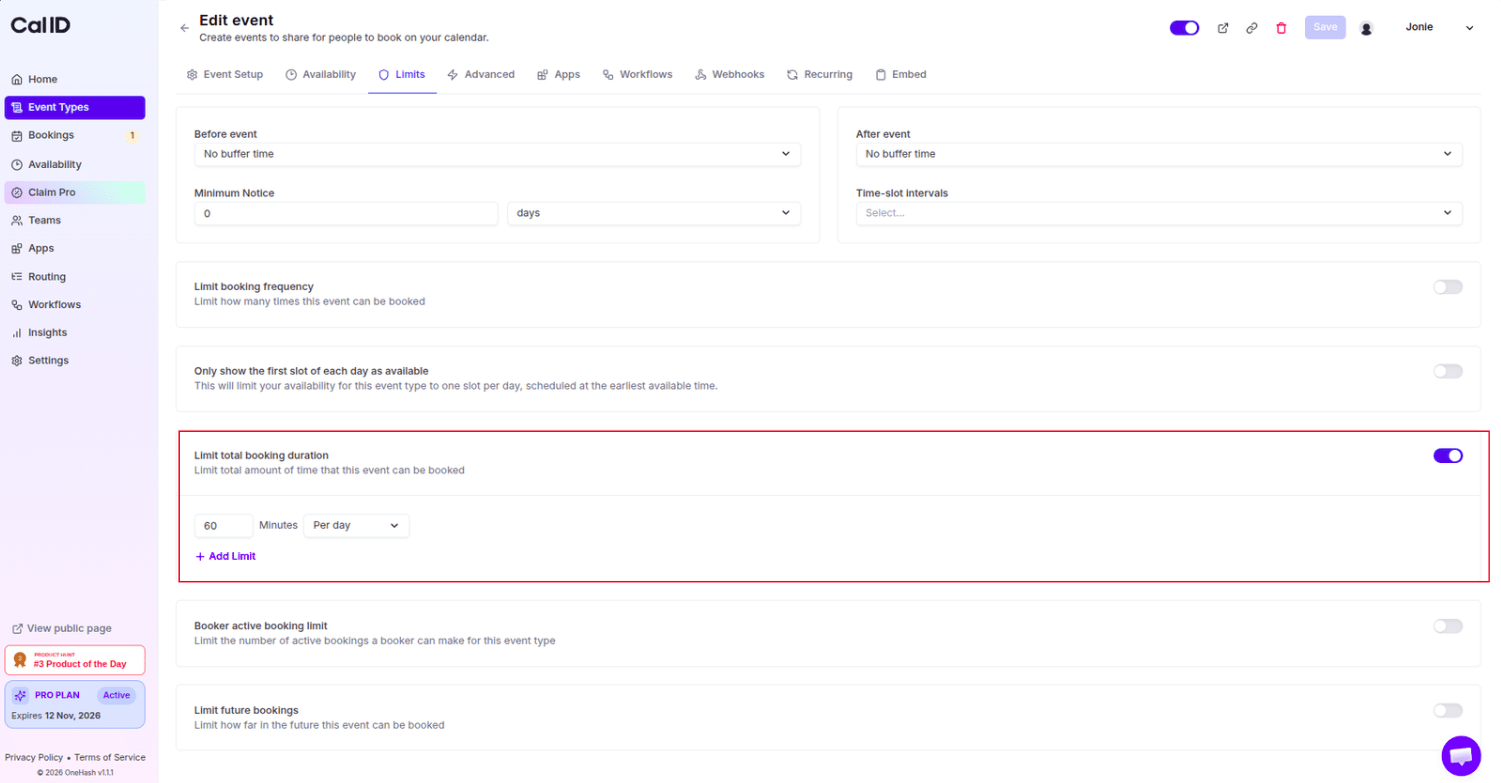 ### Timeframe options
| Timeframe | Best for |
| ------------- | ------------------------------------------------------------------------------ |
| **Per day** | Keeping each day's total meeting time under a hard ceiling. |
| **Per week** | Reserving billable time by capping free or low-priority calls across the week. |
| **Per month** | Managing a fixed monthly allocation for a project or service. |
## How it works
* **Cumulative tracking:** Cal ID keeps a running total of all confirmed bookings for this specific event type within your chosen timeframe.
* **Automatic blackout:** Once the total duration of scheduled meetings reaches your limit, the system automatically stops showing availability for that event type until the next timeframe begins.
* **Independent limits:** This limit applies only to the event type you are editing; it does not affect your other booking links.
If you have a 60-minute event and set a limit of 3 hours per day, the system allows exactly 3 bookings for that day. If a guest tries to book a 4th slot, they will see that you are "unavailable" — even if your calendar is technically empty.
## Next steps
Cap the number of bookings, rather than total hours, per day, week, or month.
Stop a single guest from holding too many active bookings at once.
## Related topics
- [Limit Booking Frequency](/docs/event-types/limits/booking-frequency.md)
- [Booker Active Booking Limit](/docs/event-types/limits/booker-limit.md)
- [Set Multiple Durations](/docs/event-types/setup/multiple-durations.md)
- [Event Buffers or Break between the Events](/docs/event-types/limits/buffers.md)
- [Limit Future Booking to Restrict the Future Booking](/docs/event-types/limits/future-booking.md)
### Timeframe options
| Timeframe | Best for |
| ------------- | ------------------------------------------------------------------------------ |
| **Per day** | Keeping each day's total meeting time under a hard ceiling. |
| **Per week** | Reserving billable time by capping free or low-priority calls across the week. |
| **Per month** | Managing a fixed monthly allocation for a project or service. |
## How it works
* **Cumulative tracking:** Cal ID keeps a running total of all confirmed bookings for this specific event type within your chosen timeframe.
* **Automatic blackout:** Once the total duration of scheduled meetings reaches your limit, the system automatically stops showing availability for that event type until the next timeframe begins.
* **Independent limits:** This limit applies only to the event type you are editing; it does not affect your other booking links.
If you have a 60-minute event and set a limit of 3 hours per day, the system allows exactly 3 bookings for that day. If a guest tries to book a 4th slot, they will see that you are "unavailable" — even if your calendar is technically empty.
## Next steps
Cap the number of bookings, rather than total hours, per day, week, or month.
Stop a single guest from holding too many active bookings at once.
## Related topics
- [Limit Booking Frequency](/docs/event-types/limits/booking-frequency.md)
- [Booker Active Booking Limit](/docs/event-types/limits/booker-limit.md)
- [Set Multiple Durations](/docs/event-types/setup/multiple-durations.md)
- [Event Buffers or Break between the Events](/docs/event-types/limits/buffers.md)
- [Limit Future Booking to Restrict the Future Booking](/docs/event-types/limits/future-booking.md)