> ## Documentation Index
> Fetch the complete documentation index at: https://cal.id/docs/llms.txt
> Use this file to discover all available pages before exploring further.
# Quick Actions Using Command Bar
> Press Cmd+K or Ctrl+K to open the Cal ID command bar and quickly jump to any page or trigger any action across your account in a few keystrokes.
Jump to any page or trigger any action in Cal ID in a few keystrokes — no clicking through menus. The command bar is a search box that surfaces all of your account's essential tasks and content in one place.
## Open the command bar
Press the shortcut for your platform to bring up the command window from anywhere in Cal ID:
⌘ K
Ctrl K
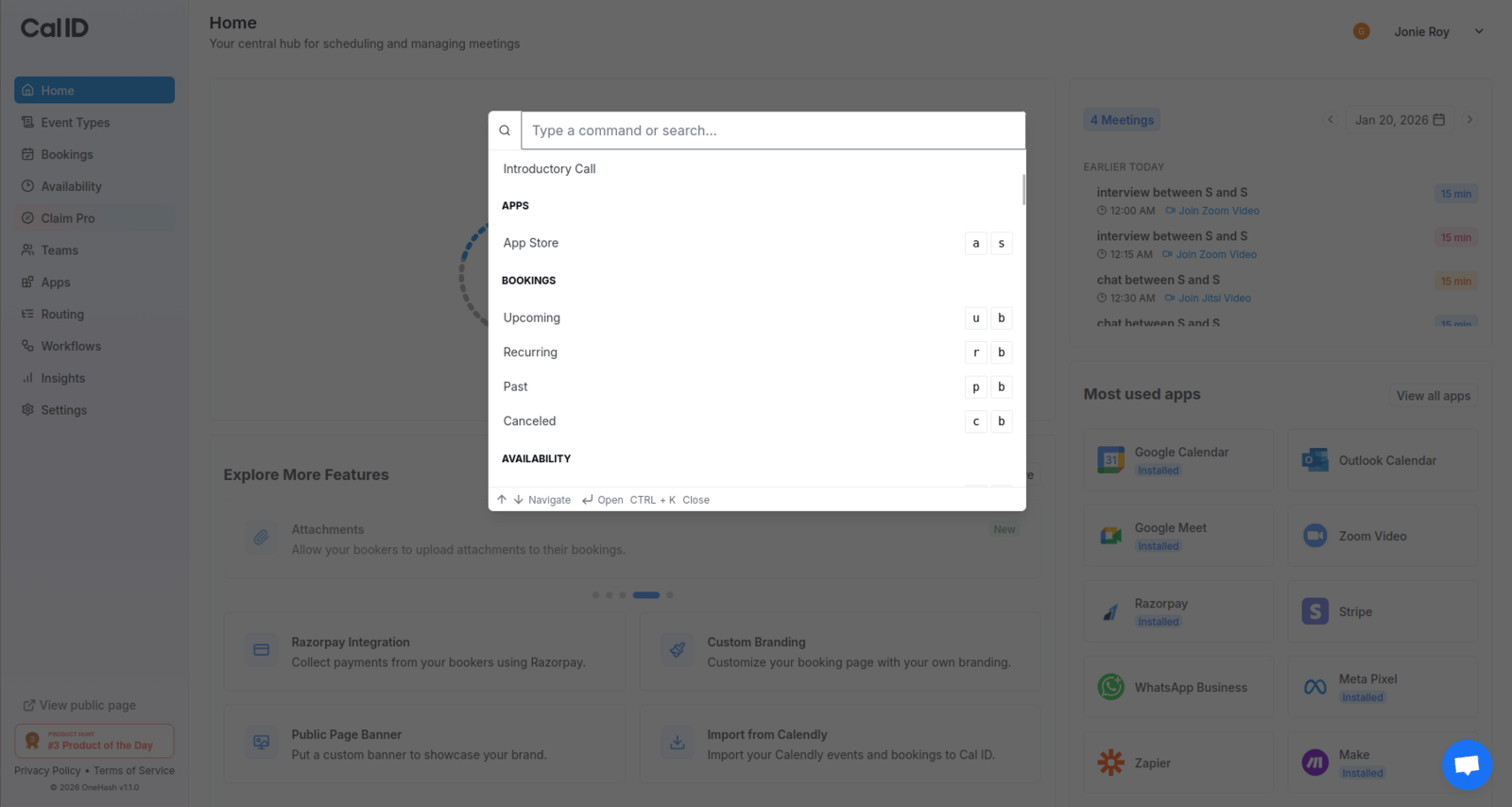 From here, simply start typing what you're looking for and select a result to jump straight to it.
The command bar works from any page — memorize ⌘ K (or Ctrl K) and you'll rarely need the sidebar again.
## Where you can jump
The command bar can take you to any of these areas of your account:
## Related topics
- [Mastering the Unified Calendar in Cal ID](/docs/getting-started/unified-calendar.md)
- [How to Schedule a Meeting through Cal ID](/docs/getting-started/schedule-a-meeting.md)
- [Cal ID Mobile Apps](/docs/getting-started/mobile-apps.md)
- [Cal ID Glossary](/docs/getting-started/glossary.md)
- [Cal ID FAQs](/docs/getting-started/faq.md)
From here, simply start typing what you're looking for and select a result to jump straight to it.
The command bar works from any page — memorize ⌘ K (or Ctrl K) and you'll rarely need the sidebar again.
## Where you can jump
The command bar can take you to any of these areas of your account:
## Related topics
- [Mastering the Unified Calendar in Cal ID](/docs/getting-started/unified-calendar.md)
- [How to Schedule a Meeting through Cal ID](/docs/getting-started/schedule-a-meeting.md)
- [Cal ID Mobile Apps](/docs/getting-started/mobile-apps.md)
- [Cal ID Glossary](/docs/getting-started/glossary.md)
- [Cal ID FAQs](/docs/getting-started/faq.md)