> ## Documentation Index
> Fetch the complete documentation index at: https://cal.id/docs/llms.txt
> Use this file to discover all available pages before exploring further.
# Subscription & Pricing Plans
> Compare Cal ID's Startup, Business, and Enterprise plans, understand team licensing and the AI Notetaker add-on, and learn how to view, upgrade, or manage your subscription.
Cal ID offers plans for individuals and teams. Your subscription determines which features are available — advanced scheduling, team scheduling, branding, and other paid features. To view or manage your subscription, payment method, billing details, and invoices, go to **Settings → Subscription**.
## Plans & pricing
| Plan | Yearly billing | Monthly billing |
| -------------- | ---------------------------------------------------------- | --------------------------------------- |
| **Startup** | Free | Free |
| **Business** | $5 / user / month (billed annually as $60/year — save 50%) | \$10 / user / month |
| **Enterprise** | [Contact us](https://cal.id/contact-us) | [Contact us](https://cal.id/contact-us) |
Everything you need to start scheduling professionally: unlimited event types, availability schedules, unlimited calendar integrations, the Unified Calendar, unlimited email workflows, up to **10 SMS and WhatsApp workflow messages per month**, Insights, webhooks, API access, and standard integrations (all apps except WhatsApp Business).
Not included: file attachments on booking, extended timezone availability, Routing Forms, Contacts, custom branding, WhatsApp Business, and team scheduling.
Everything in Startup, plus file attachments on booking, extended timezone availability, Contacts, Routing Forms, unlimited SMS and WhatsApp workflow messages, custom logo and favicon, the ability to remove Cal ID branding, WhatsApp Business and Book on WhatsApp, team scheduling (collective, round-robin, and managed events), and on-call support.
Business is **$10/user/month** billed monthly, or **$5/user/month** billed yearly (**\$60/user/year**).
Everything in Business, plus enterprise-level capabilities, higher limits, security and compliance controls, and dedicated support. Pricing is customized — [contact Sales](https://cal.id/contact-us).
## Upgrade your subscription
From your dashboard, go to **Settings → Subscription** and click **Upgrade**.
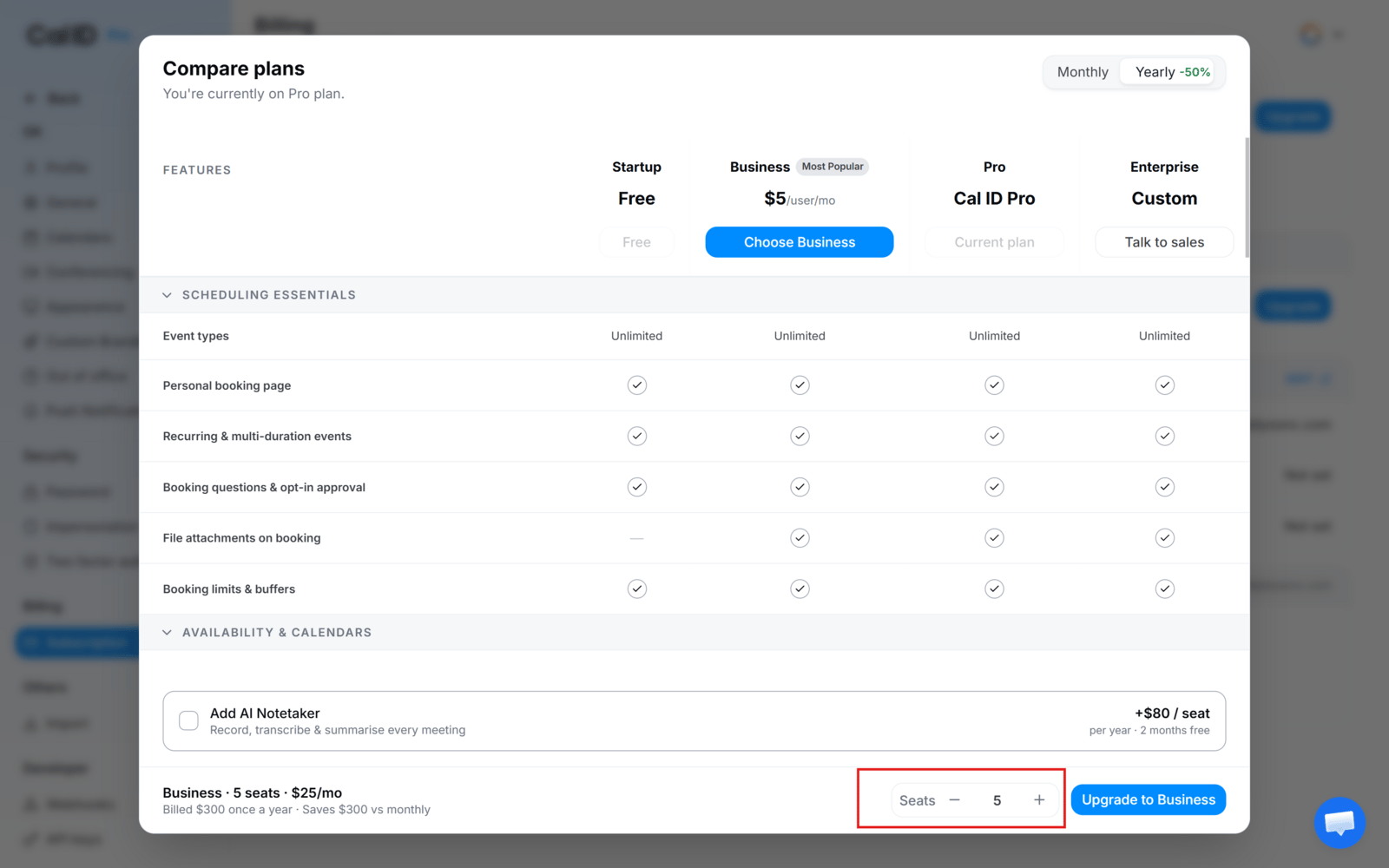
Choose **Monthly** or **Yearly** at the top right, then select the plan you want.
Choose the number of licenses to purchase.
Click **Upgrade to Business**, enter or confirm your billing information, and complete the purchase.
 ## View your subscription
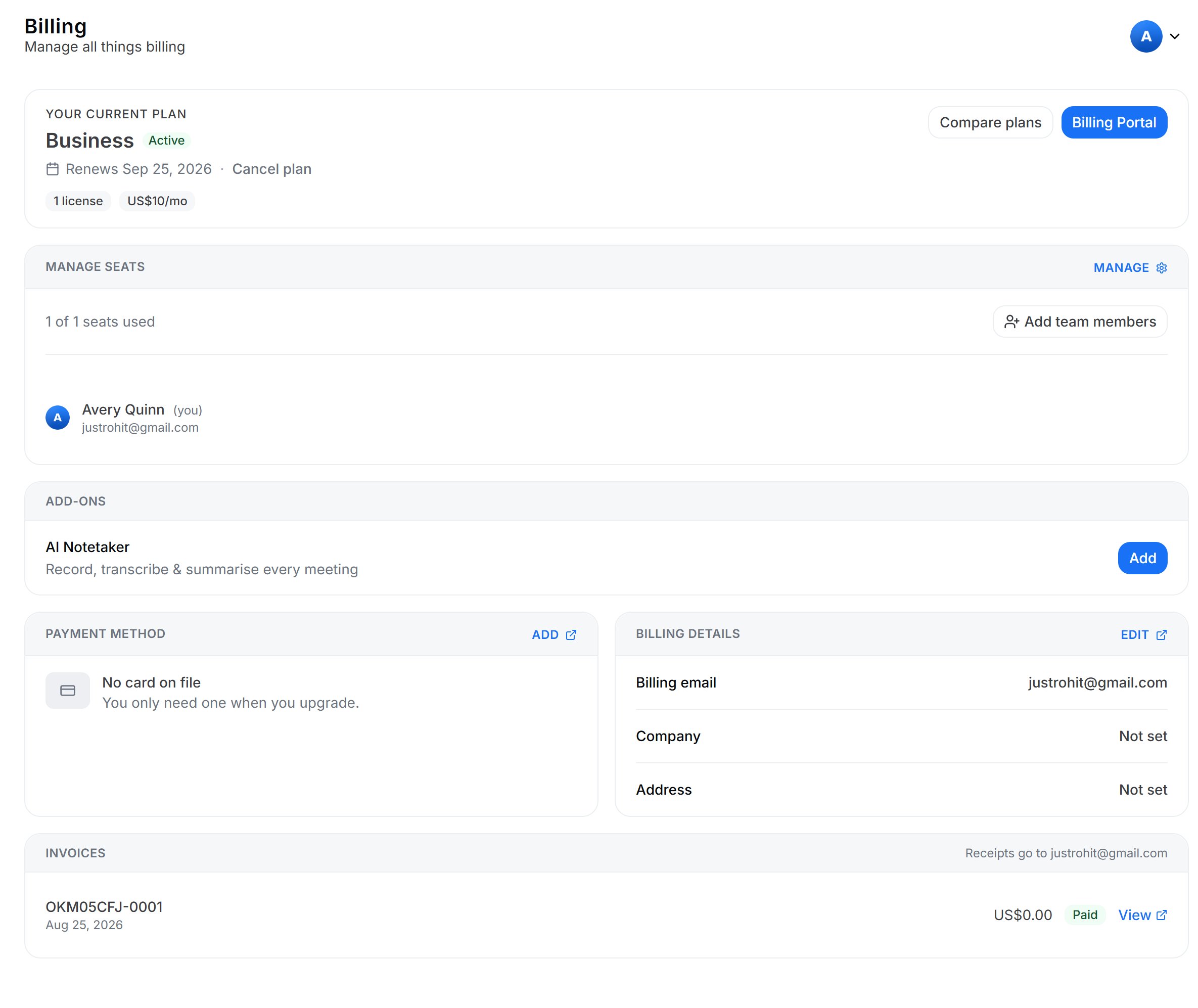
The Subscription page shows your current plan and status. Depending on your account, you may also see seats, subscription date, payment method, billing email, company and billing address, invoices, and available add-ons.
## View your subscription
The Subscription page shows your current plan and status. Depending on your account, you may also see seats, subscription date, payment method, billing email, company and billing address, invoices, and available add-ons.
 ## Manage Business licenses
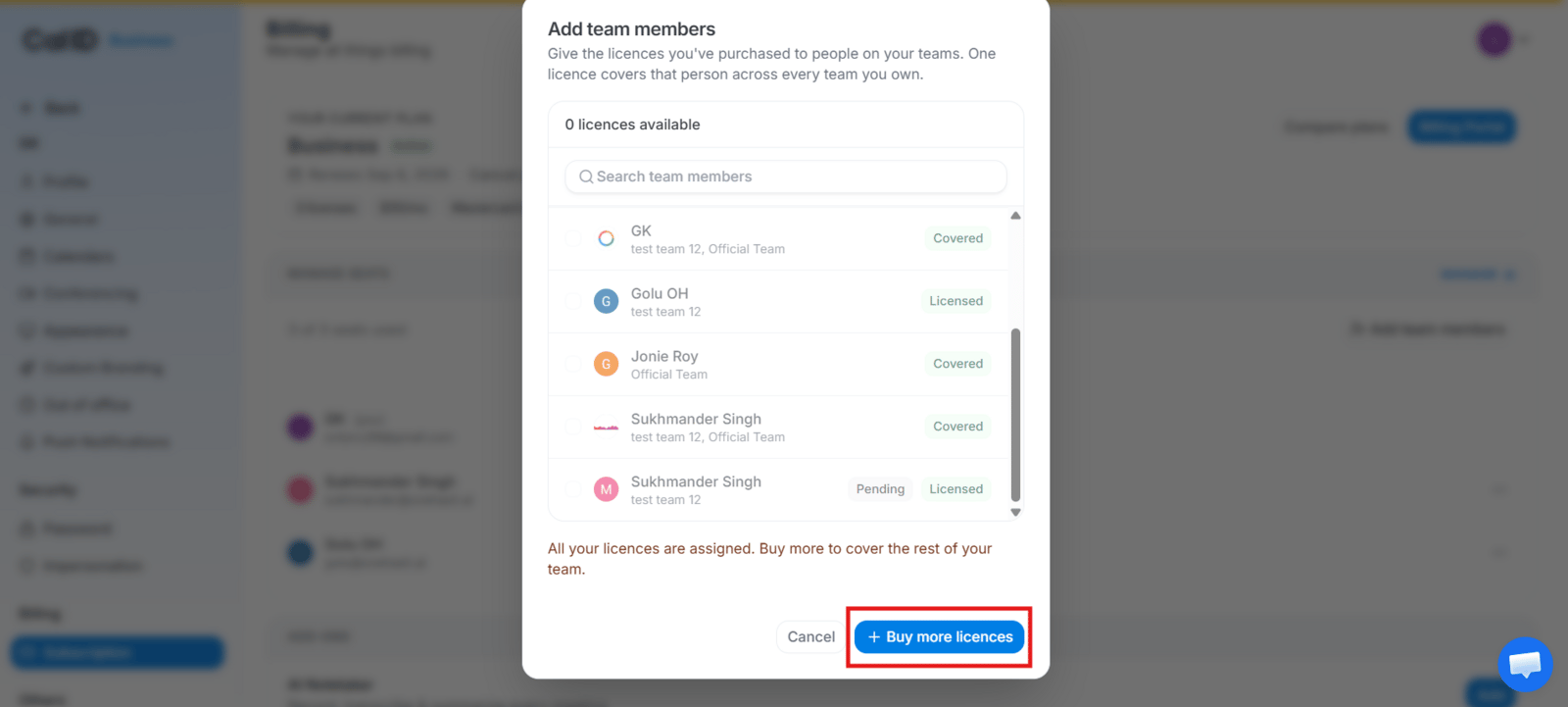
From **Settings → Subscription**, click **Manage** to increase licenses directly, or **Add team members → Buy more licenses** to purchase additional seats and complete the checkout.
## Manage Business licenses
From **Settings → Subscription**, click **Manage** to increase licenses directly, or **Add team members → Buy more licenses** to purchase additional seats and complete the checkout.
 ## Monthly vs yearly billing
Paid plans offer both monthly and yearly billing where available. Business is **$10/user/month** monthly, or **$5/user/month** billed annually at **\$60/user/year** — a **50% saving**. You can switch between Monthly and Yearly from the plan comparison screen when the option is available for your account.
## Team scheduling & licensing
Team scheduling is a **paid-plan feature**. Every member who needs to participate in or access team scheduling must have an eligible paid seat. Either the **team owner buys multiple seats** and assigns licenses to members, or a member **upgrades their own account**.
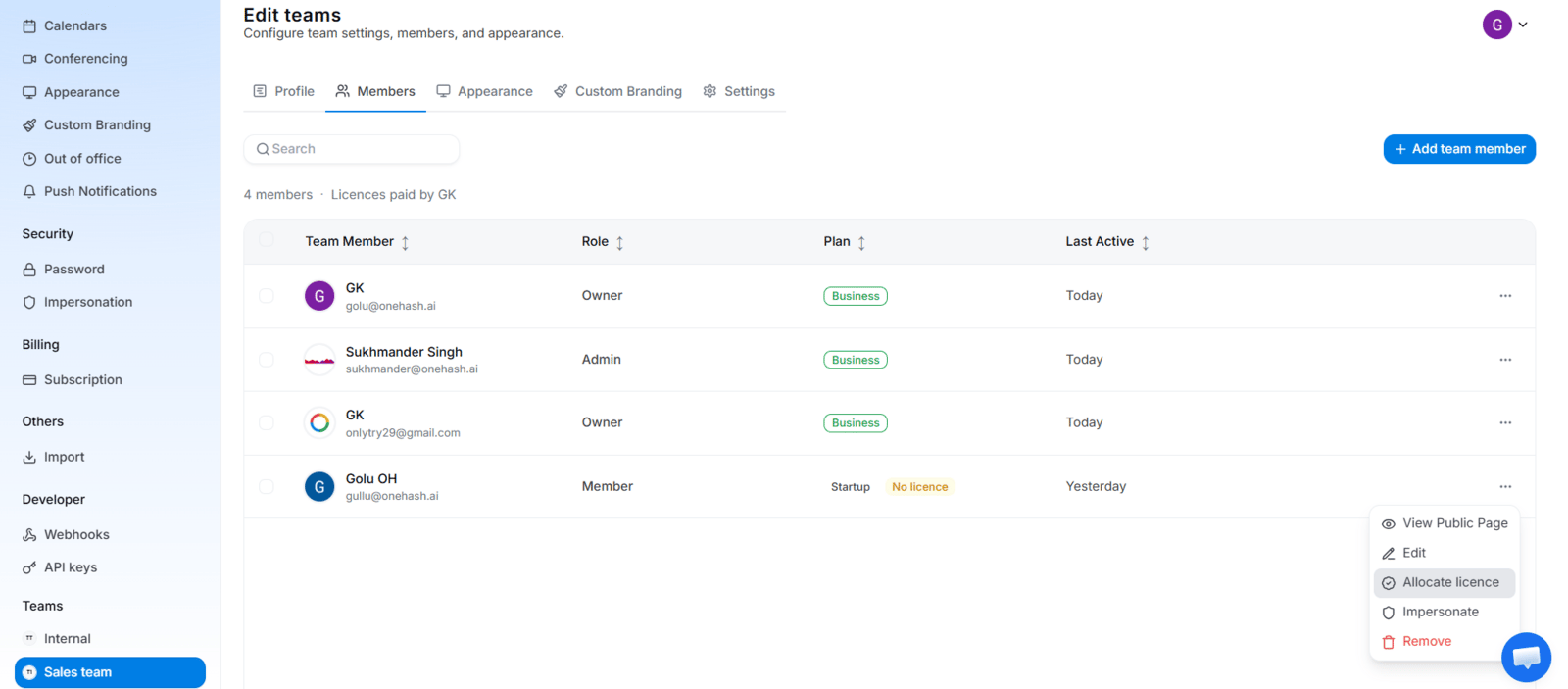
A team owner can assign, reassign, or revoke seats from **Settings → Subscription** or from **Teams → Members → three-dot menu → Revoke License**. Revoking a license removes that member's paid access but does not delete their account.
## Monthly vs yearly billing
Paid plans offer both monthly and yearly billing where available. Business is **$10/user/month** monthly, or **$5/user/month** billed annually at **\$60/user/year** — a **50% saving**. You can switch between Monthly and Yearly from the plan comparison screen when the option is available for your account.
## Team scheduling & licensing
Team scheduling is a **paid-plan feature**. Every member who needs to participate in or access team scheduling must have an eligible paid seat. Either the **team owner buys multiple seats** and assigns licenses to members, or a member **upgrades their own account**.
A team owner can assign, reassign, or revoke seats from **Settings → Subscription** or from **Teams → Members → three-dot menu → Revoke License**. Revoking a license removes that member's paid access but does not delete their account.
 ### Team event types and licensing
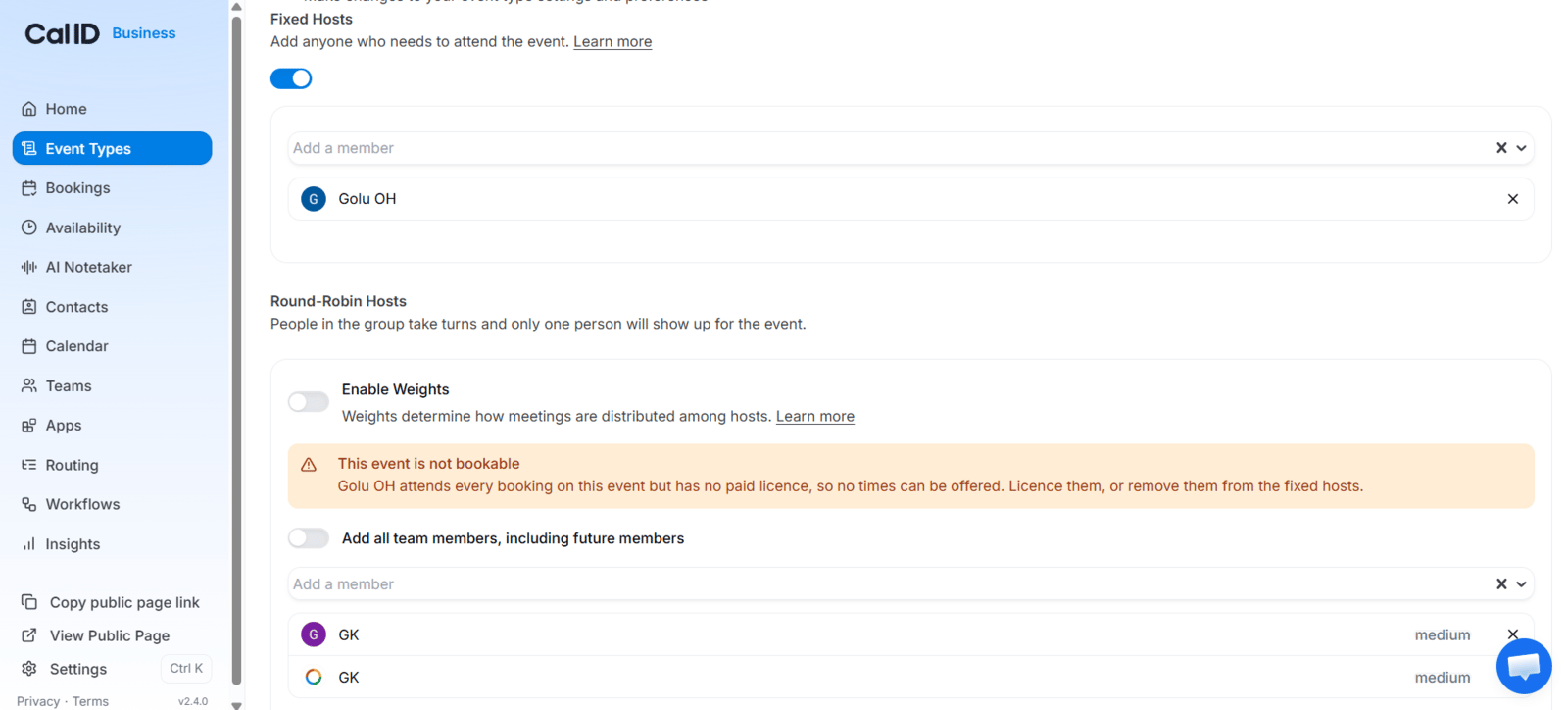
Cal ID supports three team event types — **Round Robin**, **Collective**, and **Managed** — each with licensing rules. In every case, an unlicensed host makes the event unbookable for **new bookings only**; **existing bookings are never cancelled or deleted**. To fix it, license the host or remove them from the event.
* **Round Robin** — only licensed hosts receive bookings; unlicensed hosts are skipped. If the event uses **Fixed Hosts**, every fixed host must be licensed, since a fixed host attends every booking.
* **Collective** — every assigned host must be licensed, because all hosts attend each booking.
* **Managed** — if a required member is unlicensed, that event's booking page is unavailable until they have access.
When an unlicensed host blocks an event, **team members** see which host needs a license, while **external visitors** see only a generic "not accepting bookings" message using the team's name — internal licensing details stay private.
### Team event types and licensing
Cal ID supports three team event types — **Round Robin**, **Collective**, and **Managed** — each with licensing rules. In every case, an unlicensed host makes the event unbookable for **new bookings only**; **existing bookings are never cancelled or deleted**. To fix it, license the host or remove them from the event.
* **Round Robin** — only licensed hosts receive bookings; unlicensed hosts are skipped. If the event uses **Fixed Hosts**, every fixed host must be licensed, since a fixed host attends every booking.
* **Collective** — every assigned host must be licensed, because all hosts attend each booking.
* **Managed** — if a required member is unlicensed, that event's booking page is unavailable until they have access.
When an unlicensed host blocks an event, **team members** see which host needs a license, while **external visitors** see only a generic "not accepting bookings" message using the team's name — internal licensing details stay private.
 ## Downgrading to Startup
If a team moves to the **Startup (free)** plan, paid team scheduling is disabled while on Startup — but the team configuration is **not deleted**. Returning to an eligible paid plan restores it intact. Downgrading also does not affect **personal booking** (it keeps working under Startup's features) or **existing bookings** (they're not deleted, and you can still reschedule or cancel them).
## AI Notetaker add-on
**AI Notetaker is a separate paid add-on** — not included with any plan. You purchase an AI Notetaker license separately, and can buy multiple licenses for multiple users. See the [AI Notetaker guide](/docs/apps/ai-notetaker) for how it works.
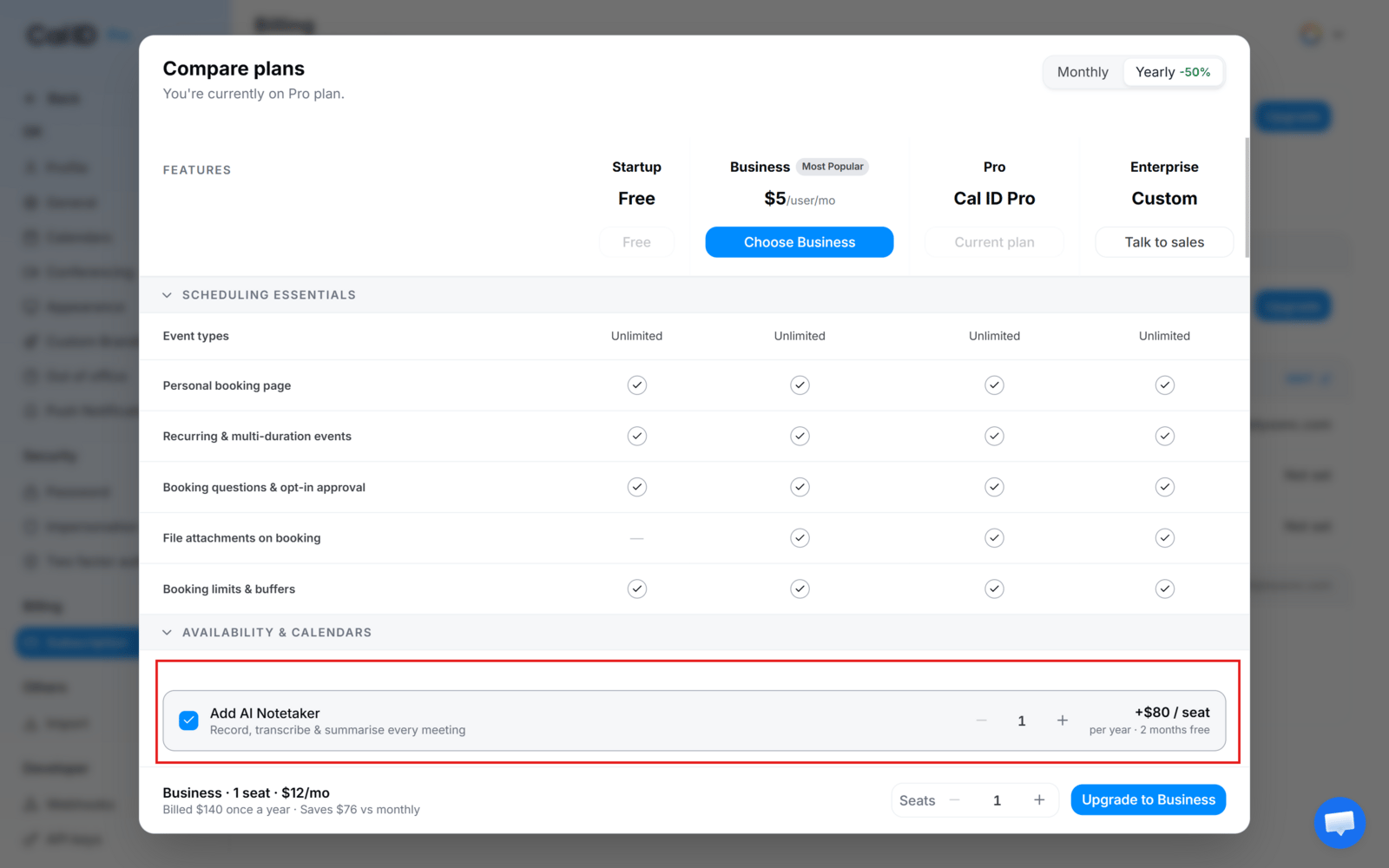
Pricing is **+$8 per seat per month** or **+$80 per seat per year** (2 months free). Buy it from **Settings → Subscription → Upgrade → Add AI Notetaker**, or from the option shown next to AI Notetaker on the Subscription page.
## Downgrading to Startup
If a team moves to the **Startup (free)** plan, paid team scheduling is disabled while on Startup — but the team configuration is **not deleted**. Returning to an eligible paid plan restores it intact. Downgrading also does not affect **personal booking** (it keeps working under Startup's features) or **existing bookings** (they're not deleted, and you can still reschedule or cancel them).
## AI Notetaker add-on
**AI Notetaker is a separate paid add-on** — not included with any plan. You purchase an AI Notetaker license separately, and can buy multiple licenses for multiple users. See the [AI Notetaker guide](/docs/apps/ai-notetaker) for how it works.
Pricing is **+$8 per seat per month** or **+$80 per seat per year** (2 months free). Buy it from **Settings → Subscription → Upgrade → Add AI Notetaker**, or from the option shown next to AI Notetaker on the Subscription page.
 ## App integrations and plans
App integrations from the [App Store](/docs/apps/app-store) are available on every plan, with one exception: **WhatsApp Business** (used for **Book on WhatsApp** and WhatsApp Business messaging) requires the Business plan.
This includes payment apps — **[Stripe](/docs/apps/stripe)**, **[Razorpay](/docs/apps/razorpay)**, and **[PayPal](/docs/apps/paypal)** all connect to any plan so you can charge for [paid bookings](/docs/apps/paid-bookings) on Startup, Business, or Enterprise. Plan limits still apply to bundled features such as SMS and WhatsApp workflow messages.
## Payment, billing & invoices
The Subscription page holds your payment method, billing details (email, company name, address), and invoices. On Startup with no paid subscription you may see "No card on file" — a payment method is required to buy a paid plan or add-on. Invoices appear in the **Invoices** section after a paid charge.
## Frequently asked questions
Yes. Startup is Cal ID's free plan.
Every member who needs paid team scheduling access needs an eligible license. A team owner can buy multiple seats and assign them.
The event can't offer new times until every required host is licensed (or the unlicensed host is removed). Existing bookings are unaffected.
Paid team features are disabled while on Startup, but the team configuration is retained and restored when you return to an eligible paid plan. Existing bookings and personal booking are unaffected.
No. It's a separate paid add-on (+$8/seat/month or +$80/seat/year) requiring its own license in addition to your base plan.
Yes, where available for your account, from the plan comparison or upgrade screen.
No. Payment apps are available on every plan, including Startup. Connect the app from the [App Store](/docs/apps/app-store) and enable it on any event type. See [Paid Bookings](/docs/apps/paid-bookings) for the setup flow.
Most App Store integrations work on every plan. **WhatsApp Business** (and the Book on WhatsApp flow that depends on it) requires the Business plan. Plan-based limits also apply to SMS and WhatsApp workflow messages.
## Explore paid features
Record meetings and generate AI summaries with the add-on.
Set up shared team scheduling once you're on a paid plan.
Get your account ready for your first booking.
Quick answers to common Cal ID questions.
## Related topics
- [Complete Your Cal ID Onboarding](/docs/getting-started/onboarding.md)
- [AI Notetaker](/docs/apps/ai-notetaker.md)
- [Teams in Cal ID](/docs/teams/overview.md)
- [Round-Robin Scheduling](/docs/teams/round-robin.md)
- [Cal ID FAQs](/docs/getting-started/faq.md)
## App integrations and plans
App integrations from the [App Store](/docs/apps/app-store) are available on every plan, with one exception: **WhatsApp Business** (used for **Book on WhatsApp** and WhatsApp Business messaging) requires the Business plan.
This includes payment apps — **[Stripe](/docs/apps/stripe)**, **[Razorpay](/docs/apps/razorpay)**, and **[PayPal](/docs/apps/paypal)** all connect to any plan so you can charge for [paid bookings](/docs/apps/paid-bookings) on Startup, Business, or Enterprise. Plan limits still apply to bundled features such as SMS and WhatsApp workflow messages.
## Payment, billing & invoices
The Subscription page holds your payment method, billing details (email, company name, address), and invoices. On Startup with no paid subscription you may see "No card on file" — a payment method is required to buy a paid plan or add-on. Invoices appear in the **Invoices** section after a paid charge.
## Frequently asked questions
Yes. Startup is Cal ID's free plan.
Every member who needs paid team scheduling access needs an eligible license. A team owner can buy multiple seats and assign them.
The event can't offer new times until every required host is licensed (or the unlicensed host is removed). Existing bookings are unaffected.
Paid team features are disabled while on Startup, but the team configuration is retained and restored when you return to an eligible paid plan. Existing bookings and personal booking are unaffected.
No. It's a separate paid add-on (+$8/seat/month or +$80/seat/year) requiring its own license in addition to your base plan.
Yes, where available for your account, from the plan comparison or upgrade screen.
No. Payment apps are available on every plan, including Startup. Connect the app from the [App Store](/docs/apps/app-store) and enable it on any event type. See [Paid Bookings](/docs/apps/paid-bookings) for the setup flow.
Most App Store integrations work on every plan. **WhatsApp Business** (and the Book on WhatsApp flow that depends on it) requires the Business plan. Plan-based limits also apply to SMS and WhatsApp workflow messages.
## Explore paid features
Record meetings and generate AI summaries with the add-on.
Set up shared team scheduling once you're on a paid plan.
Get your account ready for your first booking.
Quick answers to common Cal ID questions.
## Related topics
- [Complete Your Cal ID Onboarding](/docs/getting-started/onboarding.md)
- [AI Notetaker](/docs/apps/ai-notetaker.md)
- [Teams in Cal ID](/docs/teams/overview.md)
- [Round-Robin Scheduling](/docs/teams/round-robin.md)
- [Cal ID FAQs](/docs/getting-started/faq.md)