> ## Documentation Index
> Fetch the complete documentation index at: https://cal.id/docs/llms.txt
> Use this file to discover all available pages before exploring further.
# Analyzing Workflow Performance in Cal ID Insights
> Monitor your Cal ID workflow automation health and confirm that reminders, follow-ups, and notifications are delivered reliably to every guest.
Keep your automation healthy. The **Workflows** insight tab lets you confirm that reminders, follow-ups, and notifications are being delivered reliably to your guests, and catch failures before they cost you a booking.
## Open the Workflows dashboard
Access your dashboard at [Cal ID](https://cal.id/home).
Click **Insights** in the left-hand sidebar.
Click the **Workflows** tab at the top of the dashboard.
## Key metrics and reports
### Execution scorecards
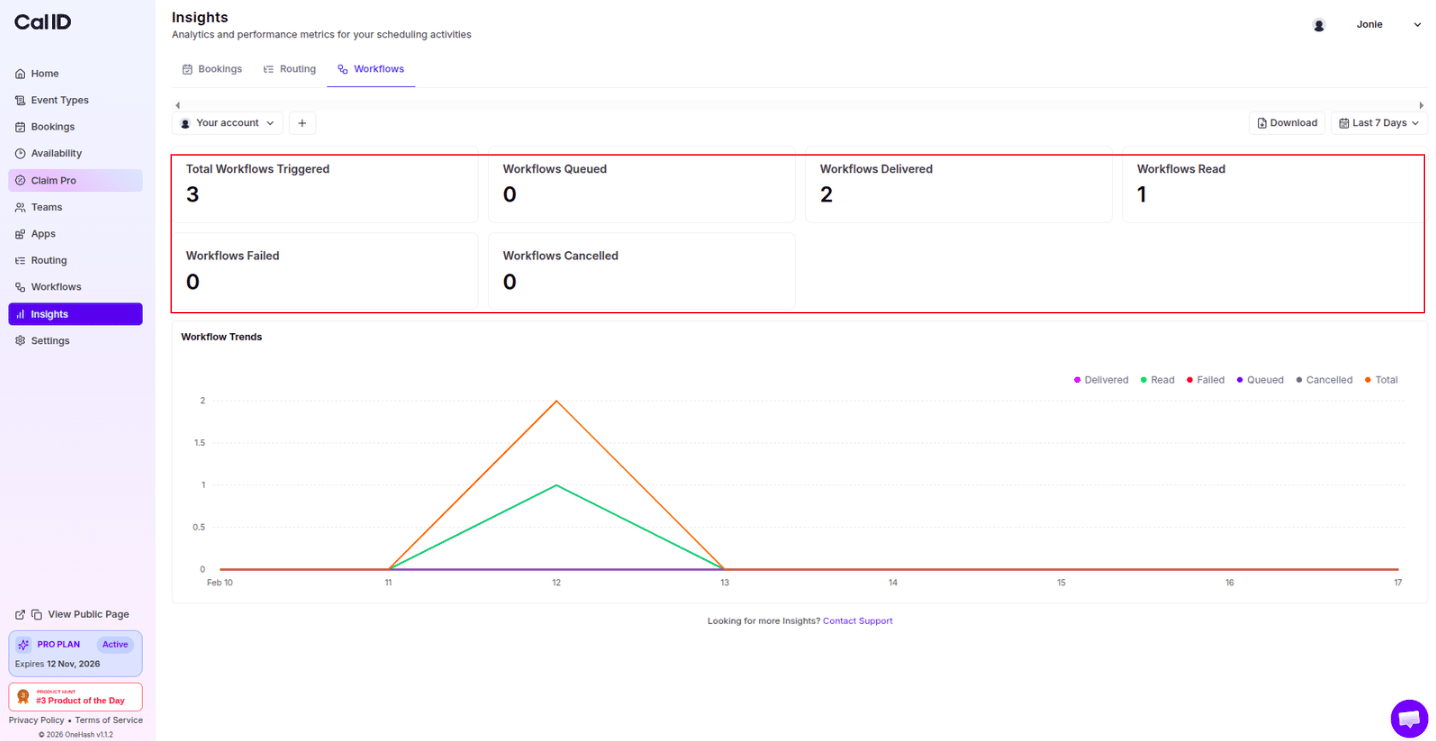
These scorecards summarize how your automations performed across the selected date range.
| Metric | What it tells you |
| ----------------------- | ------------------------------------------------------------------------------------------------------------------ |
| **Total Triggered** | The total number of times an automation was kicked off by an event. |
| **Workflows Queued** | Number of workflows that are in queue and will be delivered. |
| **Workflows Delivered** | The number of Emails, SMS, or WhatsApp messages successfully sent. |
| **Workflows Read** | The number of workflow messages that recipients have opened. |
| **Workflows Failed** | Automations that did not complete (often due to invalid contact info or integration errors). |
| **Workflows Cancelled** | Actions that were scheduled but stopped (e.g., a reminder cancelled because the meeting was cancelled or deleted). |
 ### Date-wise analysis
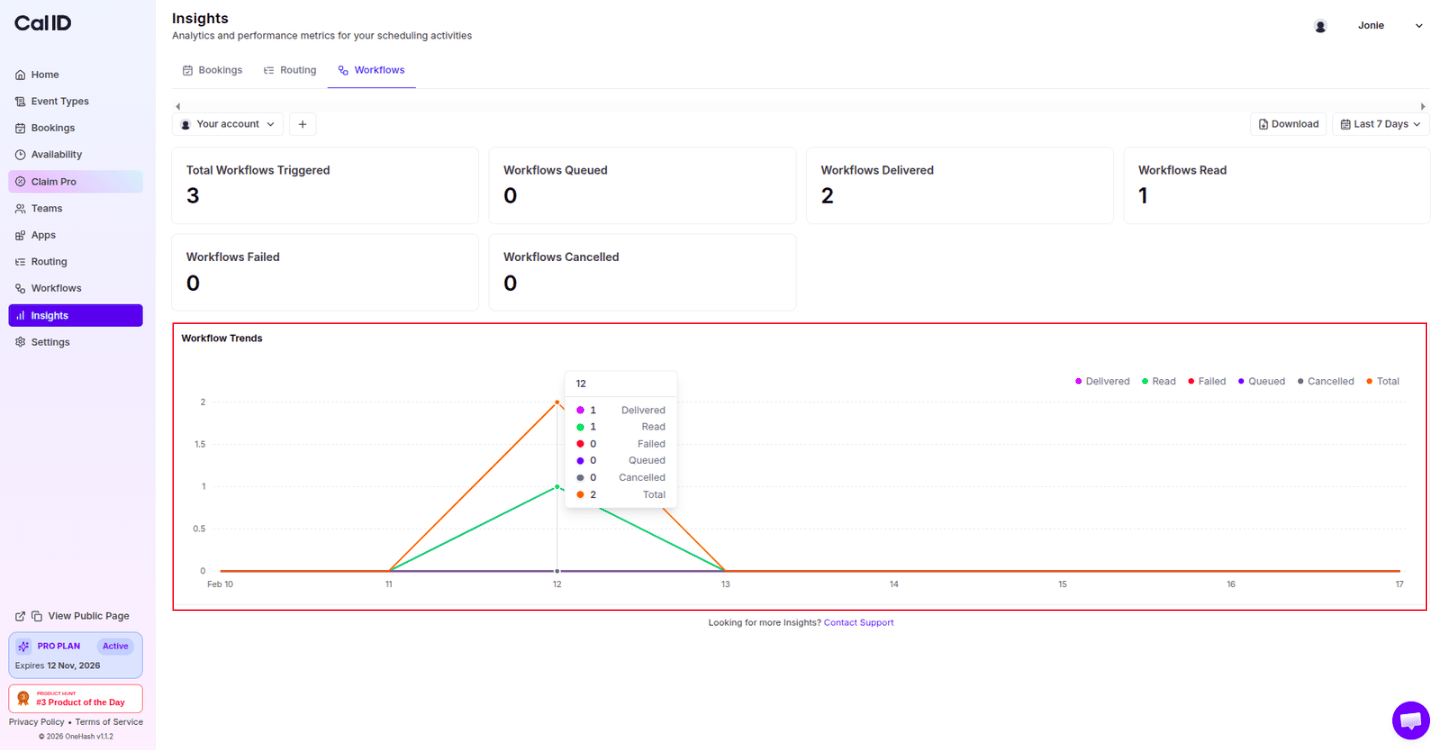
* **Delivery Status Trends**: A graph showing the volume of automated tasks handled by Cal ID over the selected date range and their status.
### Date-wise analysis
* **Delivery Status Trends**: A graph showing the volume of automated tasks handled by Cal ID over the selected date range and their status.
 ## Filtering and account selection
Both filters apply to every scorecard and graph on the page. Set them before reading the numbers so you're comparing the right period and account.
* **Date Range**: Use the top-right filter to see how many automations ran during a specific campaign or month.
* **Team vs. Personal**: Switch the account filter at the top left to see if team-wide workflows are performing differently than your personal ones.
## Next steps
Track booking efficiency, meeting trends, and no-show rates across your events.
See how visitors move through your routing forms and where they drop off.
## Related docs
* For Booking Insights, refer to [Analyzing Booking Performance with Cal ID Insights](/docs/insights/booking-performance).
* For Routing Form Insights, refer to [Analyzing Routing Form Performance in Cal ID Insights](/docs/insights/routing-performance).
## Related topics
- [Analyzing Booking Performance with Cal ID Insights](/docs/insights/booking-performance.md)
- [Analyzing Routing Form Performance in Cal ID Insights](/docs/insights/routing-performance.md)
- [Workflows Setup to Cal ID](/docs/workflows/overview.md)
- [Customizing Your Workflow Messages](/docs/workflows/custom-messages.md)
## Filtering and account selection
Both filters apply to every scorecard and graph on the page. Set them before reading the numbers so you're comparing the right period and account.
* **Date Range**: Use the top-right filter to see how many automations ran during a specific campaign or month.
* **Team vs. Personal**: Switch the account filter at the top left to see if team-wide workflows are performing differently than your personal ones.
## Next steps
Track booking efficiency, meeting trends, and no-show rates across your events.
See how visitors move through your routing forms and where they drop off.
## Related docs
* For Booking Insights, refer to [Analyzing Booking Performance with Cal ID Insights](/docs/insights/booking-performance).
* For Routing Form Insights, refer to [Analyzing Routing Form Performance in Cal ID Insights](/docs/insights/routing-performance).
## Related topics
- [Analyzing Booking Performance with Cal ID Insights](/docs/insights/booking-performance.md)
- [Analyzing Routing Form Performance in Cal ID Insights](/docs/insights/routing-performance.md)
- [Workflows Setup to Cal ID](/docs/workflows/overview.md)
- [Customizing Your Workflow Messages](/docs/workflows/custom-messages.md)