> ## Documentation Index
> Fetch the complete documentation index at: https://cal.id/docs/llms.txt
> Use this file to discover all available pages before exploring further.
# Round-Robin Scheduling
> Automatically rotate incoming team bookings to the next available host in Cal ID using priority, weights, and fixed hosts for fair distribution.
Round-robin scheduling creates a team event type with a pool of hosts and automatically assigns each new booking to the next available host in rotation. Cal ID checks everyone's calendar, skips busy hosts, and balances workloads across the team.
**How assignment rotates:** Cal ID first computes the union of available slots across all hosts, then assigns the booking to the highest-priority (or highest-weighted) host who is free in that slot, skipping anyone unavailable. When hosts tie, the least recently booked host wins.
## Configure round-robin
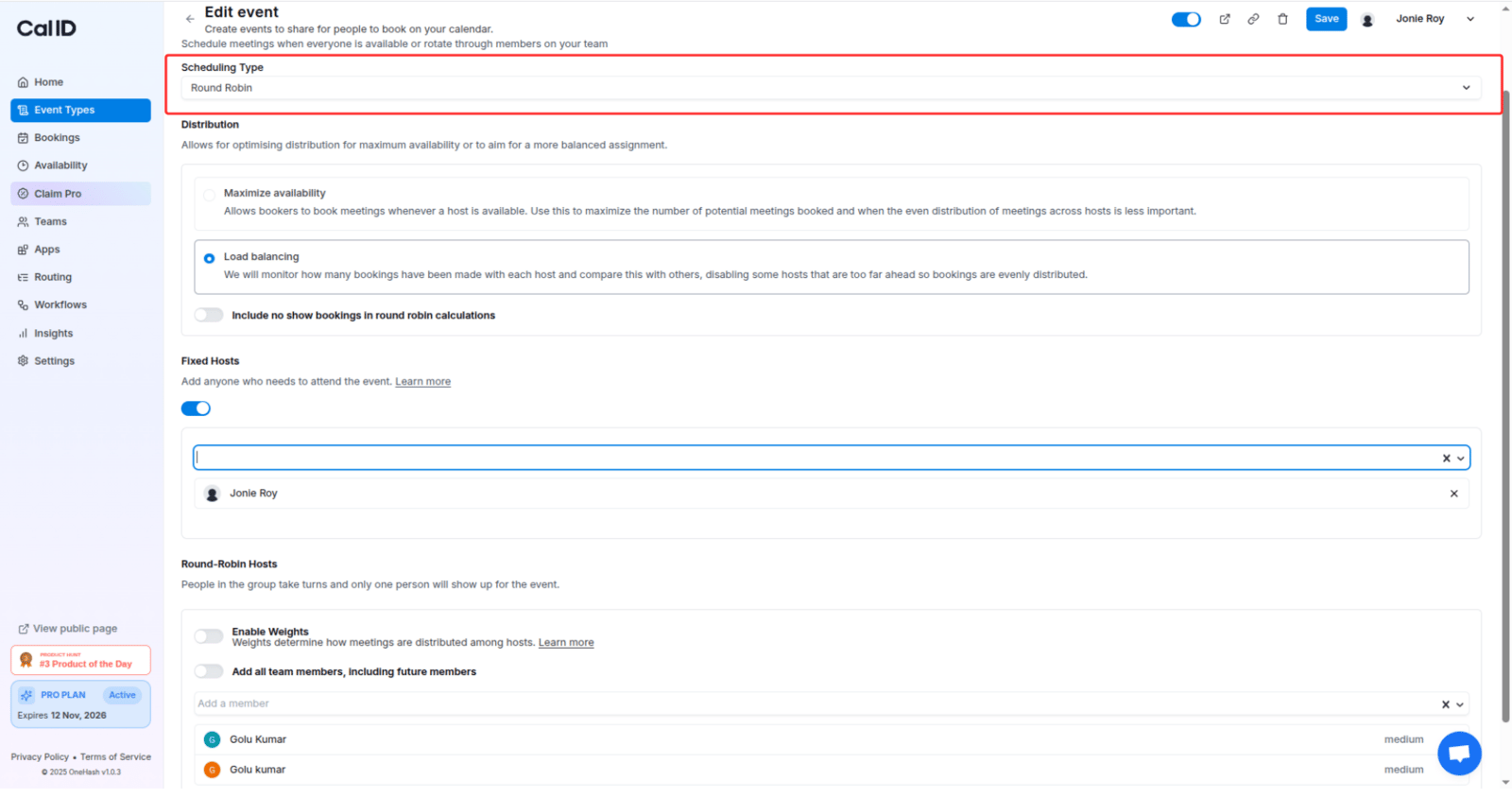
From your team, create a new event type and choose **Round Robin** as the scheduling type.
Select the team members who should share these bookings.
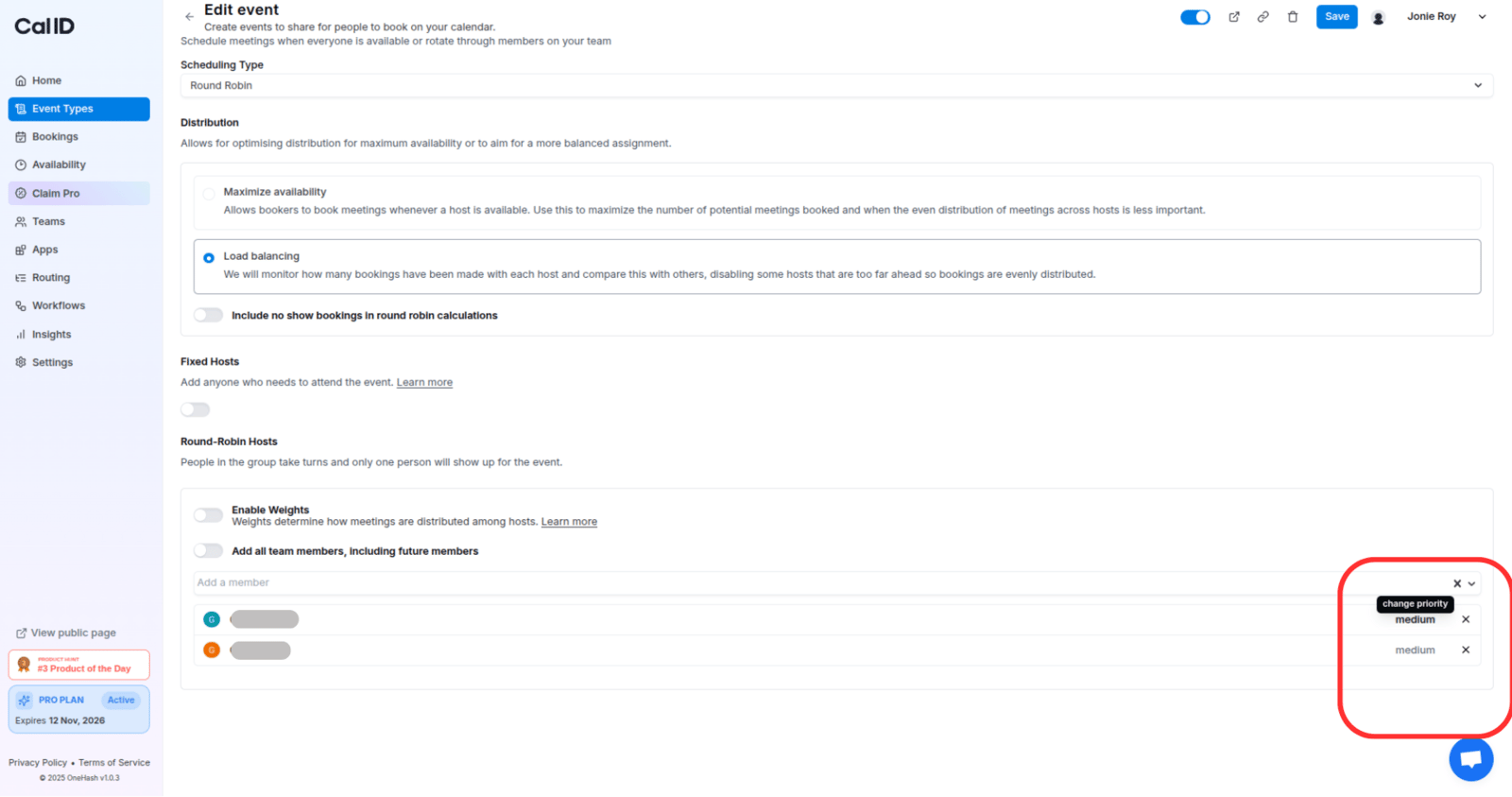
Assign a priority to each host and, optionally, enable weights to fine-tune distribution.
 Optionally mark hosts who should attend every meeting, alongside the rotating pool.
## Priority ranking
Every round-robin host has a priority (default: **medium**). Higher priorities get selected first when multiple hosts are available in a slot. Ties go to the least recently booked host. This ensures hosts with higher designated priorities are given precedence, optimizing resource allocation and streamlining event organization.
For instance, if John and Jane are both available in the same slot, but John has a priority of **High** compared to Jane's **Medium**, John will be booked. If several users share the same priority, Cal ID chooses the least recently booked user.
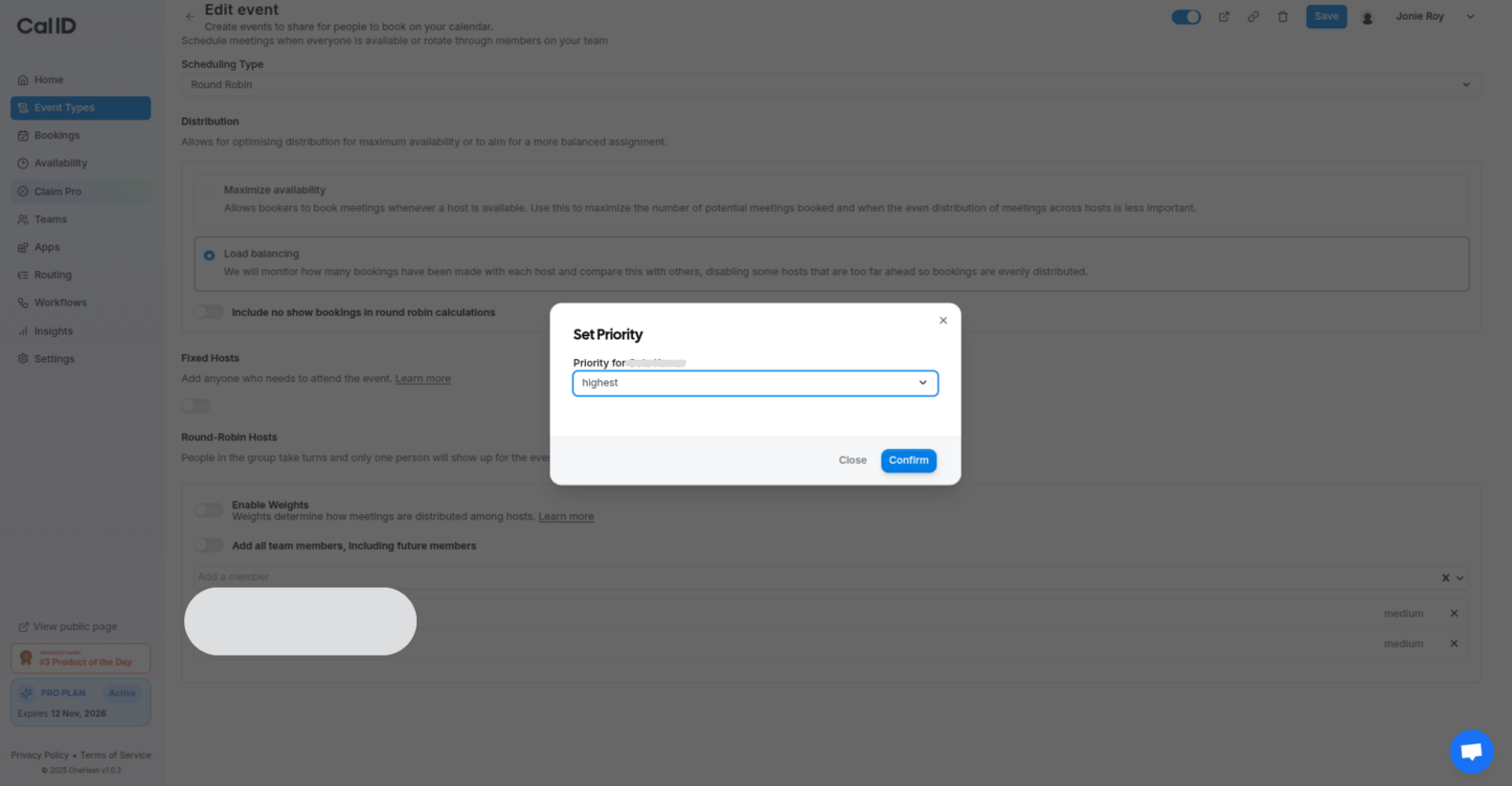
You can select a priority for each host, and based on their priority (and availability in the selected slot), the hosts will be booked.
Optionally mark hosts who should attend every meeting, alongside the rotating pool.
## Priority ranking
Every round-robin host has a priority (default: **medium**). Higher priorities get selected first when multiple hosts are available in a slot. Ties go to the least recently booked host. This ensures hosts with higher designated priorities are given precedence, optimizing resource allocation and streamlining event organization.
For instance, if John and Jane are both available in the same slot, but John has a priority of **High** compared to Jane's **Medium**, John will be booked. If several users share the same priority, Cal ID chooses the least recently booked user.
You can select a priority for each host, and based on their priority (and availability in the selected slot), the hosts will be booked.
 ## Weights
Weights are optional and must be enabled to use. They let you determine how meetings are distributed among hosts. When enabled, every host has a default weight of **100%**, meaning each host should end up with the same number of bookings by default. However, hosts with fewer availabilities can still end up with fewer bookings. Only confirmed bookings count towards past bookings.
For instance, Jane Doe has a weight of 100% and already has 8 bookings, while John Doe has a weight of 200% and already has 12 bookings. Assuming both are available, the next bookings would go to John Doe until a total of 16 bookings is reached.
**Weight adjustment:** If new hosts are added to a round-robin event type that has weights enabled, their weights will be adjusted accordingly. New hosts have their bookings adjusted proportionally to their weight, accounting for the bookings existing hosts already have. This ensures a fair distribution when new hosts are added.
Example:
| Host | Weight | Bookings |
| --------------- | ------ | -------- |
| Existing host 1 | 100% | 5 |
| Existing host 2 | 200% | 9 |
| New host | 50% | — |
Weight Adjustment = (Bookings of existing hosts / Sum of weights of existing hosts) \* New host weight
Weight Adjustment = 14 / 300 \* 50 = 2.33
The new host will have a weight adjustment of 2 bookings.
**Least recently booked** is the fallback method: the available round-robin host who was booked least recently is chosen. If more than one host meets this criterion, one is chosen at random.
## Fixed hosts
If you wish to bring Collective behavior into round-robin events, Cal ID makes it possible. You can select which hosts should always attend the meeting, while the other selected team members are booked on a round-robin basis.
* **Fixed hosts** are individuals who are consistently present at every meeting.
* **Round-robin hosts** are members of a group who take turns attending meetings. Rather than everyone attending every meeting, only one person from the group attends each time.
## Weights
Weights are optional and must be enabled to use. They let you determine how meetings are distributed among hosts. When enabled, every host has a default weight of **100%**, meaning each host should end up with the same number of bookings by default. However, hosts with fewer availabilities can still end up with fewer bookings. Only confirmed bookings count towards past bookings.
For instance, Jane Doe has a weight of 100% and already has 8 bookings, while John Doe has a weight of 200% and already has 12 bookings. Assuming both are available, the next bookings would go to John Doe until a total of 16 bookings is reached.
**Weight adjustment:** If new hosts are added to a round-robin event type that has weights enabled, their weights will be adjusted accordingly. New hosts have their bookings adjusted proportionally to their weight, accounting for the bookings existing hosts already have. This ensures a fair distribution when new hosts are added.
Example:
| Host | Weight | Bookings |
| --------------- | ------ | -------- |
| Existing host 1 | 100% | 5 |
| Existing host 2 | 200% | 9 |
| New host | 50% | — |
Weight Adjustment = (Bookings of existing hosts / Sum of weights of existing hosts) \* New host weight
Weight Adjustment = 14 / 300 \* 50 = 2.33
The new host will have a weight adjustment of 2 bookings.
**Least recently booked** is the fallback method: the available round-robin host who was booked least recently is chosen. If more than one host meets this criterion, one is chosen at random.
## Fixed hosts
If you wish to bring Collective behavior into round-robin events, Cal ID makes it possible. You can select which hosts should always attend the meeting, while the other selected team members are booked on a round-robin basis.
* **Fixed hosts** are individuals who are consistently present at every meeting.
* **Round-robin hosts** are members of a group who take turns attending meetings. Rather than everyone attending every meeting, only one person from the group attends each time.
 For tasks like scheduling sales calls or product demos, where you have a pool of people among whom you'd like to distribute meetings, round robin is the perfect choice.
## Next steps
Need everyone in the room at once? Book the whole group together.
Push a consistent event type to every team member from one place.
## Related topics
- [Collective Events](/docs/teams/collective.md)
- [Managed Events](/docs/teams/managed.md)
- [Team Availability](/docs/availability/team-availability.md)
- [Setting Up Routing Forms in Cal ID](/docs/routing/routing-forms.md)
- [Teams in Cal ID](/docs/teams/overview.md)
For tasks like scheduling sales calls or product demos, where you have a pool of people among whom you'd like to distribute meetings, round robin is the perfect choice.
## Next steps
Need everyone in the room at once? Book the whole group together.
Push a consistent event type to every team member from one place.
## Related topics
- [Collective Events](/docs/teams/collective.md)
- [Managed Events](/docs/teams/managed.md)
- [Team Availability](/docs/availability/team-availability.md)
- [Setting Up Routing Forms in Cal ID](/docs/routing/routing-forms.md)
- [Teams in Cal ID](/docs/teams/overview.md)