
Round Robin Scheduling: How It Works, What It Costs, How to Set It Up
Round robin scheduling rotates bookings across your team so nobody waits on one calendar. Here is how the rotation picks a host, what each tool charges for it, and where it goes wrong.


Key takeaways
- Round robin scheduling rotates incoming bookings across a pool of people, checking live calendars so nobody is assigned a meeting they cannot take.
- It is a paid feature almost everywhere. Cal ID includes it on Business at $5 per user per month billed annually, Calendly starts it on Teams at $16 per seat, and Chili Piper starts at $15,000 a year.
- Microsoft Bookings does not do round robin at all. It assigns staff at random, and Microsoft documents that equal distribution and per-person caps are not available.
- Strict rotation is the fairest and costs you bookings, because the only availability on offer is the next host's. Flexible rotation plus weighting gets you both fill rate and a fair split.
- Round robin picks the person. Lead routing picks the team. Most setups need a routing form in front of the rotation, not instead of it.
If more than one person on your team can take the same meeting, round robin scheduling is how you stop all of them landing on the same calendar. One shared booking link, and the system decides who gets each booking.
This guide covers what it is, how the rotation actually picks a host, the different types, what it costs in every major tool, where it goes wrong, and how to set it up. Every price and feature claim is checked against the vendor's own pages, which are linked throughout.
Two different things get called a round robin meeting
Worth clearing up first, because the phrase is used for two unrelated ideas and you may have landed here wanting either one.
A way of distributing bookings
This is the scheduling feature, and the subject of this guide. Incoming meeting requests rotate across a pool of hosts so each person gets a roughly equal share. Sales teams use it for inbound demos, support teams for incoming calls, recruiters for interviews.
A way of running a meeting
The same phrase describes a facilitation format where everyone in the room speaks in turn, in a fixed order, so the loudest voice does not take the hour. It is a useful technique for retrospectives and stand-ups, and it has nothing to do with booking software. If that is what you came for: set an order, give each person a fixed slot of time, have someone track it, and do not let the discussion jump the queue.
Everything below is about the first meaning.
What is round robin scheduling?
Round robin scheduling is an assignment method that rotates incoming bookings through a pool of people so each receives a roughly equal share. When someone books, the system looks at everyone in the pool, filters to whoever is genuinely free at that time, and picks the next host in the rotation.
The person booking never chooses a name. They pick a time that suits them, and the right colleague appears on the confirmation.
How round robin assignment actually works
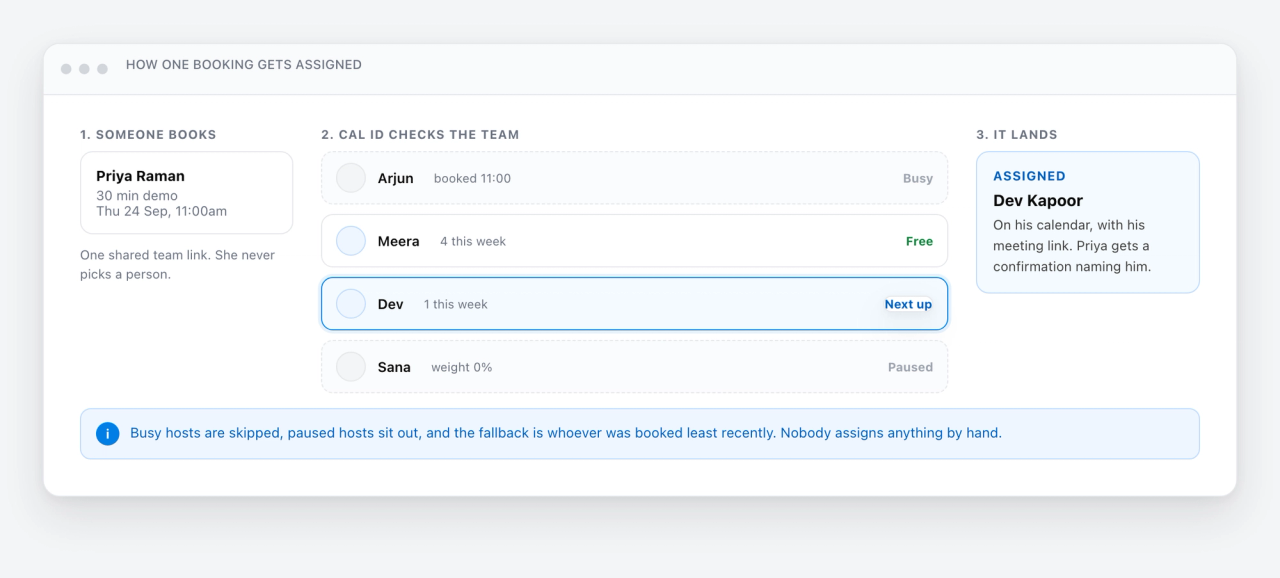
Under the hood, a round robin booking runs through four steps.
- Someone opens your shared team booking page and picks a time that works for them.
- The scheduler checks which hosts are genuinely free then, reading their connected Google or Microsoft calendars rather than a stored rota.
- It assigns the booking to the next host in the rotation. Where several are free, priority, weighting and who was booked least recently decide the winner.
- The meeting lands on that host's calendar, and the guest gets a confirmation naming the right person with the right meeting link.
The detail that matters is step two. A rotation that does not read live calendars will cheerfully assign a meeting to someone already booked, which is how teams end up manually reshuffling the thing that was supposed to be automatic.
The four types of round robin
Tools use different names, but the behaviours come down to four.
- Strict rotation goes in fixed order: A, then B, then C, regardless of anything else. Fairest on paper, worst for the person booking, because the only times offered are the next host's times.
- Flexible rotation shows the combined availability of the whole team and assigns whoever is free. Far more times on offer, so more bookings, at the cost of a less even split.
- Weighted rotation gives each host a share. A senior rep takes twice what a new hire takes, and someone at capacity is paused without leaving the team.
- Collective is the opposite of round robin and often sits next to it: instead of picking one host, it books several required people into the same slot.
What round robin scheduling costs, tool by tool
Round robin is almost never on a free plan, and most guides to it never mention money at all. Here is what each tool charges to unlock it, taken from the vendor's own pricing page in September 2026.
| Tool | First plan with round robin | Published price | How it splits the work |
|---|---|---|---|
| Cal ID | Business | $5 per user per month billed annually, $10 monthly | Five priority levels, weights from 0% to 200%, fixed hosts, least recently booked as the fallback |
| Calendly | Teams | $16 per seat per month billed yearly, $20 monthly | Priority stars, plus an equal distribution option that keeps anyone from getting more than three meetings ahead |
| HubSpot | Sales Hub Starter for basic round robin; Professional for weighted rotations | Starter from $7 per seat per month; Professional from $90 per seat per month | Even or weighted distribution, but only once you are on Professional |
| YouCanBookMe | Team | $16.20 per member per month billed yearly, $18 monthly | Equal distribution, first available, fixed order, or most availability for the booker |
| Chili Piper | Routing and Scheduling | From $1,250 per month, which is $15,000 a year, with 15 seats included and $45 per seat after that | Weighting, meeting limits, and combining rotations across teams |
| Microsoft Bookings | Not supported | Included with most Microsoft 365 plans | Assigns an available staff member at random. Microsoft documents that there is no way to ensure equal distribution or cap bookings per person |
Three things are worth pulling out of that table.
- Microsoft Bookings does not do round robin. It picks an available staff member at random, and Microsoft states plainly that there is no way to ensure equal distribution or to cap how many each person takes. If you are on Microsoft 365 and assumed this was covered, it is not.
- Calendly does not do percentage weighting. It has priority stars and an equal distribution setting that stops anyone running more than three meetings ahead, which is a different and blunter instrument than assigning someone 50% of the load.
- HubSpot splits the feature in two. Round robin booking pages work from Starter, but even and weighted rotations need Professional, which is a large step up in price.
Round robin vs collective vs group scheduling
These three team booking modes are easy to mix up, and picking the wrong one is the most common setup mistake.
| Mode | Who the meeting goes to | Best for |
|---|---|---|
| Round robin | One host, chosen from a pool by availability and rotation | Sales, support and recruiting, where any qualified person can take the meeting |
| Collective | Several required hosts, all booked into the same slot | Panel interviews and meetings that need specific people together |
| Group event | Many guests book the same single time slot | Webinars, classes and office hours with a seat limit |
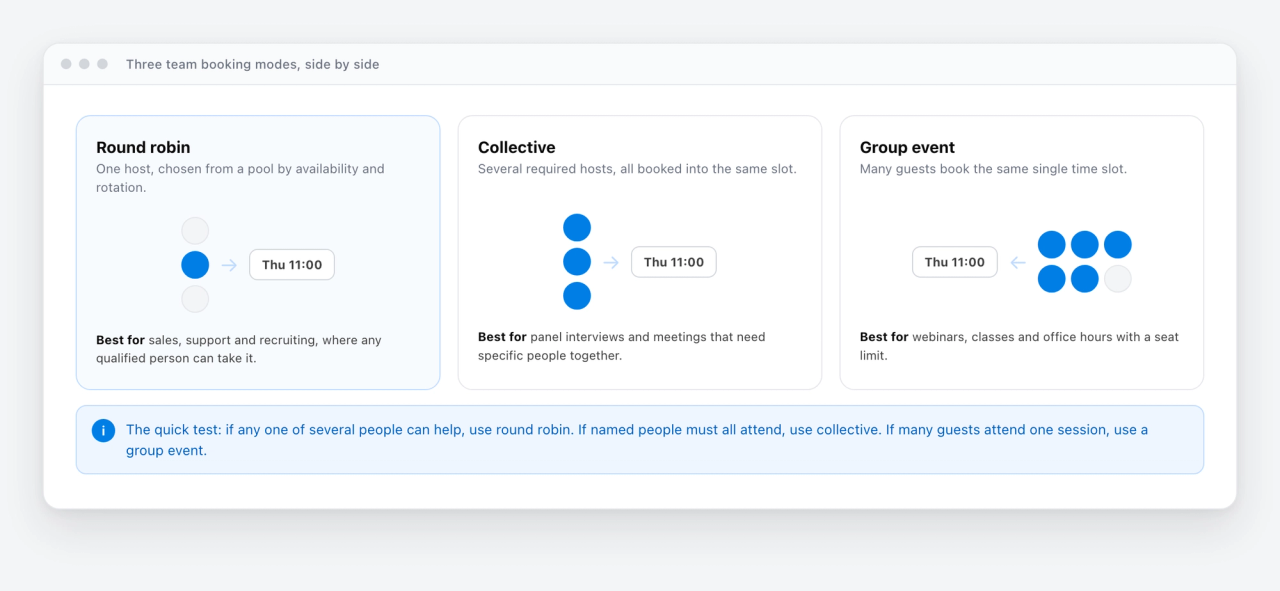
The quick test: if any one of several people can help, use round robin. If named people must all attend, use collective. If many guests attend one session, use a group event. Cal ID supports all three.
Priority, weights and fixed hosts
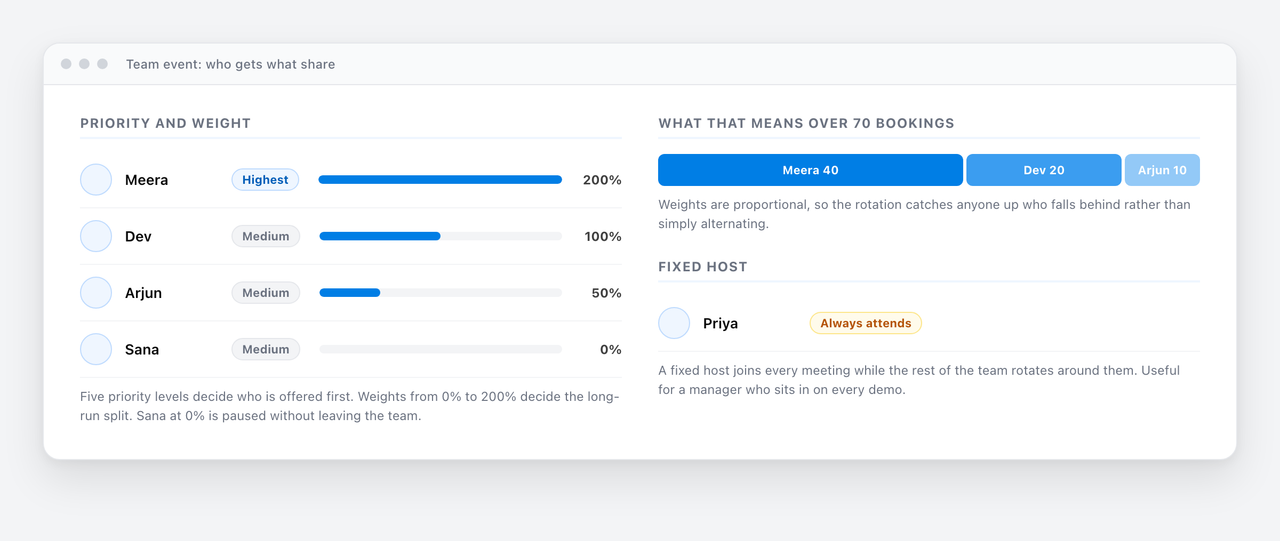
An even split is the default, but it is rarely what a real team wants. Three controls change who gets what.
Priority decides who is offered first
Rank hosts across five levels. When several people are free at the same time, the highest priority host takes the booking. This is how you send inbound demos to your strongest closers without removing anyone else from the rotation.
Weights decide the long-run split
Give each host a weight from 0% to 200%. A part-time rep on 50% takes half a normal load. Someone at capacity drops to 0% and sits out without being deleted from the team. Because weights are proportional rather than a simple alternation, the rotation catches up anyone who falls behind rather than just taking turns.
Set three hosts to 200%, 100% and 50% and, over seventy bookings, the split lands near forty, twenty and ten. That is the practical difference between weighting and the equal-distribution settings most tools offer.
Fixed hosts always attend
Pin someone to every meeting while the rest of the team rotates around them. Useful for a manager sitting in on every demo, or a solutions engineer who joins every technical call.
When to use round robin scheduling
Reach for it whenever more than one person can handle the same meeting. Most guides stop at sales; the pattern is far broader.
- Sales teams: distribute inbound demo requests evenly so no lead waits and every rep gets a fair share of pipeline. See sales scheduling.
- Support and customer success: route incoming calls to whoever is free so response times stay low. See customer success scheduling.
- Recruiting: spread first-round interviews across a panel so no one interviewer becomes the bottleneck. See interview scheduling.
- Clinics and practices: rotate intake appointments across practitioners who can all run an initial assessment.
- Universities and schools: share advising hours or admissions calls across a department.
- Agencies and consultancies: rotate discovery calls across whoever has capacity this week.
If a meeting needs specific named people, use collective scheduling instead. Round robin is for when any qualified person will do.
Why teams bother: the speed problem
The reason round robin exists is not fairness for its own sake. It is that a booking sitting in a queue waiting for one specific person to respond is a booking you are at risk of losing. Sales teams call this speed to lead: the gap between someone raising their hand and someone getting back to them.
Round robin closes that gap by removing the human step. Nobody assigns anything, nobody forwards an email, and the meeting is on a calendar before anyone has read the enquiry. That is the whole mechanism, and it is why the feature sits on paid tiers: it is the part that makes a team booking page worth paying for.
Where round robin goes wrong
Four failure modes account for most of the complaints.
- Stale calendars. The rotation is only as accurate as the calendars it reads. One person keeping their real schedule somewhere else will be handed meetings they cannot take.
- Nobody free. If every host is busy, a strict rotation shows an empty booking page. Decide in advance what should happen: widen the pool, extend the scheduling window, or let an overflow host pick it up.
- Weights that nobody revisits. A weighting set when someone was ramping and never changed is quietly wrong six months later.
- The relationship problem. A returning client may reach a different person every time, which is fine for inbound demos and bad for ongoing account work. Use a fixed host or a personal link where continuity matters.
How to set up round robin scheduling, step by step
In Cal ID the whole thing takes a few minutes.
- Create a team and add the people who should receive bookings.
- Create a team event type, for example a 30 minute demo, and choose Round Robin as the assignment method.
- Connect each member's Google or Microsoft calendar, so availability is read live rather than guessed.
- Set priority levels and weights if some people should take more or fewer meetings than others.
- Pin any fixed hosts who must attend every meeting, and set buffers and working hours per member.
- Add a routing form if you want to qualify or segment bookers before assignment, then publish the shared link.
Round robin assignment is on the Business plan at $5 per user per month billed annually, alongside collective scheduling, routing forms and workflows. Individuals can use Cal ID free forever; round robin is the team feature.
Sources
Cal ID feature and plan details come from its own round robin and pricing pages. Competitor plans and prices were read from each vendor's own pricing page and help centre on 21 September 2026: Calendly pricing and round robin distribution, Chili Piper pricing, HubSpot meeting rotations, YouCanBookMe pricing, and the Microsoft Bookings FAQ. These change often, so check the current figures before making a decision.
Frequently asked questions
Quick answers to the questions we hear most.
01 What is round robin scheduling?
It is an assignment method that rotates incoming bookings across a pool of people so each gets a roughly equal share. The person booking picks a time rather than a name, and the scheduler assigns whoever is free and next in the rotation.
02 How does round robin scheduling work?
Someone picks a time on a shared team booking page. The scheduler checks which hosts are genuinely free then by reading their connected calendars, assigns the booking to the next host in the rotation, and sends a confirmation naming that person. Priority, weighting and who was booked least recently decide it when several people are free.
03 What is a round robin meeting?
Two different things. In scheduling, it is a meeting distributed across a team by rotation. In facilitation, it is a meeting format where everyone speaks in turn in a fixed order so no one dominates. This guide is about the first.
04 Is round robin scheduling free?
Rarely. It is a team feature and sits on paid tiers almost everywhere. Cal ID includes it on the Business plan at $5 per user per month billed annually, and is free forever for individuals. Calendly starts it on Teams, YouCanBookMe on Team, HubSpot on Sales Hub Starter for basic round robin, and Chili Piper at $15,000 a year.
05 Does Microsoft Bookings support round robin?
No. Bookings assigns an available staff member at random, and Microsoft documents that there is no way to ensure equal distribution across staff or to cap how many appointments each person takes. Any balancing has to be done by hand afterwards.
06 Does Calendly support weighted round robin?
Not as a percentage weighting. Calendly uses priority stars to decide who is offered first, plus an optional equal distribution setting that keeps anyone from getting more than three meetings ahead. Round robin starts on the Teams plan.
07 What is the difference between round robin and collective scheduling?
Round robin assigns one host from a pool, so any qualified person can take the meeting. Collective books several required hosts into the same slot, so it only offers times when all of them are free. Use round robin for inbound demos, collective for panel interviews.
08 What is weighted round robin scheduling?
A rotation where each host gets a defined share rather than an equal one. In Cal ID you set a weight from 0% to 200% per person, so a part-time member takes half a load and someone at capacity drops to 0% without leaving the team. Weights are proportional, so the rotation catches up anyone who falls behind.
09 When should you not use round robin scheduling?
When continuity matters more than speed. A returning client reaching a different person each time is fine for inbound demos and bad for ongoing account work, so use a fixed host or a personal booking link there. Also avoid it when a specific named person must attend, which is what collective scheduling is for.
10 Is round robin scheduling the same as lead routing?
No. Lead routing decides which team or pool a booking should reach, using territory, company size, product interest or an answer on your form. Round robin decides who within that pool takes it. Most teams use a routing form in front of the rotation.
11 How do I set up round robin scheduling?
Create a team, add the people who should receive bookings, then create a team event type and choose Round Robin as the assignment method. Connect each member's calendar so availability is live, set priority and weights if the split should not be even, and publish the shared link.