
Music lesson scheduling software
that keeps your teaching week full.
Cal ID is a free music lesson scheduling app for private teachers and music schools. Students book their next few lessons at once, from your booking link and get a reminder before each one, so you teach instead of texting about times.
Free forever for individuals · No credit card required

Learn from
the best.
One-on-one and group lessons that fit around your week.


 2,000+ students taught Pick multiple
 Enter details
Trusted by teams at















Stop booking lessons over text messages
Most music teachers still juggle lesson times in texts, paper diaries and payment apps. A music lesson booking system puts all of it on one page.
Without Cal ID
- One lesson, one booking Students rebook every week, and your best times go to whoever asks first.
- Lesson times agreed by text Every new student starts with a long thread to find a free afternoon.
- Lesson fees chased at the door Parents forget cash, transfers arrive late and you keep a list of who owes what.
- Students who forget to turn up Nobody sends a reminder, so you wait with a tuned guitar and an empty chair.
With Cal ID
- The next few lessons in one go Students pick several lesson times, fill in their details once and pay once.
- One link for every lesson Students and parents see your open times and book in a few taps, any time of day.
- Paid when they book Take lesson fees through Stripe, Razorpay or PayPal with 0% booking commission.
- Reminders go out on their own Automatic email reminders before every lesson, with SMS and WhatsApp when you need them.
How students book music lessons online in 3 steps
A student goes from your booking link to a confirmed, paid lesson in under a minute, without a single message to you.
Choose a lesson time
Mon 53:00pm4:00pm5:00pm6:00pmTue 63:00pm4:00pm5:00pm6:00pmWed 73:00pm4:00pm5:00pm6:00pmStep 01Students pick a lesson time
They open your booking link, see the lesson times you still have free and tap the one that fits after school or work. Times you are busy never show up.
Guitar Lesson · 45 min
Tue 64:00pmStudent nameMaya ChenInstrument and levelGuitar, beginnerPay to book · $50.00Step 02They add details and pay
Name, email and anything you ask, like instrument, level or a parent's phone number. For paid lessons they pay by card through Stripe, Razorpay or PayPal before the booking is confirmed.
Confirmation page
Guitar Lesson · Tue, 6 OctBookedReminder emailScheduledStep 03The lesson is booked
The student gets a confirmation and a calendar invite, a reminder goes out before the lesson, and the booking lands on your calendar.
Music teacher scheduling software for every kind of studio
From one piano teacher working from home to a music school with a teacher for every instrument.
-
Private music teachers
Share one link with students and parents and let them book guitar, piano or drum lessons around your own calendar.
-
Music schools and academies
Give every teacher their own booking page, list lessons for each instrument and take payment when students book.
-
Online music teachers
Every booking gets a Zoom or Google Meet link, and lesson times show in each student's own time zone.
-
Vocal coaches
Book voice lessons and audition prep with questions about range and goals asked before the first session.
-
Rehearsal and recording studios
Let bands and artists book studio time by the hour, pay up front and get a buffer for setup and pack down.
-
Music therapists
Book one-to-one sessions with an intake form and send reminders before every appointment.
Music lesson scheduling software features
Everything a music lesson booking system needs to fill your teaching week, get paid and keep students turning up.
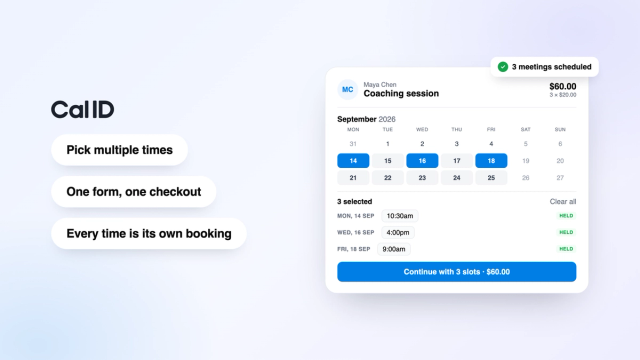
Book the next few lessons in one go
New Business planStudents pick several lesson times, fill in their details once and pay once. Each lesson becomes its own booking, and your availability still applies.
- Pick several lessons per visit
- One form and one checkout
- A calendar invite for each lesson
- Lessons spread across weeks
3 lessons selected
Each lesson becomes its own booking.
Continue with 3 lessons · $150.00Get paid before the lesson starts
Set a price for each lesson type and take payment through Stripe, Razorpay or PayPal when students book. Cal ID takes 0% commission on paid bookings.
- Stripe, Razorpay and PayPal
- 0% booking commission
- A price for each lesson length
- Payment taken at booking
Payments · This week
Reminders so students show up ready to play
Send a confirmation when a student books and a reminder before the lesson. Add SMS or WhatsApp reminders for students, or parents, who miss emails.
- Email confirmations and reminders
- SMS and WhatsApp reminders
- Sent at the time you choose
- Follow-ups after the lesson
Lesson reminders
Runs for every lesson booking.
Breathing room between back-to-back lessons
Add buffer time after each lesson to reset the room, retune or write a quick message to a parent. Connect Google, Outlook or Apple Calendar and busy times disappear from your booking page.
- Buffer time before or after lessons
- Google, Outlook and Apple Calendar
- Busy times hidden automatically
- Times shown in each student's time zone
Guitar Lesson · 45 min
Applies to every booking of this lesson.
The booking page your students will see
Every instrument, lesson length and trial gets its own event type, so your music lesson booking software shows students exactly what they can book and what it costs.
Build a lesson booking page like this in minutes
Free forever for individuals. No credit card required.
Loved by teachers and small teams
- ★★★★★ Capterra · Nov 2025
“Setting up and using Cal ID every day to book appointments with my clients has been incredibly easy and has saved me countless hours every month.”
 Nathalia Principal Designer
 - ★★★★★ Featured on cal.id
“Cal ID is the scheduler I wish I had years ago. Booking links, payments and reminders - without the Calendly tax.”
Aurélia Founder - ★★★★★ Capterra · Nov 2025
“I switched from Calendly because I didn't want to keep paying for features I barely used. Cal ID has been a game changer - my clients love how easy it is to book time with me, and the Google Calendar integration works perfectly. It does exactly what I need without the bloat or the price tag.”
Mehdi Founder & CEO · Marketing & Advertising
Free vs Business: which plan does your music studio need?
Most private music teachers run their whole schedule on the free plan. Music schools with several teachers, or students who book a few weeks of lessons at once, usually choose Business.
| Feature | Free | Business |
|---|---|---|
| Price | Free forever | $5 per user / month, billed annually |
| Lesson types and bookings | Unlimited | Unlimited |
| Payments with Stripe, Razorpay or PayPal | Included | Included |
| Booking commission | 0% | 0% |
| Calendar sync (Google, Outlook, Apple) | Included | Included |
| Email reminders | Unlimited | Unlimited |
| SMS and WhatsApp reminder workflows | 10 each | Unlimited |
| Multi-slot booking (book several lessons at once) | − | Included |
| Round-robin across teachers | − | Included |
| Remove Cal ID branding | − | Included |
Plans and limits as listed on cal.id/pricing.
Music lesson scheduling software FAQs
Answers for music teachers and music schools.
01 What is music lesson scheduling software?
Music lesson scheduling software is an online tool that lets students see a teacher's open lesson times, book and pay without texting back and forth. Cal ID is free music lesson scheduling software: you share one link, students book and pay, and reminders and calendar invites go out automatically.
02 What is the best music lesson scheduling software for teachers and music schools?
For private teachers and small music schools, Cal ID is one of the best music lesson scheduling software options because the free plan includes unlimited lesson types and bookings, online payments with 0% commission, calendar sync and email reminders. If you also need billing and student records, a full studio management tool may suit you better.
03 Is there free music lesson scheduling software?
Yes. Cal ID is free music lesson scheduling software. The free plan includes unlimited event types and bookings, Google, Outlook and Apple Calendar sync, buffer time, email reminders and payments through Stripe, Razorpay or PayPal, so a private teacher can run their whole lesson schedule at no cost.
04 Can students book several music lessons at once?
Yes, with multi-slot booking on the Business plan. A student picks several lesson times on your booking page, fills in their details once and pays once. Each lesson becomes its own booking with its own calendar invite and reminder.
05 I need a reliable booking system for music lessons with automated email reminders. Does Cal ID do that?
Yes. Cal ID is a music lesson booking system that sends an email confirmation when a student books and an automated email reminder before every lesson, on every plan including free. You choose when reminders go out, and you can add SMS or WhatsApp reminders too.
06 How does Cal ID compare with My Music Staff?
My Music Staff is full studio management software. It costs $16.95 a month for one teacher plus $4.95 for each additional teacher or staff member, with a 30-day free trial (My Music Staff pricing page, September 2026). It includes automatic invoicing, lesson notes, a student and parent portal, attendance and payroll tracking, which Cal ID does not offer. Cal ID is free for booking, payments and reminders, so it suits teachers who mainly need students to book and pay online.
07 How does Cal ID compare with Teachworks?
Teachworks is built for tutoring and music schools that want billing and admin in one place. Its Starter plan is $16.49 a month plus $0.32 per student lesson, and Growth is $47.99 a month plus $0.189 per student lesson, with a 21-day free trial (Teachworks pricing page, September 2026). Teachworks offers invoicing, teacher hours and earnings tracking, lesson notes and student and parent accounts, which Cal ID does not. Cal ID has a free plan with no per-lesson fees for booking, payments and reminders.
08 Does Cal ID work as a music lesson scheduling app?
Yes. Cal ID works as a music lesson scheduling app on any phone, tablet or computer. Students open your booking link in their browser, see live availability and book in seconds, and every booking syncs to your calendar so you can check your teaching week between lessons.
09 How does Cal ID prevent double-booking my music lessons?
Cal ID syncs with Google, Outlook and Apple Calendar in real time and hides any time you are already busy. Once a lesson time is booked it disappears from your booking link, and buffer time keeps a gap between students so lessons never overlap.
10 Can a music school manage multiple teachers with Cal ID?
Yes. Each teacher can have their own booking page, lesson types and calendar, so students book the teacher they want. That makes Cal ID practical music school scheduling software, and on the Business plan, teams and round-robin scheduling can also offer students the next available teacher from a shared pool.
11 Can students pay for music lessons when they book?
Yes. Students pay for lessons, trial sessions or studio time when they book, through Stripe, Razorpay or PayPal. Cal ID takes 0% commission, and taking payment up front secures the lesson and saves you chasing fees afterwards.
12 Can students reschedule or cancel a music lesson themselves?
Yes. Every booking confirmation includes links to reschedule or cancel, so students can move a lesson without messaging you. A new time can only be picked from your open availability, and you get notified of every change.
13 How long does it take to set up Cal ID for music lessons?
A few minutes. Sign up free, connect your calendar, add an event type for each lesson length with its price, and share your booking link. Most teachers take their first student booking the same day.
Get your free booking page in minutes.
Cal ID automates confirmations, reminders, routing, and payments after every booking. Free forever for individuals.