Create and manage shared Cal ID event types for all team members from one place, with locked and editable fields to enforce consistent booking rules.
Managed events let team admins create a common event type once and push it to every member, keeping booking rules consistent while still leaving room for individual customization. A managed event type comes with certain fields locked by the admin and others left open for members to modify.
A managed event type acts as a centrally-managed template. Once you assign it, each member receives their own regular event type generated from it — and any change you make to a locked field is pushed to every assigned member automatically.
You must be a team admin to create managed event types.
1
Start a team event type
From your team, create a new team event type and select Managed Event as the event type.
2
Configure the event
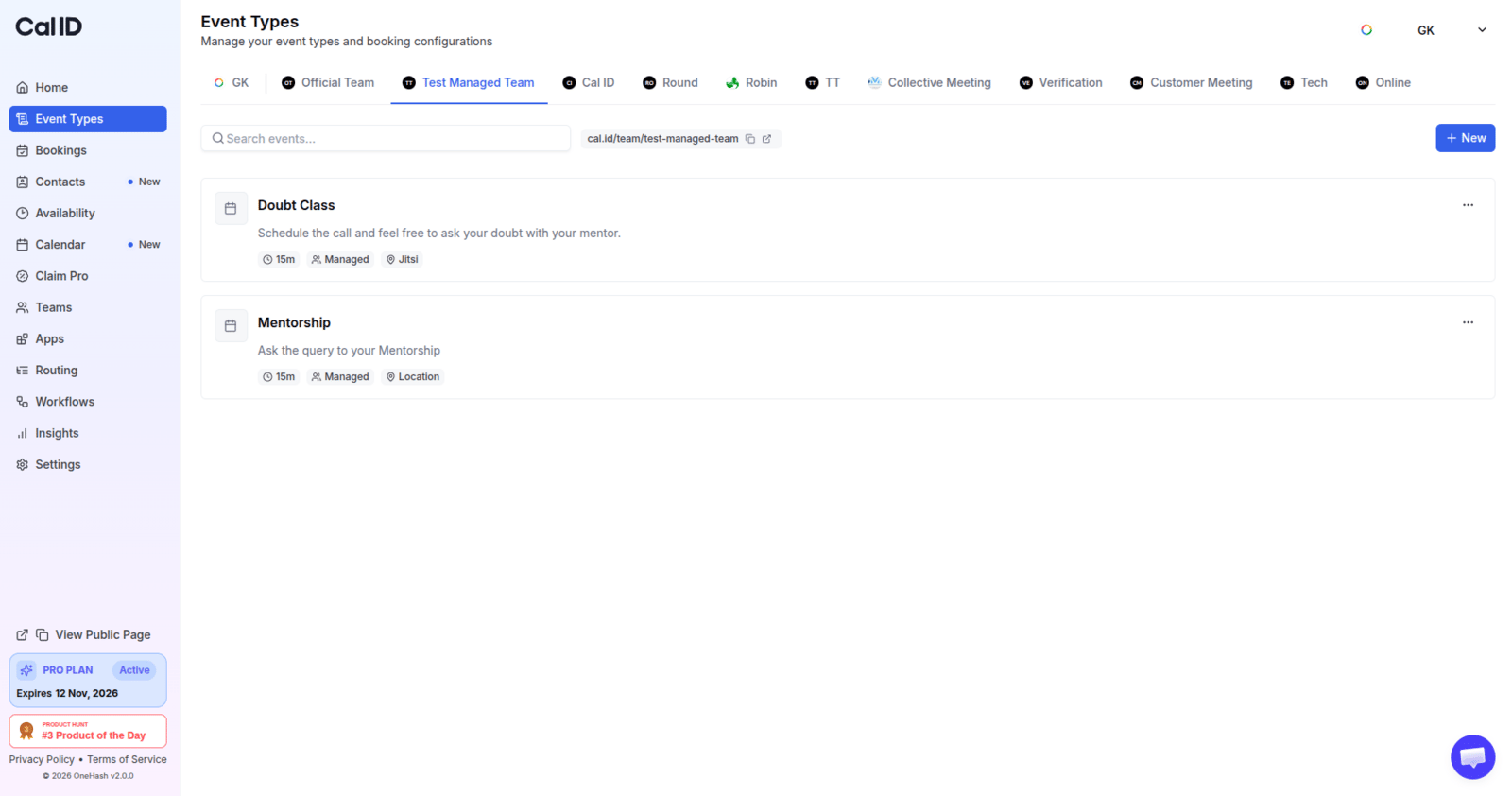
Set up the event type as usual. Fields you want to enforce across the team stay locked, while fields you leave unlocked remain editable by each member.
Locking the fields members can't change
3
Assign team members
Assign the team members who should receive this event type. Each assigned member gets their own regular event type generated from the template.
Once the managed event type is created, you can set all the fields you want to manage as a team admin. Fields that will be locked for team members are marked with a lock icon next to the field label.
A crucial part of a managed event type is the assignment of team members, so managed event types can be created on their behalf. Think of the managed event you created as an event template: assigned team members get regular event types generated from it.
Whenever you make changes to locked fields, every team member gets the same change on their regular event type created from this managed event type.
Changes to unlocked fields have no effect on event types already created for assigned members — they apply only to newly assigned members.
Managed event types have the same Apps, Webhooks and Multi Slots tabs as any other event type, so you can attach payment apps, analytics and webhooks centrally. Lock the Apps tab and members will see which apps are active on their copy but cannot change any app settings.
If you assign a managed event type to a team member who already has an event type with the same slug, a pop-up asks you to confirm. Confirming deletes the conflicting event type from that member (and notifies them) so the managed event type can be created in its place.
Team members who are notified will receive an email notification.
{"docsConfig":{"theme":"mint","$schema":"https://mintlify.com/docs.json","name":"Cal ID","description":"Cal ID help center — scheduling, event types, availability, teams, apps, workflows, and developer tools for the Cal ID meeting scheduler.","colors":{"primary":"#1972F5","light":"#5B9BFF","dark":"#0B4FB8"},"logo":{"light":"https://mintcdn.com/cal-id-docs/k1VHQ7P5ONAHeLvP/logo/light.svg?fit=max\u0026auto=format\u0026n=k1VHQ7P5ONAHeLvP\u0026q=85\u0026s=589c4a9c69ea7387516e6452f592553e","dark":"https://mintcdn.com/cal-id-docs/tkghSGJWVIrQX7X0/logo/dark.svg?fit=max\u0026auto=format\u0026n=tkghSGJWVIrQX7X0\u0026q=85\u0026s=3215902115e27959cb7782b1af38e9fe"},"favicon":"https://mintcdn.com/cal-id-docs/NUrc1nmEeHvCjwEV/favicon.svg?fit=max\u0026auto=format\u0026n=NUrc1nmEeHvCjwEV\u0026q=85\u0026s=3247c427392ba77a41b08a807c322bfb","navbar":{"links":[{"href":"mailto:support@cal.id","label":"Email Us"}],"primary":{"type":"button","label":"Go to Cal ID","href":"https://cal.id"}},"footer":{"socials":{"x":"https://x.com/OneHash","linkedin":"https://www.linkedin.com/company/onehash"}},"errors":{"404":{"redirect":false,"title":"We couldn't find that page","description":"The page you're looking for doesn't exist or may have moved. Head back to the [Help Center home](/), or jump to [Event Types](/event-types/overview), [Availability](/availability/create), [Teams](/teams/overview), or the [API Reference](/api-reference) — or use the search bar above. Still stuck? Email us at [support@cal.id](mailto:support@cal.id)."}},"contextual":{"options":["copy","view","chatgpt","claude","perplexity","mcp","cursor","vscode","download-spec"],"display":"header"},"styling":{"latex":true},"navigation":{"pages":[]}},"deployment":{"deploymentMetadataValue":{"subdomain":"cal-id-docs","hasAudioNarration":false,"actualSubdomain":"cal-id-docs","customDomains":["cal.id"],"gitSource":{"type":"github","owner":"onehashai","repo":"mintlify-docs","deployBranch":"main","contentDirectory":"","isPrivate":true,"mountPath":"","label":""},"chroma":{"latestBuiltDeploymentHistoryId":"6ab916db4c0abff9c16e8c99","collectionId":"a1537af2-6a4a-409a-a4fe-70a6408ebcf7","liveDeploymentHistoryId":"6ab916db4c0abff9c16e8c99","schemaVersion":"v3"},"feedback":{"thumbs":true,"agentFeedback":false},"entitlements":{"AI_CHAT":{"status":"ENABLED"},"WEB_MCP":{"status":"ENABLED"},"NARRATION":{"status":"ENABLED"}},"buildId":"6ab916db4c0abff9c16e8c99","clientVersion":"0.0.4044","searchFilterCounts":[{"language":"default","tag":"API Reference","count":60},{"language":"default","tag":"Endpoints","count":58},{"language":"default","tag":"Event Types","count":57},{"language":"default","tag":"Scheduling \u0026 Teams","count":31},{"language":"default","tag":"Get Started","count":31},{"language":"default","tag":"Customization \u0026 Settings","count":23},{"language":"default","tag":"Apps \u0026 Integrations","count":22},{"language":"default","tag":"Advanced","count":18},{"language":"default","tag":"Developers","count":17},{"language":"default","tag":"Teams","count":16}],"searchSettings":{"isFiltersEnabled":false}},"assistantConfig":{"enableAskAiButton":false,"enableStarterQuestions":true,"enableContextualStarterQuestions":true,"enableAskAiSearchBar":true,"deflection":{"enabled":true,"email":"support@cal.id"}},"basePath":"/docs","hasChatPermissions":true,"hasWebMcpPermissions":true,"toggles":[{"name":"kill-isr","enabled":true,"variant":{"name":"disabled","enabled":false,"feature_enabled":true},"impressionData":false},{"name":"agent-mintlify-slack","enabled":true,"variant":{"name":"disabled","enabled":false,"feature_enabled":true},"impressionData":false},{"name":"agent-integrations-settings","enabled":true,"variant":{"name":"disabled","enabled":false,"feature_enabled":true},"impressionData":false},{"name":"automations-pr-grouping","enabled":true,"variant":{"name":"disabled","enabled":false,"feature_enabled":true},"impressionData":false},{"name":"custom-prefix","enabled":true,"variant":{"name":"disabled","enabled":false,"feature_enabled":true},"impressionData":false},{"name":"analytics-v7","enabled":true,"variant":{"name":"disabled","enabled":false,"feature_enabled":true},"impressionData":false},{"name":"user-flows-analytics","enabled":true,"variant":{"name":"disabled","enabled":false,"feature_enabled":true},"impressionData":false},{"name":"no-publish-flow","enabled":true,"variant":{"name":"disabled","enabled":false,"feature_enabled":true},"impressionData":false},{"name":"workos-onboarding","enabled":true,"variant":{"name":"disabled","enabled":false,"feature_enabled":true},"impressionData":false},{"name":"llms-txt-v2","enabled":true,"variant":{"name":"disabled","enabled":false,"feature_enabled":true},"impressionData":false},{"name":"snapshot-serving-live","enabled":true,"variant":{"name":"disabled","enabled":false,"feature_enabled":true},"impressionData":false},{"name":"stripTemperatureMiddleware","enabled":true,"variant":{"name":"disabled","enabled":false,"feature_enabled":true},"impressionData":false},{"name":"support-platform-pylon-zendesk","enabled":true,"variant":{"name":"disabled","enabled":false,"feature_enabled":true},"impressionData":false},{"name":"snapshot-serving","enabled":true,"variant":{"name":"disabled","enabled":false,"feature_enabled":true},"impressionData":false},{"name":"instant-rollback","enabled":true,"variant":{"name":"disabled","enabled":false,"feature_enabled":true},"impressionData":false},{"name":"granular-notifications-server","enabled":true,"variant":{"name":"disabled","enabled":false,"feature_enabled":true},"impressionData":false},{"name":"granular-notifications","enabled":true,"variant":{"name":"disabled","enabled":false,"feature_enabled":true},"impressionData":false},{"name":"automations-fable","enabled":true,"variant":{"name":"disabled","enabled":false,"feature_enabled":true},"impressionData":false},{"name":"fixed-ai-action-pricing","enabled":true,"variant":{"name":"disabled","enabled":false,"feature_enabled":true},"impressionData":false},{"name":"automation-resolve-merge-conflict","enabled":true,"variant":{"name":"disabled","enabled":false,"feature_enabled":true},"impressionData":false},{"name":"scoped-publishing","enabled":true,"variant":{"name":"disabled","enabled":false,"feature_enabled":true},"impressionData":false},{"name":"mintql","enabled":true,"variant":{"name":"disabled","enabled":false,"feature_enabled":true},"impressionData":false},{"name":"page-level-analytics","enabled":true,"variant":{"name":"disabled","enabled":false,"feature_enabled":true},"impressionData":false},{"name":"editor-version-history-v2","enabled":true,"variant":{"name":"disabled","enabled":false,"feature_enabled":true},"impressionData":false},{"name":"billing-page-v2","enabled":true,"variant":{"name":"disabled","enabled":false,"feature_enabled":true},"impressionData":false},{"name":"full-page-search","enabled":true,"variant":{"name":"disabled","enabled":false,"feature_enabled":true},"impressionData":false},{"name":"workspace-projects","enabled":true,"variant":{"name":"disabled","enabled":false,"feature_enabled":true},"impressionData":false},{"name":"assistant-v5","enabled":true,"variant":{"name":"disabled","enabled":false,"feature_enabled":true},"impressionData":false},{"name":"byok-sep-25","enabled":true,"variant":{"name":"disabled","enabled":false,"feature_enabled":true},"impressionData":false},{"name":"fork-pr-previews","enabled":true,"variant":{"name":"disabled","enabled":false,"feature_enabled":true},"impressionData":false},{"name":"revalidation-jwt","enabled":true,"variant":{"name":"disabled","enabled":false,"feature_enabled":true},"impressionData":false},{"name":"vite-origin","enabled":true,"variant":{"name":"disabled","enabled":false,"feature_enabled":true},"impressionData":false},{"name":"billing-updated-9-15","enabled":true,"variant":{"name":"disabled","enabled":false,"feature_enabled":true},"impressionData":false},{"name":"workos-sso-scim","enabled":true,"variant":{"name":"disabled","enabled":false,"feature_enabled":true},"impressionData":false},{"name":"hobby-abuse-scan","enabled":true,"variant":{"name":"disabled","enabled":false,"feature_enabled":true},"impressionData":false},{"name":"dashboard-inbox","enabled":true,"variant":{"name":"disabled","enabled":false,"feature_enabled":true},"impressionData":false},{"name":"workos-signup","enabled":true,"variant":{"name":"disabled","enabled":false,"feature_enabled":true},"impressionData":false},{"name":"turbopuffer-dual-write","enabled":true,"variant":{"name":"disabled","enabled":false,"feature_enabled":true},"impressionData":false},{"name":"workos-enabled","enabled":true,"variant":{"name":"disabled","enabled":false,"feature_enabled":true},"impressionData":false},{"name":"approve-review-flow","enabled":true,"variant":{"name":"disabled","enabled":false,"feature_enabled":true},"impressionData":false},{"name":"sso-setup-deadline-banner","enabled":true,"variant":{"name":"disabled","enabled":false,"feature_enabled":true},"impressionData":false}],"privacy":{"consentBanner":{"enabled":false}},"googleFontsInlined":false},"customCss":[],"page":{"pagePath":"teams/managed","slug":"/teams/managed","pageMetadata":{"title":"Managed Event Types for Teams","sidebarTitle":"Managed Events","description":"Create and manage shared Cal ID event types for all team members from one place, with locked and editable fields to enforce consistent booking rules.","icon":"layer-group","keywords":["managed event","managed event type","assign event to members","team template event","duplicate to members","centralized event"],"related":["/teams/round-robin","/teams/collective","/teams/settings","/teams/invite-members","/teams/overview"],"href":"/teams/managed"},"description":{"compiledSource":"\"use strict\";\nconst {jsx: _jsx} = arguments[0];\nconst {useMDXComponents: _provideComponents} = arguments[0];\nfunction _createMdxContent(props) {\n const _components = {\n p: \"p\",\n ..._provideComponents(),\n ...props.components\n };\n return _jsx(_components.p, {\n children: \"Create and manage shared Cal ID event types for all team members from one place, with locked and editable fields to enforce consistent booking rules.\"\n });\n}\nfunction MDXContent(props = {}) {\n const {wrapper: MDXLayout} = {\n ..._provideComponents(),\n ...props.components\n };\n return MDXLayout ? _jsx(MDXLayout, {\n ...props,\n children: _jsx(_createMdxContent, {\n ...props\n })\n }) : _createMdxContent(props);\n}\nreturn {\n default: MDXContent\n};\n","frontmatter":{},"scope":{}},"pageType":"default","mdx":{"mdxSource":{"compiledSource":"\"use strict\";const{Fragment:_Fragment,jsx:_jsx,jsxs:_jsxs}=arguments[0];const{useMDXComponents:_provideComponents}=arguments[0];function _createMdxContent(props){const _components={li:`li`,p:`p`,strong:`strong`,ul:`ul`,..._provideComponents(),...props.components},{Card,CardGroup,Frame,Heading,Info,Note,OptimizedImage,Step,Steps,Warning}=_components;if(!Card)_missingMdxReference(`Card`,true);if(!CardGroup)_missingMdxReference(`CardGroup`,true);if(!Frame)_missingMdxReference(`Frame`,true);if(!Heading)_missingMdxReference(`Heading`,true);if(!Info)_missingMdxReference(`Info`,true);if(!Note)_missingMdxReference(`Note`,true);if(!OptimizedImage)_missingMdxReference(`OptimizedImage`,true);if(!Step)_missingMdxReference(`Step`,true);if(!Steps)_missingMdxReference(`Steps`,true);if(!Warning)_missingMdxReference(`Warning`,true);return _jsxs(_Fragment,{children:[_jsx(_components.p,{children:`Managed events let team admins create a common event type once and push it to every member, keeping booking rules consistent while still leaving room for individual customization. A managed event type comes with certain fields locked by the admin and others left open for members to modify.`}),`\n`,_jsx(Info,{children:_jsxs(_components.p,{children:[`A managed event type acts as a `,_jsx(_components.strong,{children:`centrally-managed template`}),`. Once you assign it, each member receives their own regular event type generated from it — and any change you make to a locked field is pushed to every assigned member automatically.`]})}),`\n`,_jsx(Heading,{level:`2`,id:`create-a-managed-event`,children:`Create a managed event`}),`\n`,_jsx(Note,{children:_jsxs(_components.p,{children:[`You must be a `,_jsx(_components.strong,{children:`team admin`}),` to create managed event types.`]})}),`\n`,_jsxs(Steps,{children:[_jsx(Step,{title:`Start a team event type`,children:_jsxs(_components.p,{children:[`From your team, create a new team event type and select `,_jsx(_components.strong,{children:`Managed Event`}),` as the event type.`]})}),_jsxs(Step,{title:`Configure the event`,children:[_jsx(_components.p,{children:`Set up the event type as usual. Fields you want to enforce across the team stay locked, while fields you leave unlocked remain editable by each member.`}),_jsx(Frame,{caption:`Locking the fields members can't change`,children:_jsx(OptimizedImage,{src:`https://mintcdn.com/cal-id-docs/k1VHQ7P5ONAHeLvP/images/teams/managed-2.png?fit=max\u0026auto=format\u0026n=k1VHQ7P5ONAHeLvP\u0026q=85\u0026s=9fa648c0fe3e777c100b601baf588781`,alt:`Managed event type setup screen with a lock icon beside each enforced field and the remaining fields left editable`,\"data-og-width\":`1600`,width:`1600`,\"data-og-height\":`842`,height:`842`,\"data-path\":`images/teams/managed-2.png`,\"data-optimize\":`true`,\"data-opv\":`3`,srcset:`https://mintcdn.com/cal-id-docs/k1VHQ7P5ONAHeLvP/images/teams/managed-2.png?w=280\u0026fit=max\u0026auto=format\u0026n=k1VHQ7P5ONAHeLvP\u0026q=85\u0026s=67a4cc12352bdda608417be0396d3675 280w, https://mintcdn.com/cal-id-docs/k1VHQ7P5ONAHeLvP/images/teams/managed-2.png?w=560\u0026fit=max\u0026auto=format\u0026n=k1VHQ7P5ONAHeLvP\u0026q=85\u0026s=1acac817ce701ee1fa46e3aea9478edc 560w, https://mintcdn.com/cal-id-docs/k1VHQ7P5ONAHeLvP/images/teams/managed-2.png?w=840\u0026fit=max\u0026auto=format\u0026n=k1VHQ7P5ONAHeLvP\u0026q=85\u0026s=aec3793cc4d240fe758605d250c6eb59 840w, https://mintcdn.com/cal-id-docs/k1VHQ7P5ONAHeLvP/images/teams/managed-2.png?w=1100\u0026fit=max\u0026auto=format\u0026n=k1VHQ7P5ONAHeLvP\u0026q=85\u0026s=edf6a159d9b131437992c53df5b5ea02 1100w, https://mintcdn.com/cal-id-docs/k1VHQ7P5ONAHeLvP/images/teams/managed-2.png?w=1650\u0026fit=max\u0026auto=format\u0026n=k1VHQ7P5ONAHeLvP\u0026q=85\u0026s=0f9be2ca5283fb74b0e883e604b03fe1 1650w, https://mintcdn.com/cal-id-docs/k1VHQ7P5ONAHeLvP/images/teams/managed-2.png?w=2500\u0026fit=max\u0026auto=format\u0026n=k1VHQ7P5ONAHeLvP\u0026q=85\u0026s=41c248bc25940d996cdb16a51e70d932 2500w`})})]}),_jsx(Step,{title:`Assign team members`,children:_jsx(_components.p,{children:`Assign the team members who should receive this event type. Each assigned member gets their own regular event type generated from the template.`})})]}),`\n`,_jsx(Heading,{level:`2`,id:`management`,children:`Management`}),`\n`,_jsxs(_components.p,{children:[`Once the managed event type is created, you can set all the fields you want to manage as a team admin. Fields that will be locked for team members are marked with a `,_jsx(_components.strong,{children:`lock icon`}),` next to the field label.`]}),`\n`,_jsx(Heading,{level:`2`,id:`assignment`,children:`Assignment`}),`\n`,_jsx(_components.p,{children:`A crucial part of a managed event type is the assignment of team members, so managed event types can be created on their behalf. Think of the managed event you created as an event template: assigned team members get regular event types generated from it.`}),`\n`,_jsxs(_components.ul,{children:[`\n`,_jsxs(_components.li,{children:[`Whenever you make changes to `,_jsx(_components.strong,{children:`locked fields`}),`, every team member gets the same change on their regular event type created from this managed event type.`]}),`\n`,_jsxs(_components.li,{children:[`Changes to `,_jsx(_components.strong,{children:`unlocked fields`}),` have no effect on event types already created for assigned members — they apply only to newly assigned members.`]}),`\n`]}),`\n`,_jsxs(_components.p,{children:[`Managed event types have the same `,_jsx(_components.strong,{children:`Apps`}),`, `,_jsx(_components.strong,{children:`Webhooks`}),` and `,_jsx(_components.strong,{children:`Multi Slots`}),` tabs as any other event type, so you can attach payment apps, analytics and webhooks centrally. Lock the `,_jsx(_components.strong,{children:`Apps`}),` tab and members will see which apps are active on their copy but cannot change any app settings.`]}),`\n`,_jsx(Warning,{children:_jsxs(_components.p,{children:[`If you assign a managed event type to a team member who already has an event type with the same slug, a pop-up asks you to confirm. Confirming `,_jsx(_components.strong,{children:`deletes the conflicting event type`}),` from that member (and notifies them) so the managed event type can be created in its place.`]})}),`\n`,_jsx(_components.p,{children:`Team members who are notified will receive an email notification.`}),`\n`,_jsx(Heading,{level:`2`,id:`other-team-event-formats`,children:`Other team event formats`}),`\n`,_jsxs(CardGroup,{cols:2,children:[_jsx(Card,{title:`Collective events`,icon:`user-group`,href:`/teams/collective`,children:_jsx(_components.p,{children:`Book several team members into the same meeting at once.`})}),_jsx(Card,{title:`Round-robin scheduling`,icon:`arrows-rotate`,href:`/teams/round-robin`,children:_jsx(_components.p,{children:`Rotate bookings across a pool of hosts for even distribution.`})})]})]})}function MDXContent(props={}){const{wrapper:MDXLayout}={..._provideComponents(),...props.components};return MDXLayout?_jsx(MDXLayout,{...props,children:_jsx(_createMdxContent,{...props})}):_createMdxContent(props)}return{default:MDXContent};function _missingMdxReference(id,component){throw new Error(`Expected `+(component?`component`:`object`)+\" `\"+id+\"` to be defined: you likely forgot to import, pass, or provide it.\")}","frontmatter":{},"scope":{"config":{},"pageMetadata":{"title":"Managed Event Types for Teams","sidebarTitle":"Managed Events","description":"Create and manage shared Cal ID event types for all team members from one place, with locked and editable fields to enforce consistent booking rules.","icon":"layer-group","keywords":["managed event","managed event type","assign event to members","team template event","duplicate to members","centralized event"],"related":["/teams/round-robin","/teams/collective","/teams/settings","/teams/invite-members","/teams/overview"],"href":"/teams/managed"}}},"mdxSourceWithNoJs":null},"mdxExtracts":{"tableOfContents":[{"title":"Create a managed event","slug":"create-a-managed-event","depth":2,"children":[]},{"title":"Management","slug":"management","depth":2,"children":[]},{"title":"Assignment","slug":"assignment","depth":2,"children":[]},{"title":"Other team event formats","slug":"other-team-event-formats","depth":2,"children":[]}],"codeExamples":{}},"jsLinks":["/docs/_mintlify/custom/cal-id-docs/09b4d95490dd9c71/support-crisp.js"],"subdomain":"cal-id-docs","siteName":"Cal ID","title":"Managed Event Types for Teams - Cal ID","relatedPages":[{"title":"Round-Robin Scheduling","link":"/teams/round-robin","icon":"arrows-rotate"},{"title":"Collective Events","link":"/teams/collective","icon":"user-group"},{"title":"Cal ID Team Profile Settings","link":"/teams/settings","icon":"gear"},{"title":"Invite Team Members","link":"/teams/invite-members","icon":"user-plus"},{"title":"Teams in Cal ID","link":"/teams/overview","icon":"users"}],"relatedPagesConfig":{"enabled":true,"limit":5,"mode":"automatic"},"contextualStarterQuestions":[{"_id":"6ab77cfdcf0405ad7152bc41","deploymentId":"6a6c20ecc3064aa95c02d1fd","questionText":"How do I create a managed event?","status":"active","generatedBy":"contextual","path":"teams/managed","createdAt":"2026-09-26T08:06:21.811Z","updatedAt":"2026-09-26T08:06:21.811Z","__v":0},{"_id":"6ab77cfdcf0405ad7152bc42","deploymentId":"6a6c20ecc3064aa95c02d1fd","questionText":"What fields can team members edit?","status":"active","generatedBy":"contextual","path":"teams/managed","createdAt":"2026-09-26T08:06:21.811Z","updatedAt":"2026-09-26T08:06:21.811Z","__v":0},{"_id":"6ab77cfdcf0405ad7152bc43","deploymentId":"6a6c20ecc3064aa95c02d1fd","questionText":"How do locked fields work?","status":"active","generatedBy":"contextual","path":"teams/managed","createdAt":"2026-09-26T08:06:21.811Z","updatedAt":"2026-09-26T08:06:21.811Z","__v":0}],"navMaps":{"firstHrefInVersion":{},"firstHrefInLanguage":{}},"lastModified":"2026-09-26T08:06:17.052Z","originalFileLocation":"teams/managed.mdx"},"headHtml":"\u003cscript data-mint-head>(function(){var d=document.documentElement,p=null;if(!p){try{p=localStorage.getItem(\"isDarkMode\")}catch(e){}if(p==='true')p='dark';else if(p==='false')p='light';if(p!=='light'\u0026\u0026p!=='dark'\u0026\u0026p!=='system')p=\"system\"}var r=p==='system'?(matchMedia(\"(prefers-color-scheme: dark)\").matches?'dark':'light'):p;d.classList.remove(r==='dark'?'light':'dark');d.classList.add(r);d.setAttribute(\"data-theme-preference\",p)})();\u003c/script>\u003cmeta data-mint-head name=\"description\" content=\"Create and manage shared Cal ID event types for all team members from one place, with locked and editable fields to enforce consistent booking rules.\">\u003cmeta data-mint-head name=\"application-name\" content=\"Cal ID\">\u003cmeta data-mint-head name=\"generator\" content=\"Mintlify\">\u003clink data-mint-head rel=\"icon\" type=\"image/png\" sizes=\"192x192\" href=\"/docs/mintlify-assets/_mintlify/favicons/cal-id-docs/Ah-PiVKdxwxdJ_gr/_generated/favicon/android-chrome-192x192.png\" media=\"(prefers-color-scheme: light)\">\u003clink data-mint-head rel=\"apple-touch-icon\" type=\"image/png\" sizes=\"180x180\" href=\"/docs/mintlify-assets/_mintlify/favicons/cal-id-docs/Ah-PiVKdxwxdJ_gr/_generated/favicon/apple-touch-icon.png\">\u003clink data-mint-head rel=\"icon\" type=\"image/png\" sizes=\"16x16\" href=\"/docs/mintlify-assets/_mintlify/favicons/cal-id-docs/Ah-PiVKdxwxdJ_gr/_generated/favicon/favicon-16x16.png\" media=\"(prefers-color-scheme: light)\">\u003clink data-mint-head rel=\"icon\" type=\"image/png\" sizes=\"32x32\" href=\"/docs/mintlify-assets/_mintlify/favicons/cal-id-docs/Ah-PiVKdxwxdJ_gr/_generated/favicon/favicon-32x32.png\" media=\"(prefers-color-scheme: light)\">\u003clink data-mint-head rel=\"shortcut icon\" type=\"image/x-icon\" href=\"/docs/mintlify-assets/_mintlify/favicons/cal-id-docs/Ah-PiVKdxwxdJ_gr/_generated/favicon/favicon.ico\" media=\"(prefers-color-scheme: light)\">\u003clink data-mint-head rel=\"icon\" type=\"image/png\" sizes=\"192x192\" href=\"/docs/mintlify-assets/_mintlify/favicons/cal-id-docs/Ah-PiVKdxwxdJ_gr/_generated/favicon-dark/android-chrome-192x192.png\" media=\"(prefers-color-scheme: dark)\">\u003clink data-mint-head rel=\"icon\" type=\"image/png\" sizes=\"16x16\" href=\"/docs/mintlify-assets/_mintlify/favicons/cal-id-docs/Ah-PiVKdxwxdJ_gr/_generated/favicon-dark/favicon-16x16.png\" media=\"(prefers-color-scheme: dark)\">\u003clink data-mint-head rel=\"icon\" type=\"image/png\" sizes=\"32x32\" href=\"/docs/mintlify-assets/_mintlify/favicons/cal-id-docs/Ah-PiVKdxwxdJ_gr/_generated/favicon-dark/favicon-32x32.png\" media=\"(prefers-color-scheme: dark)\">\u003clink data-mint-head rel=\"shortcut icon\" type=\"image/x-icon\" href=\"/docs/mintlify-assets/_mintlify/favicons/cal-id-docs/Ah-PiVKdxwxdJ_gr/_generated/favicon-dark/favicon.ico\" media=\"(prefers-color-scheme: dark)\">\u003cmeta data-mint-head property=\"og:title\" content=\"Managed Event Types for Teams - Cal ID\">\u003cmeta data-mint-head property=\"og:description\" content=\"Create and manage shared Cal ID event types for all team members from one place, with locked and editable fields to enforce consistent booking rules.\">\u003cmeta data-mint-head property=\"og:site_name\" content=\"Cal ID\">\u003cmeta data-mint-head property=\"og:url\" content=\"https://cal.id/docs/teams/managed\">\u003cmeta data-mint-head property=\"og:type\" content=\"website\">\u003cmeta data-mint-head property=\"og:image\" content=\"https://cal-id-docs.mintlify.app/_mintlify/api/og/v2?division=Teams\u0026amp;title=Managed+Event+Types+for+Teams\u0026amp;description=Create+and+manage+shared+Cal+ID+event+types+for+all+team+members+from+one+place%2C+with+locked+and+editable+fields+to+enforce+consistent+booking+rules.\u0026amp;theme=1ce1fba1bcc16a5579de1fe3\u0026amp;signature=c093fe073b02010b96de71796f40848716ce86758bd0c0e3737e0eea006c28fe\">\u003cmeta data-mint-head property=\"og:image:width\" content=\"1200\">\u003cmeta data-mint-head property=\"og:image:height\" content=\"630\">\u003cmeta data-mint-head name=\"twitter:card\" content=\"summary_large_image\">\u003cmeta data-mint-head name=\"twitter:title\" content=\"Managed Event Types for Teams - Cal ID\">\u003cmeta data-mint-head name=\"twitter:description\" content=\"Create and manage shared Cal ID event types for all team members from one place, with locked and editable fields to enforce consistent booking rules.\">\u003cmeta data-mint-head name=\"twitter:image\" content=\"https://cal-id-docs.mintlify.app/_mintlify/api/og/v2?division=Teams\u0026amp;title=Managed+Event+Types+for+Teams\u0026amp;description=Create+and+manage+shared+Cal+ID+event+types+for+all+team+members+from+one+place%2C+with+locked+and+editable+fields+to+enforce+consistent+booking+rules.\u0026amp;theme=1ce1fba1bcc16a5579de1fe3\u0026amp;signature=c093fe073b02010b96de71796f40848716ce86758bd0c0e3737e0eea006c28fe\">\u003cmeta data-mint-head name=\"twitter:image:width\" content=\"1200\">\u003cmeta data-mint-head name=\"twitter:image:height\" content=\"630\">\u003cmeta data-mint-head name=\"msapplication-config\" content=\"/docs/mintlify-assets/_mintlify/favicons/cal-id-docs/Ah-PiVKdxwxdJ_gr/_generated/favicon/browserconfig.xml\">\u003cmeta data-mint-head name=\"apple-mobile-web-app-title\" content=\"Cal ID\">\u003cmeta data-mint-head name=\"msapplication-TileColor\" content=\"#1972F5\">\u003clink data-mint-head rel=\"canonical\" href=\"https://cal.id/docs/teams/managed\">\u003clink data-mint-head rel=\"alternate\" type=\"application/xml\" href=\"/docs/sitemap.xml\">\u003clink data-mint-head rel=\"alternate\" type=\"text/markdown\" href=\"/docs/teams/managed.md\">\u003cscript data-mint-head type=\"application/ld+json\">{\"@context\":\"https://schema.org\",\"@graph\":[{\"@type\":\"Organization\",\"@id\":\"https://cal.id/#organization\",\"name\":\"Cal ID\",\"url\":\"https://cal.id\",\"logo\":{\"@type\":\"ImageObject\",\"url\":\"https://mintcdn.com/cal-id-docs/k1VHQ7P5ONAHeLvP/logo/light.svg?fit=max\u0026auto=format\u0026n=k1VHQ7P5ONAHeLvP\u0026q=85\u0026s=589c4a9c69ea7387516e6452f592553e\"}},{\"@type\":\"WebSite\",\"@id\":\"https://cal.id/docs#website\",\"name\":\"Cal ID\",\"url\":\"https://cal.id/docs\",\"publisher\":{\"@id\":\"https://cal.id/#organization\"}},{\"@type\":\"WebPage\",\"@id\":\"https://cal.id/docs/teams/managed#webpage\",\"url\":\"https://cal.id/docs/teams/managed\",\"name\":\"Managed Event Types for Teams\",\"description\":\"Create and manage shared Cal ID event types for all team members from one place, with locked and editable fields to enforce consistent booking rules.\",\"dateModified\":\"2026-09-26T08:06:17.052Z\",\"isPartOf\":{\"@id\":\"https://cal.id/docs#website\"},\"breadcrumb\":{\"@id\":\"https://cal.id/docs/teams/managed#breadcrumb\"}},{\"@type\":\"BreadcrumbList\",\"@id\":\"https://cal.id/docs/teams/managed#breadcrumb\",\"itemListElement\":[{\"@type\":\"ListItem\",\"position\":1,\"name\":\"Teams\",\"item\":\"https://cal.id/docs/teams/overview\"},{\"@type\":\"ListItem\",\"position\":2,\"name\":\"Managed Event Types for Teams\",\"item\":\"https://cal.id/docs/teams/managed\"}]},{\"@type\":[\"Article\",\"TechArticle\"],\"@id\":\"https://cal.id/docs/teams/managed#article\",\"headline\":\"Managed Event Types for Teams\",\"name\":\"Managed Event Types for Teams\",\"description\":\"Create and manage shared Cal ID event types for all team members from one place, with locked and editable fields to enforce consistent booking rules.\",\"url\":\"https://cal.id/docs/teams/managed\",\"mainEntityOfPage\":{\"@id\":\"https://cal.id/docs/teams/managed#webpage\"},\"dateModified\":\"2026-09-26T08:06:17.052Z\",\"keywords\":\"managed event, managed event type, assign event to members, team template event, duplicate to members, centralized event\",\"publisher\":{\"@id\":\"https://cal.id/#organization\"},\"isPartOf\":{\"@id\":\"https://cal.id/docs#website\"}}]}\u003c/script>\u003cscript data-mint-head type=\"application/ld+json\">{\"@context\":\"https://schema.org\",\"@type\":\"WebSite\",\"name\":\"Cal ID\",\"creator\":{\"@type\":\"Organization\",\"name\":\"Mintlify\",\"url\":\"https://mintlify.com\"}}\u003c/script>","siteName":"Cal ID","nav":{"global":null,"tabs":[{"tab":"Get Started","pages":[{"title":"Get Started","href":""}]},{"tab":"Event Types","pages":[{"title":"Event Types","href":"/event-types/overview"}]},{"tab":"Scheduling \u0026 Teams","groups":[{"group":"Overview","pages":[{"title":"Scheduling \u0026 Teams","icon":"calendar-days","sidebarTitle":"Overview","href":"/scheduling/overview"}]},{"group":"Availability","pages":[{"title":"Create Availability in Cal ID","icon":"calendar","href":"/availability/create"},{"title":"Multiple Schedules","icon":"calendar-days","href":"/availability/multiple-schedules"},{"title":"Multiple Time Slots per Day","icon":"clock","href":"/availability/multiple-time-slots"},{"title":"Date Overrides or Set Unavailable","icon":"calendar-xmark","href":"/availability/date-overrides"},{"title":"Extended Timezone Availability","sidebarTitle":"Extended timezone","icon":"globe","href":"/availability/extended-timezone"},{"title":"Set Out of Office in Cal ID","sidebarTitle":"Out of Office","icon":"plane-departure","href":"/availability/out-of-office"},{"title":"Team Availability","icon":"users-gear","href":"/availability/team-availability"}]},{"group":"Bookings","pages":[{"title":"View Booking Details","icon":"list","href":"/bookings/view-details"},{"title":"Canceling and Rescheduling Bookings","sidebarTitle":"Cancel or reschedule","icon":"calendar-xmark","href":"/bookings/cancel-reschedule"},{"title":"Reassigning a Team Booking","sidebarTitle":"Reassign a booking","icon":"arrow-right-arrow-left","href":"/bookings/reassign-round-robin"},{"title":"Export Booking Details","icon":"file-export","href":"/bookings/export"},{"title":"Mark Attendees as No-Show","icon":"user-xmark","href":"/bookings/no-show"},{"title":"Track Notification Delivery","icon":"bolt","href":"/bookings/workflow-status"}]},{"group":"Routing","pages":[{"title":"Set Up Routing Forms","icon":"diagram-project","href":"/routing/routing-forms"}]},{"group":"Workflows","pages":[{"title":"Workflows Setup to Cal ID","icon":"bell","href":"/workflows/overview"},{"title":"Customizing Your Workflow Messages","icon":"pen-to-square","href":"/workflows/custom-messages"},{"title":"Integrate WhatsApp Business","icon":"whatsapp","href":"/workflows/whatsapp-business"},{"title":"Connect with WhatsApp Business App","icon":"whatsapp","href":"/workflows/connect-whatsapp-app"},{"title":"Create New WhatsApp Business Account","icon":"whatsapp","href":"/workflows/create-whatsapp-account"}]},{"group":"Teams","pages":[{"title":"Teams in Cal ID","icon":"users","href":"/teams/overview"},{"title":"Install a Calendar on a Team","icon":"calendar-plus","href":"/teams/install-team-calendar"},{"title":"Invite Team Members","icon":"user-plus","href":"/teams/invite-members"},{"title":"Remove a Team Member","icon":"user-minus","href":"/teams/remove-member"},{"title":"Leave a Cal ID Team","sidebarTitle":"Leave a Team","icon":"right-from-bracket","href":"/teams/leave-team"},{"title":"Cal ID Team Profile Settings","sidebarTitle":"Team Profile","icon":"gear","href":"/teams/settings"},{"title":"Team Advanced Settings","icon":"sliders","href":"/teams/advanced-settings"},{"title":"Round-Robin Scheduling","icon":"arrows-rotate","href":"/teams/round-robin"},{"title":"Collective Events","description":"Set up collective events in Cal ID so bookers can schedule a meeting with several team members at once, based on shared or common team availability.","icon":"user-group","href":"/teams/collective"},{"title":"Managed Event Types for Teams","sidebarTitle":"Managed Events","icon":"layer-group","href":"/teams/managed"},{"title":"Internal Team Meeting","description":"Find common free time among team members and book an internal meeting directly from your Cal ID dashboard without leaving the scheduling interface.","icon":"calendar-check","href":"/teams/internal-meeting"}]}]},{"tab":"Apps \u0026 Integrations","pages":[{"title":"Apps \u0026 Integrations","href":"/apps/overview"}]},{"tab":"Customization \u0026 Settings","pages":[{"title":"Customization \u0026 Settings","href":"/customization/overview"}]},{"tab":"Developers","pages":[{"title":"Developers","href":"/developers/overview"}]},{"tab":"MCP","icon":"plug","pages":[{"title":"MCP","href":"/mcp/overview"}]},{"tab":"API Reference","pages":[{"title":"API Reference","href":"/api-reference/introduction"}]}]},"basePath":"","title":"Managed Event Types for Teams - Cal ID","buildId":"dpl_6cCEiK8XNNvaLBBkWzcBhdE9QfLC","deploymentId":"dpl_6cCEiK8XNNvaLBBkWzcBhdE9QfLC","dynamics":["07c022d89b","a74be98ba7"],"chunks":["Frame-Bj1PpgeO.js","DynamicMarkdown-Bas9A7wq.js","zoom-image-lightbox-B-WKhCOL.js","lightbox-handle-r17bVUz3.js"]}