Automatically rotate incoming team bookings to the next available host in Cal ID using priority, weights, and fixed hosts for fair distribution.
Round-robin scheduling creates a team event type with a pool of hosts and automatically assigns each new booking to the next available host in rotation. Cal ID checks everyone’s calendar, skips busy hosts, and balances workloads across the team.
How assignment rotates: Cal ID first computes the union of available slots across all hosts, then assigns the booking to the highest-priority (or highest-weighted) host who is free in that slot, skipping anyone unavailable. When hosts tie, the least recently booked host wins.
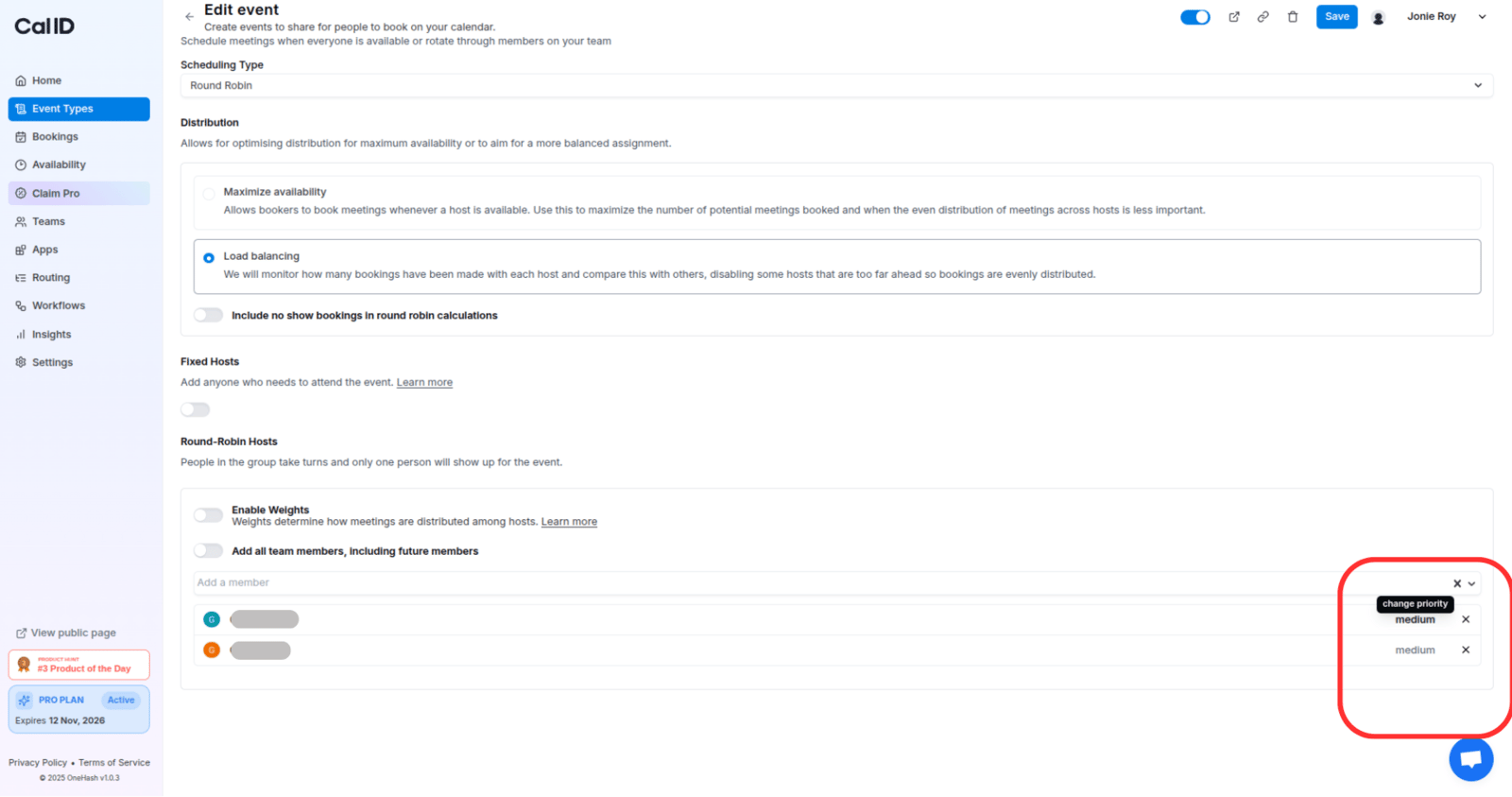
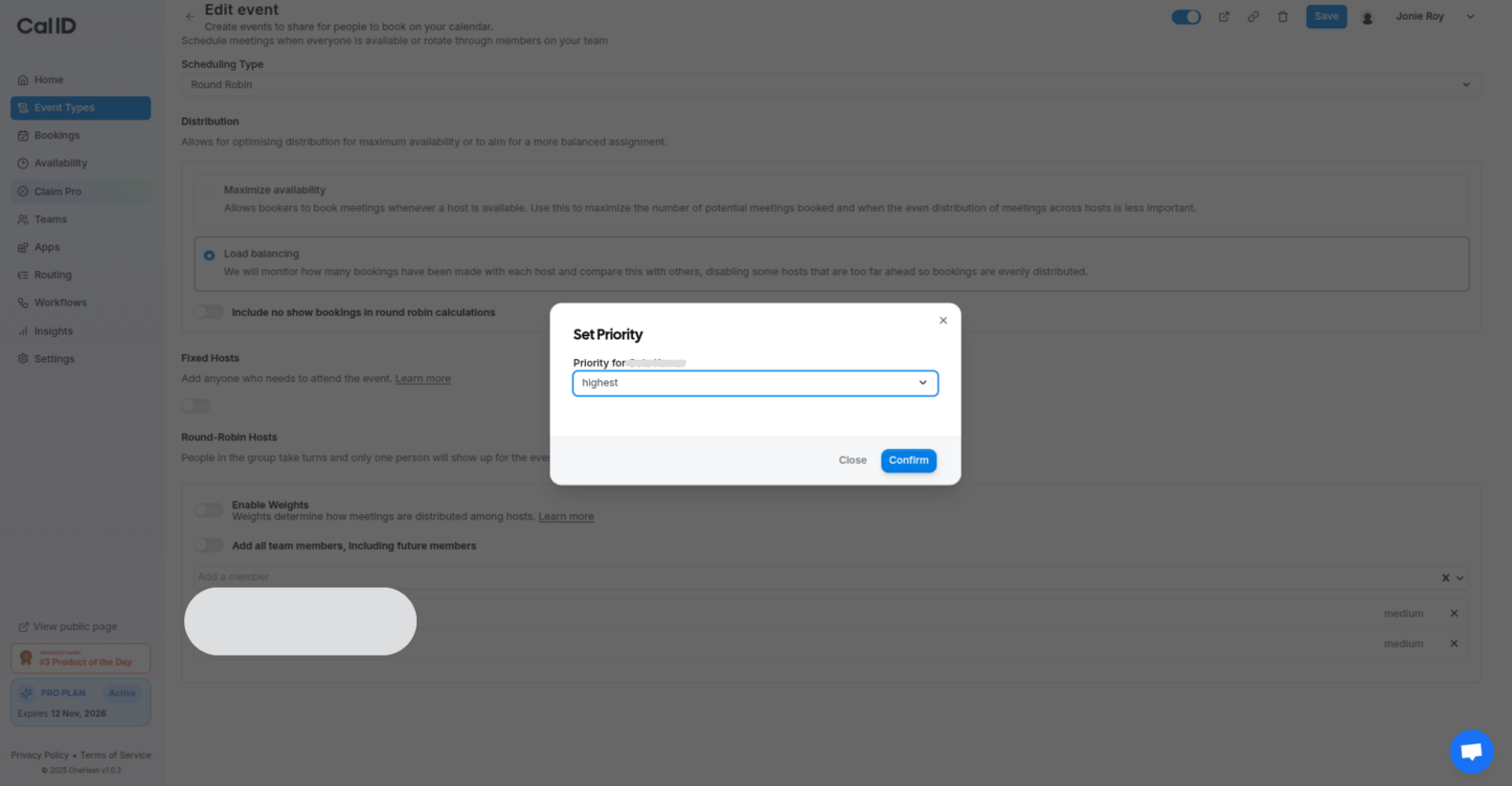
Every round-robin host has a priority (default: medium). Higher priorities get selected first when multiple hosts are available in a slot. Ties go to the least recently booked host. This ensures hosts with higher designated priorities are given precedence, optimizing resource allocation and streamlining event organization.For instance, if John and Jane are both available in the same slot, but John has a priority of High compared to Jane’s Medium, John will be booked. If several hosts share the same priority, Cal ID chooses the least recently booked host.You can select a priority for each host, and based on their priority (and availability in the selected slot), the hosts will be booked.
Weights are optional and must be enabled to use. They let you determine how meetings are distributed among hosts. When enabled, every host has a default weight of 100%, meaning each host should end up with the same number of bookings by default. However, hosts with fewer availabilities can still end up with fewer bookings. Only confirmed bookings count towards past bookings.For instance, Jane Doe has a weight of 100% and already has 8 bookings, while John Doe has a weight of 200% and already has 12 bookings. Assuming both are available, the next bookings would go to John Doe until a total of 16 bookings is reached.Weight adjustment: If new hosts are added to a round-robin event type that has weights enabled, their weights will be adjusted accordingly. New hosts have their bookings adjusted proportionally to their weight, accounting for the bookings existing hosts already have. This ensures a fair distribution when new hosts are added.Example:
Host
Weight
Bookings
Existing host 1
100%
5
Existing host 2
200%
9
New host
50%
—
Weight Adjustment = (Bookings of existing hosts / Sum of weights of existing hosts) * New host weightWeight Adjustment = 14 / 300 * 50 = 2.33The new host will have a weight adjustment of 2 bookings.
Least recently booked is the fallback method: the available round-robin host who was booked least recently is chosen. If more than one host meets this criterion, one is chosen at random.
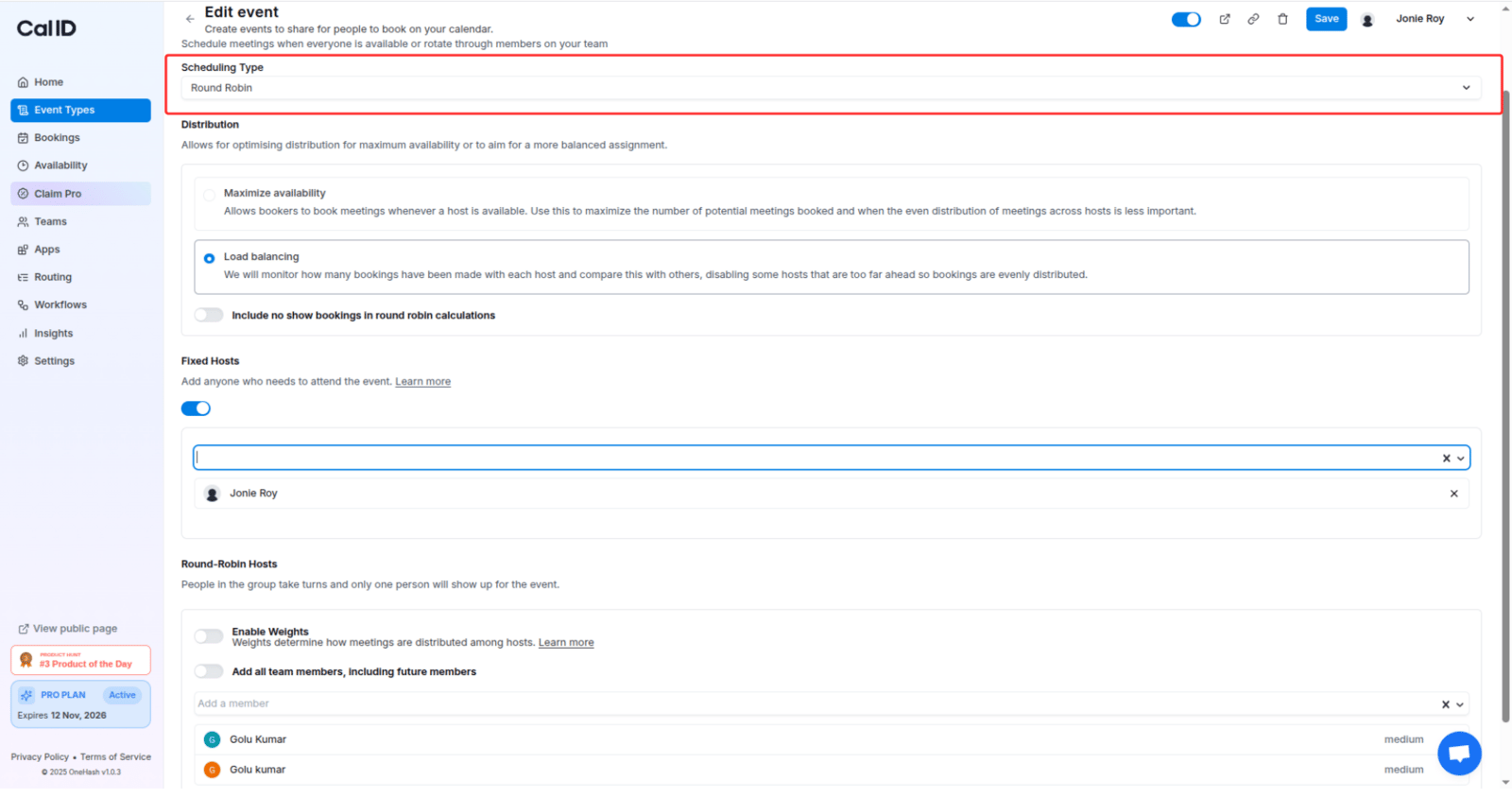
If you want to bring Collective behavior into round-robin events, Cal ID makes it possible. You can select which hosts should always attend the meeting, while the other selected team members are booked on a round-robin basis.
Fixed hosts are individuals who are consistently present at every meeting.
Round-robin hosts are members of a group who take turns attending meetings. Rather than everyone attending every meeting, only one person from the group attends each time.
Keeping one person on every call
For tasks like scheduling sales calls or product demos, where you have a pool of people among whom you’d like to distribute meetings, round-robin is the perfect choice.
Troubleshoot “No availability” on the booking page
If your round-robin booking page shows No availability, work through these checks in order. Cal ID only offers a slot when at least one round-robin host (and every fixed host) is free during team-visible hours.
Host pool is empty. Open the event type and confirm at least one team member is added under the round-robin host pool. To auto-include everyone, use the Add all team members, including future members field on the Team tab.
Hosts have no availability schedule. Each host needs working hours defined in Availability. A host with no schedule contributes zero open slots to the union.
Calendars aren’t connected. If a host hasn’t connected a calendar, Cal ID cannot check conflicts and skips them from the pool. Ask each host to connect at least one calendar under Apps > Installed Apps.
All hosts are busy. Cal ID skips hosts with conflicting events on their connected calendars. If every host is busy during team hours, no slot appears.
A fixed host is unavailable. Fixed hosts must attend every meeting. If any fixed host is busy or off-schedule, Cal ID hides the slot even when round-robin hosts are free.
Date range or minimum notice is blocking slots. Check the event type’s Limits tab for future booking window, minimum booking notice, and booking frequency caps that could zero out the visible window.
{"docsConfig":{"theme":"mint","$schema":"https://mintlify.com/docs.json","name":"Cal ID","description":"Cal ID help center — scheduling, event types, availability, teams, apps, workflows, and developer tools for the Cal ID meeting scheduler.","colors":{"primary":"#1972F5","light":"#5B9BFF","dark":"#0B4FB8"},"logo":{"light":"https://mintcdn.com/cal-id-docs/k1VHQ7P5ONAHeLvP/logo/light.svg?fit=max\u0026auto=format\u0026n=k1VHQ7P5ONAHeLvP\u0026q=85\u0026s=589c4a9c69ea7387516e6452f592553e","dark":"https://mintcdn.com/cal-id-docs/tkghSGJWVIrQX7X0/logo/dark.svg?fit=max\u0026auto=format\u0026n=tkghSGJWVIrQX7X0\u0026q=85\u0026s=3215902115e27959cb7782b1af38e9fe"},"favicon":"https://mintcdn.com/cal-id-docs/NUrc1nmEeHvCjwEV/favicon.svg?fit=max\u0026auto=format\u0026n=NUrc1nmEeHvCjwEV\u0026q=85\u0026s=3247c427392ba77a41b08a807c322bfb","navbar":{"links":[{"href":"mailto:support@cal.id","label":"Email Us"}],"primary":{"type":"button","label":"Go to Cal ID","href":"https://cal.id"}},"footer":{"socials":{"x":"https://x.com/OneHash","linkedin":"https://www.linkedin.com/company/onehash"}},"errors":{"404":{"redirect":false,"title":"We couldn't find that page","description":"The page you're looking for doesn't exist or may have moved. Head back to the [Help Center home](/), or jump to [Event Types](/event-types/overview), [Availability](/availability/create), [Teams](/teams/overview), or the [API Reference](/api-reference) — or use the search bar above. Still stuck? Email us at [support@cal.id](mailto:support@cal.id)."}},"contextual":{"options":["copy","view","chatgpt","claude","perplexity","mcp","cursor","vscode","download-spec"],"display":"header"},"styling":{"latex":true},"navigation":{"pages":[]}},"deployment":{"deploymentMetadataValue":{"subdomain":"cal-id-docs","hasAudioNarration":false,"actualSubdomain":"cal-id-docs","customDomains":["cal.id"],"gitSource":{"type":"github","owner":"onehashai","repo":"mintlify-docs","deployBranch":"main","contentDirectory":"","isPrivate":true,"mountPath":"","label":""},"chroma":{"latestBuiltDeploymentHistoryId":"6ab916db4c0abff9c16e8c99","collectionId":"a1537af2-6a4a-409a-a4fe-70a6408ebcf7","liveDeploymentHistoryId":"6ab916db4c0abff9c16e8c99","schemaVersion":"v3"},"feedback":{"thumbs":true,"agentFeedback":false},"entitlements":{"AI_CHAT":{"status":"ENABLED"},"WEB_MCP":{"status":"ENABLED"},"NARRATION":{"status":"ENABLED"}},"buildId":"6ab916db4c0abff9c16e8c99","clientVersion":"0.0.4044","searchFilterCounts":[{"language":"default","tag":"API Reference","count":60},{"language":"default","tag":"Endpoints","count":58},{"language":"default","tag":"Event Types","count":57},{"language":"default","tag":"Scheduling \u0026 Teams","count":31},{"language":"default","tag":"Get Started","count":31},{"language":"default","tag":"Customization \u0026 Settings","count":23},{"language":"default","tag":"Apps \u0026 Integrations","count":22},{"language":"default","tag":"Advanced","count":18},{"language":"default","tag":"Developers","count":17},{"language":"default","tag":"Teams","count":16}],"searchSettings":{"isFiltersEnabled":false}},"assistantConfig":{"enableAskAiButton":false,"enableStarterQuestions":true,"enableContextualStarterQuestions":true,"enableAskAiSearchBar":true,"deflection":{"enabled":true,"email":"support@cal.id"}},"basePath":"/docs","hasChatPermissions":true,"hasWebMcpPermissions":true,"toggles":[],"privacy":{"consentBanner":{"enabled":false}},"googleFontsInlined":false},"customCss":[],"page":{"pagePath":"teams/round-robin","slug":"/teams/round-robin","pageMetadata":{"title":"Round-Robin Scheduling","description":"Automatically rotate incoming team bookings to the next available host in Cal ID using priority, weights, and fixed hosts for fair distribution.","icon":"arrows-rotate","keywords":["round robin","distribute bookings","rotate meetings","assign to team member","load balancing","round-robin scheduling","fair distribution"],"related":["/teams/collective","/teams/managed","/availability/team-availability","/routing/routing-forms","/teams/overview"],"href":"/teams/round-robin"},"description":{"compiledSource":"\"use strict\";\nconst {jsx: _jsx} = arguments[0];\nconst {useMDXComponents: _provideComponents} = arguments[0];\nfunction _createMdxContent(props) {\n const _components = {\n p: \"p\",\n ..._provideComponents(),\n ...props.components\n };\n return _jsx(_components.p, {\n children: \"Automatically rotate incoming team bookings to the next available host in Cal ID using priority, weights, and fixed hosts for fair distribution.\"\n });\n}\nfunction MDXContent(props = {}) {\n const {wrapper: MDXLayout} = {\n ..._provideComponents(),\n ...props.components\n };\n return MDXLayout ? _jsx(MDXLayout, {\n ...props,\n children: _jsx(_createMdxContent, {\n ...props\n })\n }) : _createMdxContent(props);\n}\nreturn {\n default: MDXContent\n};\n","frontmatter":{},"scope":{}},"pageType":"default","mdx":{"mdxSource":{"compiledSource":"\"use strict\";const{Fragment:_Fragment,jsx:_jsx,jsxs:_jsxs}=arguments[0];const{useMDXComponents:_provideComponents}=arguments[0];function _createMdxContent(props){const _components={li:`li`,p:`p`,strong:`strong`,tbody:`tbody`,td:`td`,th:`th`,thead:`thead`,tr:`tr`,ul:`ul`,..._provideComponents(),...props.components},{Card,CardGroup,Frame,Heading,Info,Note,OptimizedImage,Step,Steps,Table}=_components;if(!Card)_missingMdxReference(`Card`,true);if(!CardGroup)_missingMdxReference(`CardGroup`,true);if(!Frame)_missingMdxReference(`Frame`,true);if(!Heading)_missingMdxReference(`Heading`,true);if(!Info)_missingMdxReference(`Info`,true);if(!Note)_missingMdxReference(`Note`,true);if(!OptimizedImage)_missingMdxReference(`OptimizedImage`,true);if(!Step)_missingMdxReference(`Step`,true);if(!Steps)_missingMdxReference(`Steps`,true);if(!Table)_missingMdxReference(`Table`,true);return _jsxs(_Fragment,{children:[_jsx(_components.p,{children:`Round-robin scheduling creates a team event type with a pool of hosts and automatically assigns each new booking to the next available host in rotation. Cal ID checks everyone’s calendar, skips busy hosts, and balances workloads across the team.`}),`\n`,_jsx(Info,{children:_jsxs(_components.p,{children:[_jsx(_components.strong,{children:`How assignment rotates:`}),` Cal ID first computes the union of available slots across all hosts, then assigns the booking to the highest-priority (or highest-weighted) host who is free in that slot, skipping anyone unavailable. When hosts tie, the least recently booked host wins.`]})}),`\n`,_jsx(Heading,{level:`2`,id:`configure-round-robin`,children:`Configure round-robin`}),`\n`,_jsxs(Steps,{children:[_jsx(Step,{title:`Create a team event type`,children:_jsxs(_components.p,{children:[`From your team, create a new event type and choose `,_jsx(_components.strong,{children:`Round Robin`}),` as the scheduling type.`]})}),_jsx(Step,{title:`Add your host pool`,children:_jsx(_components.p,{children:`Select the team members who should share these bookings.`})}),_jsxs(Step,{title:`Set priorities and weights`,children:[_jsx(_components.p,{children:`Assign a priority to each host and, optionally, enable weights to fine-tune distribution.`}),_jsx(Frame,{caption:`Tuning how bookings are shared out`,children:_jsx(OptimizedImage,{src:`https://mintcdn.com/cal-id-docs/k1VHQ7P5ONAHeLvP/images/teams/round-robin-1.png?fit=max\u0026auto=format\u0026n=k1VHQ7P5ONAHeLvP\u0026q=85\u0026s=a7ad752c7e4f2ceaecceb9e886453440`,alt:`Round-robin host settings with a priority dropdown beside each host and the option to enable weights`,\"data-og-width\":`1600`,width:`1600`,\"data-og-height\":`843`,height:`843`,\"data-path\":`images/teams/round-robin-1.png`,\"data-optimize\":`true`,\"data-opv\":`3`,srcset:`https://mintcdn.com/cal-id-docs/k1VHQ7P5ONAHeLvP/images/teams/round-robin-1.png?w=280\u0026fit=max\u0026auto=format\u0026n=k1VHQ7P5ONAHeLvP\u0026q=85\u0026s=4dca80ca21d31c75ddad837917fd1d43 280w, https://mintcdn.com/cal-id-docs/k1VHQ7P5ONAHeLvP/images/teams/round-robin-1.png?w=560\u0026fit=max\u0026auto=format\u0026n=k1VHQ7P5ONAHeLvP\u0026q=85\u0026s=73b16b17bedd17a1ea89f4c372c838b0 560w, https://mintcdn.com/cal-id-docs/k1VHQ7P5ONAHeLvP/images/teams/round-robin-1.png?w=840\u0026fit=max\u0026auto=format\u0026n=k1VHQ7P5ONAHeLvP\u0026q=85\u0026s=7d79fc8c39fb270c292e110c7e565a57 840w, https://mintcdn.com/cal-id-docs/k1VHQ7P5ONAHeLvP/images/teams/round-robin-1.png?w=1100\u0026fit=max\u0026auto=format\u0026n=k1VHQ7P5ONAHeLvP\u0026q=85\u0026s=4687a60b68dd8c3e2119b266f951de73 1100w, https://mintcdn.com/cal-id-docs/k1VHQ7P5ONAHeLvP/images/teams/round-robin-1.png?w=1650\u0026fit=max\u0026auto=format\u0026n=k1VHQ7P5ONAHeLvP\u0026q=85\u0026s=8a2b4a70012bdf60f3a3411e6ada266c 1650w, https://mintcdn.com/cal-id-docs/k1VHQ7P5ONAHeLvP/images/teams/round-robin-1.png?w=2500\u0026fit=max\u0026auto=format\u0026n=k1VHQ7P5ONAHeLvP\u0026q=85\u0026s=fb7f4f614c47b1f191adcac2b83939ee 2500w`})})]}),_jsx(Step,{title:`Choose any fixed hosts`,children:_jsx(_components.p,{children:`Optionally mark hosts who should attend every meeting, alongside the rotating pool.`})})]}),`\n`,_jsx(Heading,{level:`2`,id:`priority-ranking`,children:`Priority ranking`}),`\n`,_jsxs(_components.p,{children:[`Every round-robin host has a priority (default: `,_jsx(_components.strong,{children:`medium`}),`). Higher priorities get selected first when multiple hosts are available in a slot. Ties go to the least recently booked host. This ensures hosts with higher designated priorities are given precedence, optimizing resource allocation and streamlining event organization.`]}),`\n`,_jsxs(_components.p,{children:[`For instance, if John and Jane are both available in the same slot, but John has a priority of `,_jsx(_components.strong,{children:`High`}),` compared to Jane’s `,_jsx(_components.strong,{children:`Medium`}),`, John will be booked. If several hosts share the same priority, Cal ID chooses the least recently booked host.`]}),`\n`,_jsx(_components.p,{children:`You can select a priority for each host, and based on their priority (and availability in the selected slot), the hosts will be booked.`}),`\n`,_jsx(Frame,{caption:`Deciding who gets booked first`,children:_jsx(OptimizedImage,{src:`https://mintcdn.com/cal-id-docs/k1VHQ7P5ONAHeLvP/images/teams/round-robin-2.png?fit=max\u0026auto=format\u0026n=k1VHQ7P5ONAHeLvP\u0026q=85\u0026s=c498752a246352793ef8b2302dc627ac`,alt:`Host list on a round-robin event type with a priority dropdown open beside a host's name, showing options including High and Medium`,\"data-og-width\":`1600`,width:`1600`,\"data-og-height\":`832`,height:`832`,\"data-path\":`images/teams/round-robin-2.png`,\"data-optimize\":`true`,\"data-opv\":`3`,srcset:`https://mintcdn.com/cal-id-docs/k1VHQ7P5ONAHeLvP/images/teams/round-robin-2.png?w=280\u0026fit=max\u0026auto=format\u0026n=k1VHQ7P5ONAHeLvP\u0026q=85\u0026s=0fdf6c0fe7489f054939a68f1d563acc 280w, https://mintcdn.com/cal-id-docs/k1VHQ7P5ONAHeLvP/images/teams/round-robin-2.png?w=560\u0026fit=max\u0026auto=format\u0026n=k1VHQ7P5ONAHeLvP\u0026q=85\u0026s=bc833a1c83c859949a8a92ec35c62b02 560w, https://mintcdn.com/cal-id-docs/k1VHQ7P5ONAHeLvP/images/teams/round-robin-2.png?w=840\u0026fit=max\u0026auto=format\u0026n=k1VHQ7P5ONAHeLvP\u0026q=85\u0026s=36d15a9e7d6c972b469a7fafa1b1e082 840w, https://mintcdn.com/cal-id-docs/k1VHQ7P5ONAHeLvP/images/teams/round-robin-2.png?w=1100\u0026fit=max\u0026auto=format\u0026n=k1VHQ7P5ONAHeLvP\u0026q=85\u0026s=c6f523fbb50089417be47a21be5d4d02 1100w, https://mintcdn.com/cal-id-docs/k1VHQ7P5ONAHeLvP/images/teams/round-robin-2.png?w=1650\u0026fit=max\u0026auto=format\u0026n=k1VHQ7P5ONAHeLvP\u0026q=85\u0026s=4ca322aa5f586b31a450c8cc678a61dc 1650w, https://mintcdn.com/cal-id-docs/k1VHQ7P5ONAHeLvP/images/teams/round-robin-2.png?w=2500\u0026fit=max\u0026auto=format\u0026n=k1VHQ7P5ONAHeLvP\u0026q=85\u0026s=92b59d9f419833df03d99fdd533c2939 2500w`})}),`\n`,_jsx(Heading,{level:`2`,id:`weights`,children:`Weights`}),`\n`,_jsxs(_components.p,{children:[`Weights are optional and must be enabled to use. They let you determine how meetings are distributed among hosts. When enabled, every host has a default weight of `,_jsx(_components.strong,{children:`100%`}),`, meaning each host should end up with the same number of bookings by default. However, hosts with fewer availabilities can still end up with fewer bookings. Only confirmed bookings count towards past bookings.`]}),`\n`,_jsx(_components.p,{children:`For instance, Jane Doe has a weight of 100% and already has 8 bookings, while John Doe has a weight of 200% and already has 12 bookings. Assuming both are available, the next bookings would go to John Doe until a total of 16 bookings is reached.`}),`\n`,_jsxs(_components.p,{children:[_jsx(_components.strong,{children:`Weight adjustment:`}),` If new hosts are added to a round-robin event type that has weights enabled, their weights will be adjusted accordingly. New hosts have their bookings adjusted proportionally to their weight, accounting for the bookings existing hosts already have. This ensures a fair distribution when new hosts are added.`]}),`\n`,_jsx(_components.p,{children:`Example:`}),`\n`,_jsxs(Table,{children:[_jsx(_components.thead,{children:_jsxs(_components.tr,{children:[_jsx(_components.th,{children:`Host`}),_jsx(_components.th,{children:`Weight`}),_jsx(_components.th,{children:`Bookings`})]})}),_jsxs(_components.tbody,{children:[_jsxs(_components.tr,{children:[_jsx(_components.td,{children:`Existing host 1`}),_jsx(_components.td,{\"data-numeric\":`true`,children:`100%`}),_jsx(_components.td,{\"data-numeric\":`true`,children:`5`})]}),_jsxs(_components.tr,{children:[_jsx(_components.td,{children:`Existing host 2`}),_jsx(_components.td,{\"data-numeric\":`true`,children:`200%`}),_jsx(_components.td,{\"data-numeric\":`true`,children:`9`})]}),_jsxs(_components.tr,{children:[_jsx(_components.td,{children:`New host`}),_jsx(_components.td,{\"data-numeric\":`true`,children:`50%`}),_jsx(_components.td,{children:`—`})]})]})]}),`\n`,_jsx(_components.p,{children:`Weight Adjustment = (Bookings of existing hosts / Sum of weights of existing hosts) * New host weight`}),`\n`,_jsx(_components.p,{children:`Weight Adjustment = 14 / 300 * 50 = 2.33`}),`\n`,_jsx(_components.p,{children:`The new host will have a weight adjustment of 2 bookings.`}),`\n`,_jsx(Note,{children:_jsxs(_components.p,{children:[_jsx(_components.strong,{children:`Least recently booked`}),` is the fallback method: the available round-robin host who was booked least recently is chosen. If more than one host meets this criterion, one is chosen at random.`]})}),`\n`,_jsx(Heading,{level:`2`,id:`fixed-hosts`,children:`Fixed hosts`}),`\n`,_jsx(_components.p,{children:`If you want to bring Collective behavior into round-robin events, Cal ID makes it possible. You can select which hosts should always attend the meeting, while the other selected team members are booked on a round-robin basis.`}),`\n`,_jsxs(_components.ul,{children:[`\n`,_jsxs(_components.li,{children:[_jsx(_components.strong,{children:`Fixed hosts`}),` are individuals who are consistently present at every meeting.`]}),`\n`,_jsxs(_components.li,{children:[_jsx(_components.strong,{children:`Round-robin hosts`}),` are members of a group who take turns attending meetings. Rather than everyone attending every meeting, only one person from the group attends each time.`]}),`\n`]}),`\n`,_jsx(Frame,{caption:`Keeping one person on every call`,children:_jsx(OptimizedImage,{src:`https://mintcdn.com/cal-id-docs/k1VHQ7P5ONAHeLvP/images/teams/round-robin-3.png?fit=max\u0026auto=format\u0026n=k1VHQ7P5ONAHeLvP\u0026q=85\u0026s=52061bf665b3d9263acdc485982e3211`,alt:`Team tab of a round-robin event type with some members listed as fixed hosts and the remaining members listed as round-robin hosts`,\"data-og-width\":`1600`,width:`1600`,\"data-og-height\":`844`,height:`844`,\"data-path\":`images/teams/round-robin-3.png`,\"data-optimize\":`true`,\"data-opv\":`3`,srcset:`https://mintcdn.com/cal-id-docs/k1VHQ7P5ONAHeLvP/images/teams/round-robin-3.png?w=280\u0026fit=max\u0026auto=format\u0026n=k1VHQ7P5ONAHeLvP\u0026q=85\u0026s=cfc06ab152898a7df0db063a9373f94e 280w, https://mintcdn.com/cal-id-docs/k1VHQ7P5ONAHeLvP/images/teams/round-robin-3.png?w=560\u0026fit=max\u0026auto=format\u0026n=k1VHQ7P5ONAHeLvP\u0026q=85\u0026s=ba978d117fb7614a28a2c10285818bb4 560w, https://mintcdn.com/cal-id-docs/k1VHQ7P5ONAHeLvP/images/teams/round-robin-3.png?w=840\u0026fit=max\u0026auto=format\u0026n=k1VHQ7P5ONAHeLvP\u0026q=85\u0026s=7e288e0c657f342e617d39f68ce33644 840w, https://mintcdn.com/cal-id-docs/k1VHQ7P5ONAHeLvP/images/teams/round-robin-3.png?w=1100\u0026fit=max\u0026auto=format\u0026n=k1VHQ7P5ONAHeLvP\u0026q=85\u0026s=46fd0100fd71628054a6f5987e5f4eaa 1100w, https://mintcdn.com/cal-id-docs/k1VHQ7P5ONAHeLvP/images/teams/round-robin-3.png?w=1650\u0026fit=max\u0026auto=format\u0026n=k1VHQ7P5ONAHeLvP\u0026q=85\u0026s=c9014d7d12cf4c7ad222a4358f3696b7 1650w, https://mintcdn.com/cal-id-docs/k1VHQ7P5ONAHeLvP/images/teams/round-robin-3.png?w=2500\u0026fit=max\u0026auto=format\u0026n=k1VHQ7P5ONAHeLvP\u0026q=85\u0026s=a432e0805c1cc91ff2e55b728cdaa534 2500w`})}),`\n`,_jsx(_components.p,{children:`For tasks like scheduling sales calls or product demos, where you have a pool of people among whom you’d like to distribute meetings, round-robin is the perfect choice.`}),`\n`,_jsx(Heading,{level:`2`,id:`troubleshoot-“no-availability”-on-the-booking-page`,children:`Troubleshoot “No availability” on the booking page`}),`\n`,_jsxs(_components.p,{children:[`If your round-robin booking page shows `,_jsx(_components.strong,{children:`No availability`}),`, work through these checks in order. Cal ID only offers a slot when at least one round-robin host (and every fixed host) is free during team-visible hours.`]}),`\n`,_jsxs(_components.ul,{children:[`\n`,_jsxs(_components.li,{children:[_jsx(_components.strong,{children:`Host pool is empty.`}),` Open the event type and confirm at least one team member is added under the round-robin host pool. To auto-include everyone, use the `,_jsx(_components.strong,{children:`Add all team members, including future members`}),` field on the Team tab.`]}),`\n`,_jsxs(_components.li,{children:[_jsx(_components.strong,{children:`Hosts have no availability schedule.`}),` Each host needs working hours defined in `,_jsx(_components.strong,{children:`Availability`}),`. A host with no schedule contributes zero open slots to the union.`]}),`\n`,_jsxs(_components.li,{children:[_jsx(_components.strong,{children:`Calendars aren’t connected.`}),` If a host hasn’t connected a calendar, Cal ID cannot check conflicts and skips them from the pool. Ask each host to connect at least one calendar under `,_jsx(_components.strong,{children:`Apps > Installed Apps`}),`.`]}),`\n`,_jsxs(_components.li,{children:[_jsx(_components.strong,{children:`All hosts are busy.`}),` Cal ID skips hosts with conflicting events on their connected calendars. If every host is busy during team hours, no slot appears.`]}),`\n`,_jsxs(_components.li,{children:[_jsx(_components.strong,{children:`A fixed host is unavailable.`}),` Fixed hosts must attend every meeting. If any fixed host is busy or off-schedule, Cal ID hides the slot even when round-robin hosts are free.`]}),`\n`,_jsxs(_components.li,{children:[_jsx(_components.strong,{children:`Date range or minimum notice is blocking slots.`}),` Check the event type’s `,_jsx(_components.strong,{children:`Limits`}),` tab for future booking window, minimum booking notice, and booking frequency caps that could zero out the visible window.`]}),`\n`]}),`\n`,_jsx(Heading,{level:`2`,id:`other-team-event-types`,children:`Other team event types`}),`\n`,_jsxs(CardGroup,{cols:2,children:[_jsx(Card,{title:`Collective events`,icon:`user-group`,href:`/teams/collective`,children:_jsx(_components.p,{children:`Need everyone in the room at once? Book the whole group together.`})}),_jsx(Card,{title:`Managed events`,icon:`layer-group`,href:`/teams/managed`,children:_jsx(_components.p,{children:`Push a consistent event type to every team member from one place.`})})]})]})}function MDXContent(props={}){const{wrapper:MDXLayout}={..._provideComponents(),...props.components};return MDXLayout?_jsx(MDXLayout,{...props,children:_jsx(_createMdxContent,{...props})}):_createMdxContent(props)}return{default:MDXContent};function _missingMdxReference(id,component){throw new Error(`Expected `+(component?`component`:`object`)+\" `\"+id+\"` to be defined: you likely forgot to import, pass, or provide it.\")}","frontmatter":{},"scope":{"config":{},"pageMetadata":{"title":"Round-Robin Scheduling","description":"Automatically rotate incoming team bookings to the next available host in Cal ID using priority, weights, and fixed hosts for fair distribution.","icon":"arrows-rotate","keywords":["round robin","distribute bookings","rotate meetings","assign to team member","load balancing","round-robin scheduling","fair distribution"],"related":["/teams/collective","/teams/managed","/availability/team-availability","/routing/routing-forms","/teams/overview"],"href":"/teams/round-robin"}}},"mdxSourceWithNoJs":null},"mdxExtracts":{"tableOfContents":[{"title":"Configure round-robin","slug":"configure-round-robin","depth":2,"children":[]},{"title":"Priority ranking","slug":"priority-ranking","depth":2,"children":[]},{"title":"Weights","slug":"weights","depth":2,"children":[]},{"title":"Fixed hosts","slug":"fixed-hosts","depth":2,"children":[]},{"title":"Troubleshoot “No availability” on the booking page","slug":"troubleshoot-“no-availability”-on-the-booking-page","depth":2,"children":[]},{"title":"Other team event types","slug":"other-team-event-types","depth":2,"children":[]}],"codeExamples":{}},"jsLinks":["/docs/_mintlify/custom/cal-id-docs/09b4d95490dd9c71/support-crisp.js"],"subdomain":"cal-id-docs","siteName":"Cal ID","title":"Round-Robin Scheduling - Cal ID","relatedPages":[{"title":"Collective Events","link":"/teams/collective","icon":"user-group"},{"title":"Managed Event Types for Teams","link":"/teams/managed","icon":"layer-group"},{"title":"Team Availability","link":"/availability/team-availability","icon":"users-gear"},{"title":"Set Up Routing Forms","link":"/routing/routing-forms","icon":"diagram-project"},{"title":"Teams in Cal ID","link":"/teams/overview","icon":"users"}],"relatedPagesConfig":{"enabled":true,"limit":5,"mode":"automatic"},"contextualStarterQuestions":[{"_id":"6ab916e61a15b6ccee6b96dd","deploymentId":"6a6c20ecc3064aa95c02d1fd","questionText":"How does round-robin assignment work?","status":"active","generatedBy":"contextual","path":"teams/round-robin","createdAt":"2026-09-27T13:15:18.686Z","updatedAt":"2026-09-27T13:15:18.686Z","__v":0},{"_id":"6ab916e61a15b6ccee6b96df","deploymentId":"6a6c20ecc3064aa95c02d1fd","questionText":"What are priorities and weights?","status":"active","generatedBy":"contextual","path":"teams/round-robin","createdAt":"2026-09-27T13:15:18.686Z","updatedAt":"2026-09-27T13:15:18.686Z","__v":0},{"_id":"6ab916e61a15b6ccee6b96de","deploymentId":"6a6c20ecc3064aa95c02d1fd","questionText":"How do I set up round-robin scheduling?","status":"active","generatedBy":"contextual","path":"teams/round-robin","createdAt":"2026-09-27T13:15:18.686Z","updatedAt":"2026-09-27T13:15:18.686Z","__v":0}],"navMaps":{"firstHrefInVersion":{},"firstHrefInLanguage":{}},"lastModified":"2026-09-27T13:15:14.864Z","originalFileLocation":"teams/round-robin.mdx"},"headHtml":"\u003cscript data-mint-head>(function(){var d=document.documentElement,p=null;if(!p){try{p=localStorage.getItem(\"isDarkMode\")}catch(e){}if(p==='true')p='dark';else if(p==='false')p='light';if(p!=='light'\u0026\u0026p!=='dark'\u0026\u0026p!=='system')p=\"system\"}var r=p==='system'?(matchMedia(\"(prefers-color-scheme: dark)\").matches?'dark':'light'):p;d.classList.remove(r==='dark'?'light':'dark');d.classList.add(r);d.setAttribute(\"data-theme-preference\",p)})();\u003c/script>\u003cmeta data-mint-head name=\"description\" content=\"Automatically rotate incoming team bookings to the next available host in Cal ID using priority, weights, and fixed hosts for fair distribution.\">\u003cmeta data-mint-head name=\"application-name\" content=\"Cal ID\">\u003cmeta data-mint-head name=\"generator\" content=\"Mintlify\">\u003clink data-mint-head rel=\"icon\" type=\"image/png\" sizes=\"192x192\" href=\"/docs/mintlify-assets/_mintlify/favicons/cal-id-docs/Ah-PiVKdxwxdJ_gr/_generated/favicon/android-chrome-192x192.png\" media=\"(prefers-color-scheme: light)\">\u003clink data-mint-head rel=\"apple-touch-icon\" type=\"image/png\" sizes=\"180x180\" href=\"/docs/mintlify-assets/_mintlify/favicons/cal-id-docs/Ah-PiVKdxwxdJ_gr/_generated/favicon/apple-touch-icon.png\">\u003clink data-mint-head rel=\"icon\" type=\"image/png\" sizes=\"16x16\" href=\"/docs/mintlify-assets/_mintlify/favicons/cal-id-docs/Ah-PiVKdxwxdJ_gr/_generated/favicon/favicon-16x16.png\" media=\"(prefers-color-scheme: light)\">\u003clink data-mint-head rel=\"icon\" type=\"image/png\" sizes=\"32x32\" href=\"/docs/mintlify-assets/_mintlify/favicons/cal-id-docs/Ah-PiVKdxwxdJ_gr/_generated/favicon/favicon-32x32.png\" media=\"(prefers-color-scheme: light)\">\u003clink data-mint-head rel=\"shortcut icon\" type=\"image/x-icon\" href=\"/docs/mintlify-assets/_mintlify/favicons/cal-id-docs/Ah-PiVKdxwxdJ_gr/_generated/favicon/favicon.ico\" media=\"(prefers-color-scheme: light)\">\u003clink data-mint-head rel=\"icon\" type=\"image/png\" sizes=\"192x192\" href=\"/docs/mintlify-assets/_mintlify/favicons/cal-id-docs/Ah-PiVKdxwxdJ_gr/_generated/favicon-dark/android-chrome-192x192.png\" media=\"(prefers-color-scheme: dark)\">\u003clink data-mint-head rel=\"icon\" type=\"image/png\" sizes=\"16x16\" href=\"/docs/mintlify-assets/_mintlify/favicons/cal-id-docs/Ah-PiVKdxwxdJ_gr/_generated/favicon-dark/favicon-16x16.png\" media=\"(prefers-color-scheme: dark)\">\u003clink data-mint-head rel=\"icon\" type=\"image/png\" sizes=\"32x32\" href=\"/docs/mintlify-assets/_mintlify/favicons/cal-id-docs/Ah-PiVKdxwxdJ_gr/_generated/favicon-dark/favicon-32x32.png\" media=\"(prefers-color-scheme: dark)\">\u003clink data-mint-head rel=\"shortcut icon\" type=\"image/x-icon\" href=\"/docs/mintlify-assets/_mintlify/favicons/cal-id-docs/Ah-PiVKdxwxdJ_gr/_generated/favicon-dark/favicon.ico\" media=\"(prefers-color-scheme: dark)\">\u003cmeta data-mint-head property=\"og:title\" content=\"Round-Robin Scheduling - Cal ID\">\u003cmeta data-mint-head property=\"og:description\" content=\"Automatically rotate incoming team bookings to the next available host in Cal ID using priority, weights, and fixed hosts for fair distribution.\">\u003cmeta data-mint-head property=\"og:site_name\" content=\"Cal ID\">\u003cmeta data-mint-head property=\"og:url\" content=\"https://cal.id/docs/teams/round-robin\">\u003cmeta data-mint-head property=\"og:type\" content=\"website\">\u003cmeta data-mint-head property=\"og:image\" content=\"https://cal-id-docs.mintlify.app/_mintlify/api/og/v2?division=Teams\u0026amp;title=Round-Robin+Scheduling\u0026amp;description=Automatically+rotate+incoming+team+bookings+to+the+next+available+host+in+Cal+ID+using+priority%2C+weights%2C+and+fixed+hosts+for+fair+distribution.\u0026amp;theme=1ce1fba1bcc16a5579de1fe3\u0026amp;signature=0b69b194646e1c27492d782e41ea60cee171e822d7ba44fa035106099a8e7bd0\">\u003cmeta data-mint-head property=\"og:image:width\" content=\"1200\">\u003cmeta data-mint-head property=\"og:image:height\" content=\"630\">\u003cmeta data-mint-head name=\"twitter:card\" content=\"summary_large_image\">\u003cmeta data-mint-head name=\"twitter:title\" content=\"Round-Robin Scheduling - Cal ID\">\u003cmeta data-mint-head name=\"twitter:description\" content=\"Automatically rotate incoming team bookings to the next available host in Cal ID using priority, weights, and fixed hosts for fair distribution.\">\u003cmeta data-mint-head name=\"twitter:image\" content=\"https://cal-id-docs.mintlify.app/_mintlify/api/og/v2?division=Teams\u0026amp;title=Round-Robin+Scheduling\u0026amp;description=Automatically+rotate+incoming+team+bookings+to+the+next+available+host+in+Cal+ID+using+priority%2C+weights%2C+and+fixed+hosts+for+fair+distribution.\u0026amp;theme=1ce1fba1bcc16a5579de1fe3\u0026amp;signature=0b69b194646e1c27492d782e41ea60cee171e822d7ba44fa035106099a8e7bd0\">\u003cmeta data-mint-head name=\"twitter:image:width\" content=\"1200\">\u003cmeta data-mint-head name=\"twitter:image:height\" content=\"630\">\u003cmeta data-mint-head name=\"msapplication-config\" content=\"/docs/mintlify-assets/_mintlify/favicons/cal-id-docs/Ah-PiVKdxwxdJ_gr/_generated/favicon/browserconfig.xml\">\u003cmeta data-mint-head name=\"apple-mobile-web-app-title\" content=\"Cal ID\">\u003cmeta data-mint-head name=\"msapplication-TileColor\" content=\"#1972F5\">\u003clink data-mint-head rel=\"canonical\" href=\"https://cal.id/docs/teams/round-robin\">\u003clink data-mint-head rel=\"alternate\" type=\"application/xml\" href=\"/docs/sitemap.xml\">\u003clink data-mint-head rel=\"alternate\" type=\"text/markdown\" href=\"/docs/teams/round-robin.md\">\u003cscript data-mint-head type=\"application/ld+json\">{\"@context\":\"https://schema.org\",\"@graph\":[{\"@type\":\"Organization\",\"@id\":\"https://cal.id/#organization\",\"name\":\"Cal ID\",\"url\":\"https://cal.id\",\"logo\":{\"@type\":\"ImageObject\",\"url\":\"https://mintcdn.com/cal-id-docs/k1VHQ7P5ONAHeLvP/logo/light.svg?fit=max\u0026auto=format\u0026n=k1VHQ7P5ONAHeLvP\u0026q=85\u0026s=589c4a9c69ea7387516e6452f592553e\"}},{\"@type\":\"WebSite\",\"@id\":\"https://cal.id/docs#website\",\"name\":\"Cal ID\",\"url\":\"https://cal.id/docs\",\"publisher\":{\"@id\":\"https://cal.id/#organization\"}},{\"@type\":\"WebPage\",\"@id\":\"https://cal.id/docs/teams/round-robin#webpage\",\"url\":\"https://cal.id/docs/teams/round-robin\",\"name\":\"Round-Robin Scheduling\",\"description\":\"Automatically rotate incoming team bookings to the next available host in Cal ID using priority, weights, and fixed hosts for fair distribution.\",\"dateModified\":\"2026-09-27T13:15:14.864Z\",\"isPartOf\":{\"@id\":\"https://cal.id/docs#website\"},\"breadcrumb\":{\"@id\":\"https://cal.id/docs/teams/round-robin#breadcrumb\"}},{\"@type\":\"BreadcrumbList\",\"@id\":\"https://cal.id/docs/teams/round-robin#breadcrumb\",\"itemListElement\":[{\"@type\":\"ListItem\",\"position\":1,\"name\":\"Teams\",\"item\":\"https://cal.id/docs/teams/overview\"},{\"@type\":\"ListItem\",\"position\":2,\"name\":\"Round-Robin Scheduling\",\"item\":\"https://cal.id/docs/teams/round-robin\"}]},{\"@type\":[\"Article\",\"TechArticle\"],\"@id\":\"https://cal.id/docs/teams/round-robin#article\",\"headline\":\"Round-Robin Scheduling\",\"name\":\"Round-Robin Scheduling\",\"description\":\"Automatically rotate incoming team bookings to the next available host in Cal ID using priority, weights, and fixed hosts for fair distribution.\",\"url\":\"https://cal.id/docs/teams/round-robin\",\"mainEntityOfPage\":{\"@id\":\"https://cal.id/docs/teams/round-robin#webpage\"},\"dateModified\":\"2026-09-27T13:15:14.864Z\",\"keywords\":\"round robin, distribute bookings, rotate meetings, assign to team member, load balancing, round-robin scheduling, fair distribution\",\"publisher\":{\"@id\":\"https://cal.id/#organization\"},\"isPartOf\":{\"@id\":\"https://cal.id/docs#website\"}}]}\u003c/script>\u003cscript data-mint-head type=\"application/ld+json\">{\"@context\":\"https://schema.org\",\"@type\":\"WebSite\",\"name\":\"Cal ID\",\"creator\":{\"@type\":\"Organization\",\"name\":\"Mintlify\",\"url\":\"https://mintlify.com\"}}\u003c/script>","siteName":"Cal ID","nav":{"global":null,"tabs":[{"tab":"Get Started","pages":[{"title":"Get Started","href":""}]},{"tab":"Event Types","pages":[{"title":"Event Types","href":"/event-types/overview"}]},{"tab":"Scheduling \u0026 Teams","groups":[{"group":"Overview","pages":[{"title":"Scheduling \u0026 Teams","icon":"calendar-days","sidebarTitle":"Overview","href":"/scheduling/overview"}]},{"group":"Availability","pages":[{"title":"Create Availability in Cal ID","icon":"calendar","href":"/availability/create"},{"title":"Multiple Schedules","icon":"calendar-days","href":"/availability/multiple-schedules"},{"title":"Multiple Time Slots per Day","icon":"clock","href":"/availability/multiple-time-slots"},{"title":"Date Overrides or Set Unavailable","icon":"calendar-xmark","href":"/availability/date-overrides"},{"title":"Extended Timezone Availability","sidebarTitle":"Extended timezone","icon":"globe","href":"/availability/extended-timezone"},{"title":"Set Out of Office in Cal ID","sidebarTitle":"Out of Office","icon":"plane-departure","href":"/availability/out-of-office"},{"title":"Team Availability","icon":"users-gear","href":"/availability/team-availability"}]},{"group":"Bookings","pages":[{"title":"View Booking Details","icon":"list","href":"/bookings/view-details"},{"title":"Canceling and Rescheduling Bookings","sidebarTitle":"Cancel or reschedule","icon":"calendar-xmark","href":"/bookings/cancel-reschedule"},{"title":"Reassigning a Team Booking","sidebarTitle":"Reassign a booking","icon":"arrow-right-arrow-left","href":"/bookings/reassign-round-robin"},{"title":"Export Booking Details","icon":"file-export","href":"/bookings/export"},{"title":"Mark Attendees as No-Show","icon":"user-xmark","href":"/bookings/no-show"},{"title":"Track Notification Delivery","icon":"bolt","href":"/bookings/workflow-status"}]},{"group":"Routing","pages":[{"title":"Set Up Routing Forms","icon":"diagram-project","href":"/routing/routing-forms"}]},{"group":"Workflows","pages":[{"title":"Workflows Setup to Cal ID","icon":"bell","href":"/workflows/overview"},{"title":"Customizing Your Workflow Messages","icon":"pen-to-square","href":"/workflows/custom-messages"},{"title":"Integrate WhatsApp Business","icon":"whatsapp","href":"/workflows/whatsapp-business"},{"title":"Connect with WhatsApp Business App","icon":"whatsapp","href":"/workflows/connect-whatsapp-app"},{"title":"Create New WhatsApp Business Account","icon":"whatsapp","href":"/workflows/create-whatsapp-account"}]},{"group":"Teams","pages":[{"title":"Teams in Cal ID","icon":"users","href":"/teams/overview"},{"title":"Install a Calendar on a Team","icon":"calendar-plus","href":"/teams/install-team-calendar"},{"title":"Invite Team Members","icon":"user-plus","href":"/teams/invite-members"},{"title":"Remove a Team Member","icon":"user-minus","href":"/teams/remove-member"},{"title":"Leave a Cal ID Team","sidebarTitle":"Leave a Team","icon":"right-from-bracket","href":"/teams/leave-team"},{"title":"Cal ID Team Profile Settings","sidebarTitle":"Team Profile","icon":"gear","href":"/teams/settings"},{"title":"Team Advanced Settings","description":"Manage user impersonation, private team visibility, and team-wide booking frequency limits from the advanced Settings tab of your Cal ID team.","icon":"sliders","href":"/teams/advanced-settings"},{"title":"Round-Robin Scheduling","icon":"arrows-rotate","href":"/teams/round-robin"},{"title":"Collective Events","description":"Set up collective events in Cal ID so bookers can schedule a meeting with several team members at once, based on shared or common team availability.","icon":"user-group","href":"/teams/collective"},{"title":"Managed Event Types for Teams","sidebarTitle":"Managed Events","icon":"layer-group","href":"/teams/managed"},{"title":"Internal Team Meeting","icon":"calendar-check","href":"/teams/internal-meeting"}]}]},{"tab":"Apps \u0026 Integrations","pages":[{"title":"Apps \u0026 Integrations","href":"/apps/overview"}]},{"tab":"Customization \u0026 Settings","pages":[{"title":"Customization \u0026 Settings","href":"/customization/overview"}]},{"tab":"Developers","pages":[{"title":"Developers","href":"/developers/overview"}]},{"tab":"MCP","icon":"plug","pages":[{"title":"MCP","href":"/mcp/overview"}]},{"tab":"API Reference","pages":[{"title":"API Reference","href":"/api-reference/introduction"}]}]},"basePath":"","title":"Round-Robin Scheduling - Cal ID","buildId":"dpl_6cCEiK8XNNvaLBBkWzcBhdE9QfLC","deploymentId":"dpl_6cCEiK8XNNvaLBBkWzcBhdE9QfLC","dynamics":["07c022d89b","a74be98ba7"],"chunks":["Frame-Bj1PpgeO.js","DynamicMarkdown-Bas9A7wq.js","zoom-image-lightbox-B-WKhCOL.js","lightbox-handle-r17bVUz3.js"]}