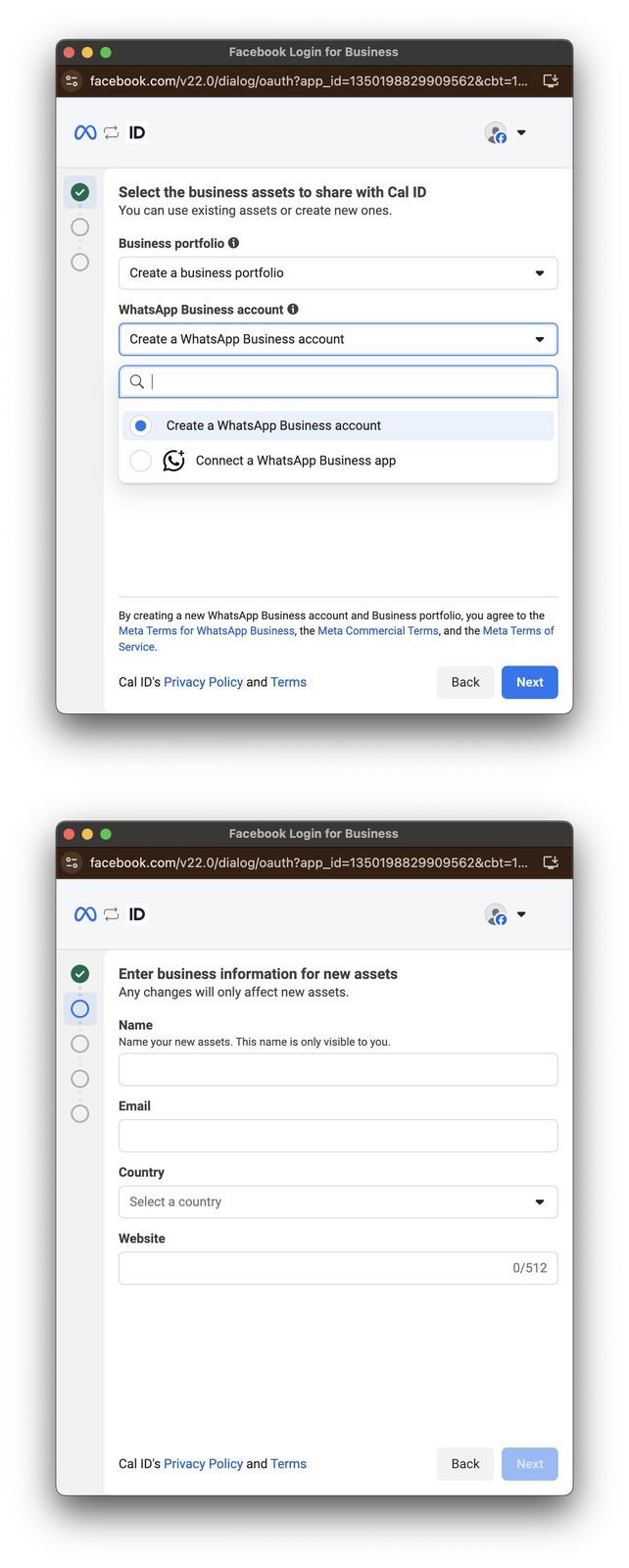
Create a new business portfolio and WhatsApp Business account in Meta Business Suite so you can connect it to Cal ID for automated booking messages.
If you don’t yet have a WhatsApp Business account, create one in Meta first. This gives you the business portfolio and account you’ll connect to Cal ID for automated booking messages.
You must verify your Tax ID on Meta to trigger the templates. Your Meta business and address details need to be verified before templates will send.
{"docsConfig":{"theme":"mint","$schema":"https://mintlify.com/docs.json","name":"Cal ID","description":"Cal ID help center — scheduling, event types, availability, teams, apps, workflows, and developer tools for the Cal ID meeting scheduler.","colors":{"primary":"#1972F5","light":"#5B9BFF","dark":"#0B4FB8"},"logo":{"light":"https://mintcdn.com/cal-id-docs/k1VHQ7P5ONAHeLvP/logo/light.svg?fit=max\u0026auto=format\u0026n=k1VHQ7P5ONAHeLvP\u0026q=85\u0026s=589c4a9c69ea7387516e6452f592553e","dark":"https://mintcdn.com/cal-id-docs/tkghSGJWVIrQX7X0/logo/dark.svg?fit=max\u0026auto=format\u0026n=tkghSGJWVIrQX7X0\u0026q=85\u0026s=3215902115e27959cb7782b1af38e9fe"},"favicon":"https://mintcdn.com/cal-id-docs/NUrc1nmEeHvCjwEV/favicon.svg?fit=max\u0026auto=format\u0026n=NUrc1nmEeHvCjwEV\u0026q=85\u0026s=3247c427392ba77a41b08a807c322bfb","navbar":{"links":[{"href":"mailto:support@cal.id","label":"Email Us"}],"primary":{"type":"button","label":"Go to Cal ID","href":"https://cal.id"}},"footer":{"socials":{"x":"https://x.com/OneHash","linkedin":"https://www.linkedin.com/company/onehash"}},"errors":{"404":{"redirect":false,"title":"We couldn't find that page","description":"The page you're looking for doesn't exist or may have moved. Head back to the [Help Center home](/), or jump to [Event Types](/event-types/overview), [Availability](/availability/create), [Teams](/teams/overview), or the [API Reference](/api-reference) — or use the search bar above. Still stuck? Email us at [support@cal.id](mailto:support@cal.id)."}},"contextual":{"options":["copy","view","chatgpt","claude","perplexity","mcp","cursor","vscode","download-spec"],"display":"header"},"styling":{"latex":true},"navigation":{"pages":[]}},"deployment":{"deploymentMetadataValue":{"subdomain":"cal-id-docs","hasAudioNarration":false,"actualSubdomain":"cal-id-docs","customDomains":["cal.id"],"gitSource":{"type":"github","owner":"onehashai","repo":"mintlify-docs","deployBranch":"main","contentDirectory":"","isPrivate":true,"mountPath":"","label":""},"chroma":{"latestBuiltDeploymentHistoryId":"6ab916db4c0abff9c16e8c99","collectionId":"a1537af2-6a4a-409a-a4fe-70a6408ebcf7","liveDeploymentHistoryId":"6ab916db4c0abff9c16e8c99","schemaVersion":"v3"},"feedback":{"thumbs":true,"agentFeedback":false},"entitlements":{"AI_CHAT":{"status":"ENABLED"},"WEB_MCP":{"status":"ENABLED"},"NARRATION":{"status":"ENABLED"}},"buildId":"6ab916db4c0abff9c16e8c99","clientVersion":"0.0.4044","searchFilterCounts":[{"language":"default","tag":"API Reference","count":60},{"language":"default","tag":"Endpoints","count":58},{"language":"default","tag":"Event Types","count":57},{"language":"default","tag":"Scheduling \u0026 Teams","count":31},{"language":"default","tag":"Get Started","count":31},{"language":"default","tag":"Customization \u0026 Settings","count":23},{"language":"default","tag":"Apps \u0026 Integrations","count":22},{"language":"default","tag":"Advanced","count":18},{"language":"default","tag":"Developers","count":17},{"language":"default","tag":"Teams","count":16}],"searchSettings":{"isFiltersEnabled":false}},"assistantConfig":{"enableAskAiButton":false,"enableStarterQuestions":true,"enableContextualStarterQuestions":true,"enableAskAiSearchBar":true,"deflection":{"enabled":true,"email":"support@cal.id"}},"basePath":"/docs","hasChatPermissions":true,"hasWebMcpPermissions":true,"toggles":[{"name":"kill-isr","enabled":true,"variant":{"name":"disabled","enabled":false,"feature_enabled":true},"impressionData":false},{"name":"agent-mintlify-slack","enabled":true,"variant":{"name":"disabled","enabled":false,"feature_enabled":true},"impressionData":false},{"name":"agent-integrations-settings","enabled":true,"variant":{"name":"disabled","enabled":false,"feature_enabled":true},"impressionData":false},{"name":"automations-pr-grouping","enabled":true,"variant":{"name":"disabled","enabled":false,"feature_enabled":true},"impressionData":false},{"name":"custom-prefix","enabled":true,"variant":{"name":"disabled","enabled":false,"feature_enabled":true},"impressionData":false},{"name":"analytics-v7","enabled":true,"variant":{"name":"disabled","enabled":false,"feature_enabled":true},"impressionData":false},{"name":"user-flows-analytics","enabled":true,"variant":{"name":"disabled","enabled":false,"feature_enabled":true},"impressionData":false},{"name":"no-publish-flow","enabled":true,"variant":{"name":"disabled","enabled":false,"feature_enabled":true},"impressionData":false},{"name":"workos-onboarding","enabled":true,"variant":{"name":"disabled","enabled":false,"feature_enabled":true},"impressionData":false},{"name":"llms-txt-v2","enabled":true,"variant":{"name":"disabled","enabled":false,"feature_enabled":true},"impressionData":false},{"name":"snapshot-serving-live","enabled":true,"variant":{"name":"disabled","enabled":false,"feature_enabled":true},"impressionData":false},{"name":"stripTemperatureMiddleware","enabled":true,"variant":{"name":"disabled","enabled":false,"feature_enabled":true},"impressionData":false},{"name":"support-platform-pylon-zendesk","enabled":true,"variant":{"name":"disabled","enabled":false,"feature_enabled":true},"impressionData":false},{"name":"snapshot-serving","enabled":true,"variant":{"name":"disabled","enabled":false,"feature_enabled":true},"impressionData":false},{"name":"instant-rollback","enabled":true,"variant":{"name":"disabled","enabled":false,"feature_enabled":true},"impressionData":false},{"name":"granular-notifications-server","enabled":true,"variant":{"name":"disabled","enabled":false,"feature_enabled":true},"impressionData":false},{"name":"granular-notifications","enabled":true,"variant":{"name":"disabled","enabled":false,"feature_enabled":true},"impressionData":false},{"name":"automations-fable","enabled":true,"variant":{"name":"disabled","enabled":false,"feature_enabled":true},"impressionData":false},{"name":"fixed-ai-action-pricing","enabled":true,"variant":{"name":"disabled","enabled":false,"feature_enabled":true},"impressionData":false},{"name":"automation-resolve-merge-conflict","enabled":true,"variant":{"name":"disabled","enabled":false,"feature_enabled":true},"impressionData":false},{"name":"scoped-publishing","enabled":true,"variant":{"name":"disabled","enabled":false,"feature_enabled":true},"impressionData":false},{"name":"mintql","enabled":true,"variant":{"name":"disabled","enabled":false,"feature_enabled":true},"impressionData":false},{"name":"page-level-analytics","enabled":true,"variant":{"name":"disabled","enabled":false,"feature_enabled":true},"impressionData":false},{"name":"editor-version-history-v2","enabled":true,"variant":{"name":"disabled","enabled":false,"feature_enabled":true},"impressionData":false},{"name":"billing-page-v2","enabled":true,"variant":{"name":"disabled","enabled":false,"feature_enabled":true},"impressionData":false},{"name":"full-page-search","enabled":true,"variant":{"name":"disabled","enabled":false,"feature_enabled":true},"impressionData":false},{"name":"workspace-projects","enabled":true,"variant":{"name":"disabled","enabled":false,"feature_enabled":true},"impressionData":false},{"name":"assistant-v5","enabled":true,"variant":{"name":"disabled","enabled":false,"feature_enabled":true},"impressionData":false},{"name":"byok-sep-25","enabled":true,"variant":{"name":"disabled","enabled":false,"feature_enabled":true},"impressionData":false},{"name":"fork-pr-previews","enabled":true,"variant":{"name":"disabled","enabled":false,"feature_enabled":true},"impressionData":false},{"name":"revalidation-jwt","enabled":true,"variant":{"name":"disabled","enabled":false,"feature_enabled":true},"impressionData":false},{"name":"vite-origin","enabled":true,"variant":{"name":"disabled","enabled":false,"feature_enabled":true},"impressionData":false},{"name":"billing-updated-9-15","enabled":true,"variant":{"name":"disabled","enabled":false,"feature_enabled":true},"impressionData":false},{"name":"workos-sso-scim","enabled":true,"variant":{"name":"disabled","enabled":false,"feature_enabled":true},"impressionData":false},{"name":"hobby-abuse-scan","enabled":true,"variant":{"name":"disabled","enabled":false,"feature_enabled":true},"impressionData":false},{"name":"dashboard-inbox","enabled":true,"variant":{"name":"disabled","enabled":false,"feature_enabled":true},"impressionData":false},{"name":"workos-signup","enabled":true,"variant":{"name":"disabled","enabled":false,"feature_enabled":true},"impressionData":false},{"name":"turbopuffer-dual-write","enabled":true,"variant":{"name":"disabled","enabled":false,"feature_enabled":true},"impressionData":false},{"name":"workos-enabled","enabled":true,"variant":{"name":"disabled","enabled":false,"feature_enabled":true},"impressionData":false},{"name":"approve-review-flow","enabled":true,"variant":{"name":"disabled","enabled":false,"feature_enabled":true},"impressionData":false},{"name":"sso-setup-deadline-banner","enabled":true,"variant":{"name":"disabled","enabled":false,"feature_enabled":true},"impressionData":false}],"privacy":{"consentBanner":{"enabled":false}},"googleFontsInlined":false},"customCss":[],"page":{"pagePath":"workflows/create-whatsapp-account","slug":"/workflows/create-whatsapp-account","pageMetadata":{"title":"Create New WhatsApp Business Account","description":"Create a new business portfolio and WhatsApp Business account in Meta Business Suite so you can connect it to Cal ID for automated booking messages.","icon":"whatsapp","keywords":["create whatsapp account","whatsapp business account","register whatsapp","whatsapp signup","new whatsapp account","whatsapp api setup"],"related":["/workflows/connect-whatsapp-app","/workflows/whatsapp-business","/workflows/overview","/workflows/custom-messages","/apps/install-app"],"href":"/workflows/create-whatsapp-account"},"description":{"compiledSource":"\"use strict\";\nconst {jsx: _jsx} = arguments[0];\nconst {useMDXComponents: _provideComponents} = arguments[0];\nfunction _createMdxContent(props) {\n const _components = {\n p: \"p\",\n ..._provideComponents(),\n ...props.components\n };\n return _jsx(_components.p, {\n children: \"Create a new business portfolio and WhatsApp Business account in Meta Business Suite so you can connect it to Cal ID for automated booking messages.\"\n });\n}\nfunction MDXContent(props = {}) {\n const {wrapper: MDXLayout} = {\n ..._provideComponents(),\n ...props.components\n };\n return MDXLayout ? _jsx(MDXLayout, {\n ...props,\n children: _jsx(_createMdxContent, {\n ...props\n })\n }) : _createMdxContent(props);\n}\nreturn {\n default: MDXContent\n};\n","frontmatter":{},"scope":{}},"pageType":"default","mdx":{"mdxSource":{"compiledSource":"\"use strict\";const{Fragment:_Fragment,jsx:_jsx,jsxs:_jsxs}=arguments[0];const{useMDXComponents:_provideComponents}=arguments[0];function _createMdxContent(props){const _components={a:`a`,p:`p`,strong:`strong`,..._provideComponents(),...props.components},{Card,CardGroup,Check,Frame,Heading,Info,OptimizedImage,Step,Steps}=_components;if(!Card)_missingMdxReference(`Card`,true);if(!CardGroup)_missingMdxReference(`CardGroup`,true);if(!Check)_missingMdxReference(`Check`,true);if(!Frame)_missingMdxReference(`Frame`,true);if(!Heading)_missingMdxReference(`Heading`,true);if(!Info)_missingMdxReference(`Info`,true);if(!OptimizedImage)_missingMdxReference(`OptimizedImage`,true);if(!Step)_missingMdxReference(`Step`,true);if(!Steps)_missingMdxReference(`Steps`,true);return _jsxs(_Fragment,{children:[_jsx(_components.p,{children:`If you don’t yet have a WhatsApp Business account, create one in Meta first. This gives you the business portfolio and account you’ll connect to Cal ID for automated booking messages.`}),`\n`,_jsx(Info,{children:_jsx(_components.p,{children:`You must verify your Tax ID on Meta to trigger the templates. Your Meta business and address details need to be verified before templates will send.`})}),`\n`,_jsx(Heading,{level:`2`,id:`create-a-new-whatsapp-business-account`,children:`Create a new WhatsApp Business account`}),`\n`,_jsxs(Steps,{children:[_jsx(Step,{title:`Create the portfolio and account`,children:_jsxs(_components.p,{children:[`In the respective fields, select `,_jsx(_components.strong,{children:`Create a business portfolio`}),` and `,_jsx(_components.strong,{children:`Create a WhatsApp Business account`}),`.`]})}),_jsxs(Step,{title:`Complete the setup`,children:[_jsx(_components.p,{children:`Fill in all required fields and save.`}),_jsx(Frame,{caption:`Filling in the Meta account details`,children:_jsx(OptimizedImage,{src:`https://mintcdn.com/cal-id-docs/k1VHQ7P5ONAHeLvP/images/workflows/create-whatsapp-account-1.png?fit=max\u0026auto=format\u0026n=k1VHQ7P5ONAHeLvP\u0026q=85\u0026s=cf855385b25988321761b8221178ebab`,alt:`Meta setup form with the Create a business portfolio and Create a WhatsApp Business account fields completed`,\"data-og-width\":`642`,width:`642`,\"data-og-height\":`1600`,height:`1600`,\"data-path\":`images/workflows/create-whatsapp-account-1.png`,\"data-optimize\":`true`,\"data-opv\":`3`,srcset:`https://mintcdn.com/cal-id-docs/k1VHQ7P5ONAHeLvP/images/workflows/create-whatsapp-account-1.png?w=280\u0026fit=max\u0026auto=format\u0026n=k1VHQ7P5ONAHeLvP\u0026q=85\u0026s=567bff900070e88a3f636dee6abd1adb 280w, https://mintcdn.com/cal-id-docs/k1VHQ7P5ONAHeLvP/images/workflows/create-whatsapp-account-1.png?w=560\u0026fit=max\u0026auto=format\u0026n=k1VHQ7P5ONAHeLvP\u0026q=85\u0026s=7aa3c837db2f1827d6971f59e15cbaee 560w, https://mintcdn.com/cal-id-docs/k1VHQ7P5ONAHeLvP/images/workflows/create-whatsapp-account-1.png?w=840\u0026fit=max\u0026auto=format\u0026n=k1VHQ7P5ONAHeLvP\u0026q=85\u0026s=e3a8d8fcafd26db12ab4d0adbfc72295 840w, https://mintcdn.com/cal-id-docs/k1VHQ7P5ONAHeLvP/images/workflows/create-whatsapp-account-1.png?w=1100\u0026fit=max\u0026auto=format\u0026n=k1VHQ7P5ONAHeLvP\u0026q=85\u0026s=8676d8e4b76681043c68b06b625b88fe 1100w, https://mintcdn.com/cal-id-docs/k1VHQ7P5ONAHeLvP/images/workflows/create-whatsapp-account-1.png?w=1650\u0026fit=max\u0026auto=format\u0026n=k1VHQ7P5ONAHeLvP\u0026q=85\u0026s=ebf6155b6fa78ce1a04c92ccf37bd995 1650w, https://mintcdn.com/cal-id-docs/k1VHQ7P5ONAHeLvP/images/workflows/create-whatsapp-account-1.png?w=2500\u0026fit=max\u0026auto=format\u0026n=k1VHQ7P5ONAHeLvP\u0026q=85\u0026s=3c6bb83a32e83afee39688c91d7c2e3c 2500w`})})]})]}),`\n`,_jsx(Check,{children:_jsxs(_components.p,{children:[`Your WhatsApp Business account is ready. You can now connect it with Cal ID — see `,_jsx(_components.a,{href:`/workflows/connect-whatsapp-app`,children:`Connect with WhatsApp Business app`}),`.`]})}),`\n`,_jsx(Heading,{level:`2`,id:`continue-your-whatsapp-setup`,children:`Continue your WhatsApp setup`}),`\n`,_jsxs(CardGroup,{cols:2,children:[_jsx(Card,{title:`Connect the WhatsApp app`,icon:`link`,href:`/workflows/connect-whatsapp-app`,children:_jsx(_components.p,{children:`Link your WhatsApp Business app to Cal ID with an access code.`})}),_jsx(Card,{title:`Integrate WhatsApp Business`,icon:`whatsapp`,href:`/workflows/whatsapp-business`,children:_jsx(_components.p,{children:`Attach your business number to a workflow.`})}),_jsx(Card,{title:`Set up a workflow`,icon:`bell`,href:`/workflows/overview`,children:_jsx(_components.p,{children:`Automate reminders and follow-ups around each booking.`})}),_jsx(Card,{title:`Customize your messages`,icon:`pen-to-square`,href:`/workflows/custom-messages`,children:_jsx(_components.p,{children:`Personalize sender names, subjects, and booking variables.`})})]})]})}function MDXContent(props={}){const{wrapper:MDXLayout}={..._provideComponents(),...props.components};return MDXLayout?_jsx(MDXLayout,{...props,children:_jsx(_createMdxContent,{...props})}):_createMdxContent(props)}return{default:MDXContent};function _missingMdxReference(id,component){throw new Error(`Expected `+(component?`component`:`object`)+\" `\"+id+\"` to be defined: you likely forgot to import, pass, or provide it.\")}","frontmatter":{},"scope":{"config":{},"pageMetadata":{"title":"Create New WhatsApp Business Account","description":"Create a new business portfolio and WhatsApp Business account in Meta Business Suite so you can connect it to Cal ID for automated booking messages.","icon":"whatsapp","keywords":["create whatsapp account","whatsapp business account","register whatsapp","whatsapp signup","new whatsapp account","whatsapp api setup"],"related":["/workflows/connect-whatsapp-app","/workflows/whatsapp-business","/workflows/overview","/workflows/custom-messages","/apps/install-app"],"href":"/workflows/create-whatsapp-account"}}},"mdxSourceWithNoJs":null},"mdxExtracts":{"tableOfContents":[{"title":"Create a new WhatsApp Business account","slug":"create-a-new-whatsapp-business-account","depth":2,"children":[]},{"title":"Continue your WhatsApp setup","slug":"continue-your-whatsapp-setup","depth":2,"children":[]}],"codeExamples":{}},"jsLinks":["/docs/_mintlify/custom/cal-id-docs/09b4d95490dd9c71/support-crisp.js"],"subdomain":"cal-id-docs","siteName":"Cal ID","title":"Create New WhatsApp Business Account - Cal ID","relatedPages":[{"title":"Connect with WhatsApp Business App","link":"/workflows/connect-whatsapp-app","icon":"whatsapp"},{"title":"Integrate WhatsApp Business","link":"/workflows/whatsapp-business","icon":"whatsapp"},{"title":"Workflows Setup to Cal ID","link":"/workflows/overview","icon":"bell"},{"title":"Customizing Your Workflow Messages","link":"/workflows/custom-messages","icon":"pen-to-square"},{"title":"Install New App on Cal ID","link":"/apps/install-app","icon":"download"}],"relatedPagesConfig":{"enabled":true,"limit":5,"mode":"automatic"},"contextualStarterQuestions":[{"_id":"6a986291cabf01e77694faf6","deploymentId":"6a6c20ecc3064aa95c02d1fd","questionText":"Why won't my templates send?","status":"active","generatedBy":"contextual","path":"workflows/create-whatsapp-account","createdAt":"2026-09-02T17:53:21.428Z","updatedAt":"2026-09-02T17:53:21.428Z","__v":0},{"_id":"6a986291cabf01e77694faf4","deploymentId":"6a6c20ecc3064aa95c02d1fd","questionText":"How do I create a WhatsApp account?","status":"active","generatedBy":"contextual","path":"workflows/create-whatsapp-account","createdAt":"2026-09-02T17:53:21.428Z","updatedAt":"2026-09-02T17:53:21.428Z","__v":0},{"_id":"6a986291cabf01e77694faf5","deploymentId":"6a6c20ecc3064aa95c02d1fd","questionText":"What verification is required first?","status":"active","generatedBy":"contextual","path":"workflows/create-whatsapp-account","createdAt":"2026-09-02T17:53:21.428Z","updatedAt":"2026-09-02T17:53:21.428Z","__v":0}],"navMaps":{"firstHrefInVersion":{},"firstHrefInLanguage":{}},"lastModified":"2026-09-02T17:52:54.813Z","originalFileLocation":"workflows/create-whatsapp-account.mdx"},"headHtml":"\u003cscript data-mint-head>(function(){var d=document.documentElement,p=null;if(!p){try{p=localStorage.getItem(\"isDarkMode\")}catch(e){}if(p==='true')p='dark';else if(p==='false')p='light';if(p!=='light'\u0026\u0026p!=='dark'\u0026\u0026p!=='system')p=\"system\"}var r=p==='system'?(matchMedia(\"(prefers-color-scheme: dark)\").matches?'dark':'light'):p;d.classList.remove(r==='dark'?'light':'dark');d.classList.add(r);d.setAttribute(\"data-theme-preference\",p)})();\u003c/script>\u003cmeta data-mint-head name=\"description\" content=\"Create a new business portfolio and WhatsApp Business account in Meta Business Suite so you can connect it to Cal ID for automated booking messages.\">\u003cmeta data-mint-head name=\"application-name\" content=\"Cal ID\">\u003cmeta data-mint-head name=\"generator\" content=\"Mintlify\">\u003clink data-mint-head rel=\"icon\" type=\"image/png\" sizes=\"192x192\" href=\"/docs/mintlify-assets/_mintlify/favicons/cal-id-docs/Ah-PiVKdxwxdJ_gr/_generated/favicon/android-chrome-192x192.png\" media=\"(prefers-color-scheme: light)\">\u003clink data-mint-head rel=\"apple-touch-icon\" type=\"image/png\" sizes=\"180x180\" href=\"/docs/mintlify-assets/_mintlify/favicons/cal-id-docs/Ah-PiVKdxwxdJ_gr/_generated/favicon/apple-touch-icon.png\">\u003clink data-mint-head rel=\"icon\" type=\"image/png\" sizes=\"16x16\" href=\"/docs/mintlify-assets/_mintlify/favicons/cal-id-docs/Ah-PiVKdxwxdJ_gr/_generated/favicon/favicon-16x16.png\" media=\"(prefers-color-scheme: light)\">\u003clink data-mint-head rel=\"icon\" type=\"image/png\" sizes=\"32x32\" href=\"/docs/mintlify-assets/_mintlify/favicons/cal-id-docs/Ah-PiVKdxwxdJ_gr/_generated/favicon/favicon-32x32.png\" media=\"(prefers-color-scheme: light)\">\u003clink data-mint-head rel=\"shortcut icon\" type=\"image/x-icon\" href=\"/docs/mintlify-assets/_mintlify/favicons/cal-id-docs/Ah-PiVKdxwxdJ_gr/_generated/favicon/favicon.ico\" media=\"(prefers-color-scheme: light)\">\u003clink data-mint-head rel=\"icon\" type=\"image/png\" sizes=\"192x192\" href=\"/docs/mintlify-assets/_mintlify/favicons/cal-id-docs/Ah-PiVKdxwxdJ_gr/_generated/favicon-dark/android-chrome-192x192.png\" media=\"(prefers-color-scheme: dark)\">\u003clink data-mint-head rel=\"icon\" type=\"image/png\" sizes=\"16x16\" href=\"/docs/mintlify-assets/_mintlify/favicons/cal-id-docs/Ah-PiVKdxwxdJ_gr/_generated/favicon-dark/favicon-16x16.png\" media=\"(prefers-color-scheme: dark)\">\u003clink data-mint-head rel=\"icon\" type=\"image/png\" sizes=\"32x32\" href=\"/docs/mintlify-assets/_mintlify/favicons/cal-id-docs/Ah-PiVKdxwxdJ_gr/_generated/favicon-dark/favicon-32x32.png\" media=\"(prefers-color-scheme: dark)\">\u003clink data-mint-head rel=\"shortcut icon\" type=\"image/x-icon\" href=\"/docs/mintlify-assets/_mintlify/favicons/cal-id-docs/Ah-PiVKdxwxdJ_gr/_generated/favicon-dark/favicon.ico\" media=\"(prefers-color-scheme: dark)\">\u003cmeta data-mint-head property=\"og:title\" content=\"Create New WhatsApp Business Account - Cal ID\">\u003cmeta data-mint-head property=\"og:description\" content=\"Create a new business portfolio and WhatsApp Business account in Meta Business Suite so you can connect it to Cal ID for automated booking messages.\">\u003cmeta data-mint-head property=\"og:site_name\" content=\"Cal ID\">\u003cmeta data-mint-head property=\"og:url\" content=\"https://cal.id/docs/workflows/create-whatsapp-account\">\u003cmeta data-mint-head property=\"og:type\" content=\"website\">\u003cmeta data-mint-head property=\"og:image\" content=\"https://cal-id-docs.mintlify.app/_mintlify/api/og/v2?division=Workflows\u0026amp;title=Create+New+WhatsApp+Business+Account\u0026amp;description=Create+a+new+business+portfolio+and+WhatsApp+Business+account+in+Meta+Business+Suite+so+you+can+connect+it+to+Cal+ID+for+automated+booking+messages.\u0026amp;theme=1ce1fba1bcc16a5579de1fe3\u0026amp;signature=8fa1a8a6bbdd3bbdaa7183f88615f0f3d6367335ed60d56d7278004c54d097a0\">\u003cmeta data-mint-head property=\"og:image:width\" content=\"1200\">\u003cmeta data-mint-head property=\"og:image:height\" content=\"630\">\u003cmeta data-mint-head name=\"twitter:card\" content=\"summary_large_image\">\u003cmeta data-mint-head name=\"twitter:title\" content=\"Create New WhatsApp Business Account - Cal ID\">\u003cmeta data-mint-head name=\"twitter:description\" content=\"Create a new business portfolio and WhatsApp Business account in Meta Business Suite so you can connect it to Cal ID for automated booking messages.\">\u003cmeta data-mint-head name=\"twitter:image\" content=\"https://cal-id-docs.mintlify.app/_mintlify/api/og/v2?division=Workflows\u0026amp;title=Create+New+WhatsApp+Business+Account\u0026amp;description=Create+a+new+business+portfolio+and+WhatsApp+Business+account+in+Meta+Business+Suite+so+you+can+connect+it+to+Cal+ID+for+automated+booking+messages.\u0026amp;theme=1ce1fba1bcc16a5579de1fe3\u0026amp;signature=8fa1a8a6bbdd3bbdaa7183f88615f0f3d6367335ed60d56d7278004c54d097a0\">\u003cmeta data-mint-head name=\"twitter:image:width\" content=\"1200\">\u003cmeta data-mint-head name=\"twitter:image:height\" content=\"630\">\u003cmeta data-mint-head name=\"msapplication-config\" content=\"/docs/mintlify-assets/_mintlify/favicons/cal-id-docs/Ah-PiVKdxwxdJ_gr/_generated/favicon/browserconfig.xml\">\u003cmeta data-mint-head name=\"apple-mobile-web-app-title\" content=\"Cal ID\">\u003cmeta data-mint-head name=\"msapplication-TileColor\" content=\"#1972F5\">\u003clink data-mint-head rel=\"canonical\" href=\"https://cal.id/docs/workflows/create-whatsapp-account\">\u003clink data-mint-head rel=\"alternate\" type=\"application/xml\" href=\"/docs/sitemap.xml\">\u003clink data-mint-head rel=\"alternate\" type=\"text/markdown\" href=\"/docs/workflows/create-whatsapp-account.md\">\u003cscript data-mint-head type=\"application/ld+json\">{\"@context\":\"https://schema.org\",\"@graph\":[{\"@type\":\"Organization\",\"@id\":\"https://cal.id/#organization\",\"name\":\"Cal ID\",\"url\":\"https://cal.id\",\"logo\":{\"@type\":\"ImageObject\",\"url\":\"https://mintcdn.com/cal-id-docs/k1VHQ7P5ONAHeLvP/logo/light.svg?fit=max\u0026auto=format\u0026n=k1VHQ7P5ONAHeLvP\u0026q=85\u0026s=589c4a9c69ea7387516e6452f592553e\"}},{\"@type\":\"WebSite\",\"@id\":\"https://cal.id/docs#website\",\"name\":\"Cal ID\",\"url\":\"https://cal.id/docs\",\"publisher\":{\"@id\":\"https://cal.id/#organization\"}},{\"@type\":\"WebPage\",\"@id\":\"https://cal.id/docs/workflows/create-whatsapp-account#webpage\",\"url\":\"https://cal.id/docs/workflows/create-whatsapp-account\",\"name\":\"Create New WhatsApp Business Account\",\"description\":\"Create a new business portfolio and WhatsApp Business account in Meta Business Suite so you can connect it to Cal ID for automated booking messages.\",\"dateModified\":\"2026-09-02T17:52:54.813Z\",\"isPartOf\":{\"@id\":\"https://cal.id/docs#website\"},\"breadcrumb\":{\"@id\":\"https://cal.id/docs/workflows/create-whatsapp-account#breadcrumb\"}},{\"@type\":\"BreadcrumbList\",\"@id\":\"https://cal.id/docs/workflows/create-whatsapp-account#breadcrumb\",\"itemListElement\":[{\"@type\":\"ListItem\",\"position\":1,\"name\":\"Workflows\",\"item\":\"https://cal.id/docs/workflows/overview\"},{\"@type\":\"ListItem\",\"position\":2,\"name\":\"Create New WhatsApp Business Account\",\"item\":\"https://cal.id/docs/workflows/create-whatsapp-account\"}]},{\"@type\":[\"Article\",\"TechArticle\"],\"@id\":\"https://cal.id/docs/workflows/create-whatsapp-account#article\",\"headline\":\"Create New WhatsApp Business Account\",\"name\":\"Create New WhatsApp Business Account\",\"description\":\"Create a new business portfolio and WhatsApp Business account in Meta Business Suite so you can connect it to Cal ID for automated booking messages.\",\"url\":\"https://cal.id/docs/workflows/create-whatsapp-account\",\"mainEntityOfPage\":{\"@id\":\"https://cal.id/docs/workflows/create-whatsapp-account#webpage\"},\"dateModified\":\"2026-09-02T17:52:54.813Z\",\"keywords\":\"create whatsapp account, whatsapp business account, register whatsapp, whatsapp signup, new whatsapp account, whatsapp api setup\",\"publisher\":{\"@id\":\"https://cal.id/#organization\"},\"isPartOf\":{\"@id\":\"https://cal.id/docs#website\"}}]}\u003c/script>\u003cscript data-mint-head type=\"application/ld+json\">{\"@context\":\"https://schema.org\",\"@type\":\"WebSite\",\"name\":\"Cal ID\",\"creator\":{\"@type\":\"Organization\",\"name\":\"Mintlify\",\"url\":\"https://mintlify.com\"}}\u003c/script>","siteName":"Cal ID","nav":{"global":null,"tabs":[{"tab":"Get Started","pages":[{"title":"Get Started","href":""}]},{"tab":"Event Types","pages":[{"title":"Event Types","href":"/event-types/overview"}]},{"tab":"Scheduling \u0026 Teams","groups":[{"group":"Overview","pages":[{"title":"Scheduling \u0026 Teams","icon":"calendar-days","sidebarTitle":"Overview","href":"/scheduling/overview"}]},{"group":"Availability","pages":[{"title":"Create Availability in Cal ID","icon":"calendar","href":"/availability/create"},{"title":"Multiple Schedules","icon":"calendar-days","href":"/availability/multiple-schedules"},{"title":"Multiple Time Slots per Day","icon":"clock","href":"/availability/multiple-time-slots"},{"title":"Date Overrides or Set Unavailable","icon":"calendar-xmark","href":"/availability/date-overrides"},{"title":"Extended Timezone Availability","sidebarTitle":"Extended timezone","icon":"globe","href":"/availability/extended-timezone"},{"title":"Set Out of Office in Cal ID","sidebarTitle":"Out of Office","icon":"plane-departure","href":"/availability/out-of-office"},{"title":"Team Availability","icon":"users-gear","href":"/availability/team-availability"}]},{"group":"Bookings","pages":[{"title":"View Booking Details","icon":"list","href":"/bookings/view-details"},{"title":"Canceling and Rescheduling Bookings","sidebarTitle":"Cancel or reschedule","icon":"calendar-xmark","href":"/bookings/cancel-reschedule"},{"title":"Reassigning a Team Booking","sidebarTitle":"Reassign a booking","icon":"arrow-right-arrow-left","href":"/bookings/reassign-round-robin"},{"title":"Export Booking Details","icon":"file-export","href":"/bookings/export"},{"title":"Mark Attendees as No-Show","icon":"user-xmark","href":"/bookings/no-show"},{"title":"Track Notification Delivery","icon":"bolt","href":"/bookings/workflow-status"}]},{"group":"Routing","pages":[{"title":"Set Up Routing Forms","icon":"diagram-project","href":"/routing/routing-forms"}]},{"group":"Workflows","pages":[{"title":"Workflows Setup to Cal ID","icon":"bell","href":"/workflows/overview"},{"title":"Customizing Your Workflow Messages","icon":"pen-to-square","href":"/workflows/custom-messages"},{"title":"Integrate WhatsApp Business","icon":"whatsapp","href":"/workflows/whatsapp-business"},{"title":"Connect with WhatsApp Business App","description":"Link an existing WhatsApp Business app on your phone to Cal ID using an access code and QR scan so bookings can trigger WhatsApp reminders and follow-ups.","icon":"whatsapp","href":"/workflows/connect-whatsapp-app"},{"title":"Create New WhatsApp Business Account","icon":"whatsapp","href":"/workflows/create-whatsapp-account"}]},{"group":"Teams","pages":[{"title":"Teams in Cal ID","description":"Create a team in Cal ID to share availability, distribute incoming bookings among members, and present a unified booking page to your customers.","icon":"users","href":"/teams/overview"},{"title":"Install a Calendar on a Team","icon":"calendar-plus","href":"/teams/install-team-calendar"},{"title":"Invite Team Members","icon":"user-plus","href":"/teams/invite-members"},{"title":"Remove a Team Member","icon":"user-minus","href":"/teams/remove-member"},{"title":"Leave a Cal ID Team","sidebarTitle":"Leave a Team","icon":"right-from-bracket","href":"/teams/leave-team"},{"title":"Cal ID Team Profile Settings","sidebarTitle":"Team Profile","icon":"gear","href":"/teams/settings"},{"title":"Team Advanced Settings","icon":"sliders","href":"/teams/advanced-settings"},{"title":"Round-Robin Scheduling","icon":"arrows-rotate","href":"/teams/round-robin"},{"title":"Collective Events","icon":"user-group","href":"/teams/collective"},{"title":"Managed Event Types for Teams","sidebarTitle":"Managed Events","icon":"layer-group","href":"/teams/managed"},{"title":"Internal Team Meeting","icon":"calendar-check","href":"/teams/internal-meeting"}]}]},{"tab":"Apps \u0026 Integrations","pages":[{"title":"Apps \u0026 Integrations","href":"/apps/overview"}]},{"tab":"Customization \u0026 Settings","pages":[{"title":"Customization \u0026 Settings","href":"/customization/overview"}]},{"tab":"Developers","pages":[{"title":"Developers","href":"/developers/overview"}]},{"tab":"MCP","icon":"plug","pages":[{"title":"MCP","href":"/mcp/overview"}]},{"tab":"API Reference","pages":[{"title":"API Reference","href":"/api-reference/introduction"}]}]},"basePath":"","title":"Create New WhatsApp Business Account - Cal ID","buildId":"dpl_6cCEiK8XNNvaLBBkWzcBhdE9QfLC","deploymentId":"dpl_6cCEiK8XNNvaLBBkWzcBhdE9QfLC","dynamics":["07c022d89b","a74be98ba7"],"chunks":["Frame-Bj1PpgeO.js","DynamicMarkdown-Bas9A7wq.js","zoom-image-lightbox-B-WKhCOL.js","lightbox-handle-r17bVUz3.js"]}