

Adding buffer time to your events
Buffer times are “blocked” periods on your calendar that bookers cannot book. They act as a protective layer around your meetings.Why use event buffers?
- Avoid exhaustion: Prevent back-to-back calls that leave you no time to even grab water.
- Prep and wrap-up: Use “Before” buffers to prepare for a call and “After” buffers to finish your meeting notes.
- Travel time: If you meet in person, buffers provide the time needed to get from one location to another.
How to set up buffers
1
Go to Event Types
Click on Event Types in the left sidebar.
2
Select an event
Click on the event you want to edit (e.g., “Introductory Call”).
3
Navigate to Limits
Click on the Limits tab in the top menu bar of the event editor.
4
Set your buffers
- After Event: Enter the number of minutes you want free after every booking.
- Before Event: Enter the number of minutes you want free before every booking.
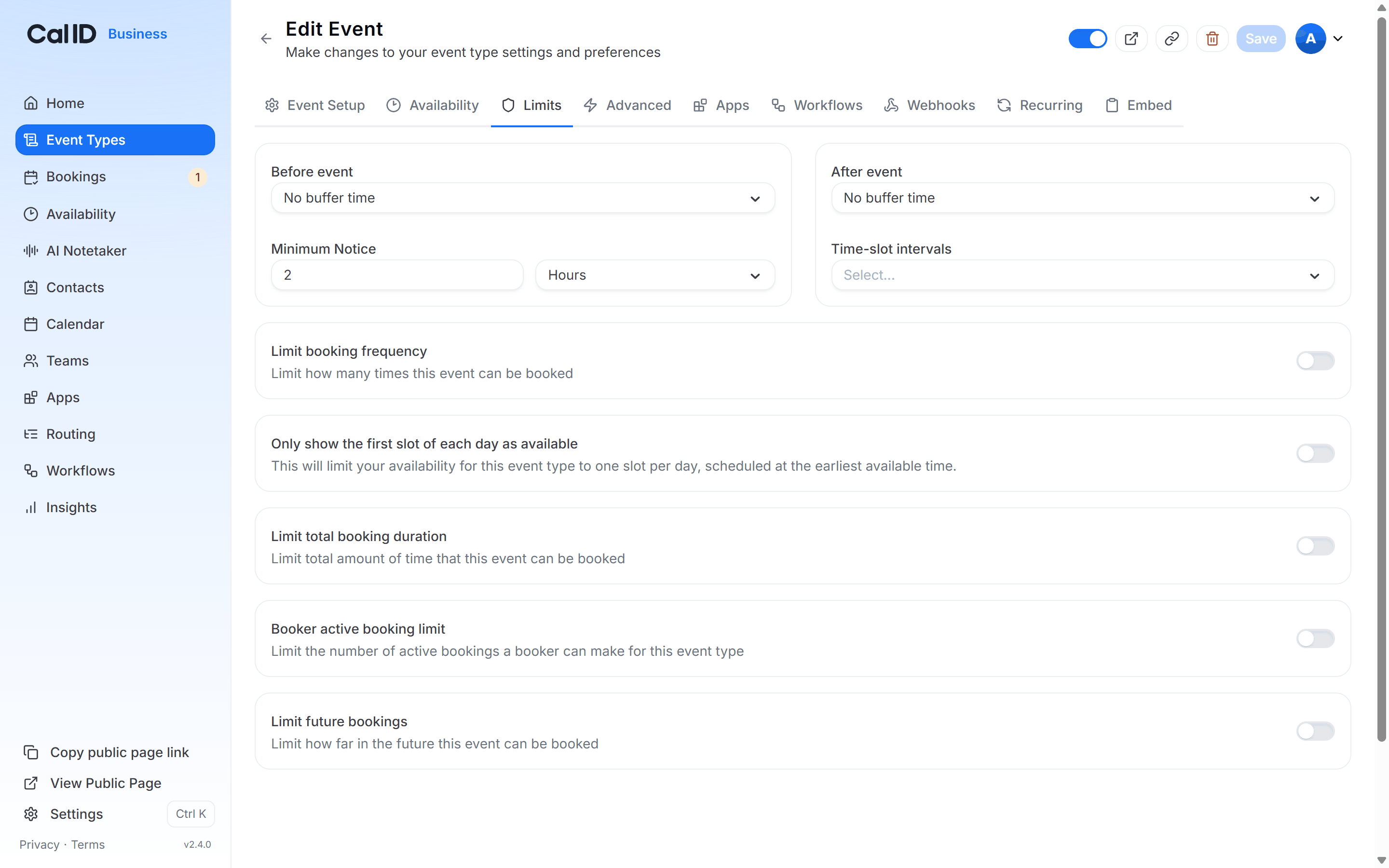
Building in prep and wrap-up time
5
Save
Click the Save button at the top right.
How it works with availability
- Invisible to bookers: Bookers don’t see your buffer times; those slots show as “Unavailable” on your booking page.
- Automatic calculation: If you have a 30-minute meeting with a 15-minute “After” buffer, Cal ID will block a total of 45 minutes on your calendar to ensure you stay protected.
- Multiple durations: If you use Multiple Durations, the buffer applies to whichever length the booker chooses.
Example
Suppose your availability is 9:00 AM to 5:00 PM, your event is 60 minutes, and you set a 30-minute buffer before and after. Buffers apply around booked meetings, not to the start or end of your working day. Before anyone books, the first slot starts at 9:00 AM. The “before” buffer blocks nothing here, because there’s no meeting ahead of it and the buffer isn’t applied to the start of your day. After a booker takes the 9:00–10:00 AM slot, Cal ID reserves the 30 minutes on each side of that meeting:- 8:30–9:00 AM (before) — outside working hours, so nothing changes.
- 10:00–10:30 AM (after) — now blocked.
Other booking limits
Set Minimum Booking Notice
Require lead time before a booker can book this event.
Time-Slot Intervals
Set how often start times appear on your booking page.
Limit Booking Frequency
Cap how many bookings you take per day, week, or month.
Limit Total Booking Duration
Cap the total hours this event can be booked for.